
Google Workspace Marketplace


Calendar EventTemplates
A solution that makes creating and storing event templates on Google Calendar™ quick and easy.
Listing updated:18 юли 2026 г.
Works with:
10 хил.+




Общ преглед
Imagine you have many events that occur regularly, like birthdays, meetings or even workout sessions. Instead of manually adding all the details every time, EventTemplates lets you create templates for these events. Think of templates as pre-designed forms that you can reuse whenever you need to schedule a similar event again. Using EventTemplates is as simple as a few clicks.
Step 1: Install our Add-on.
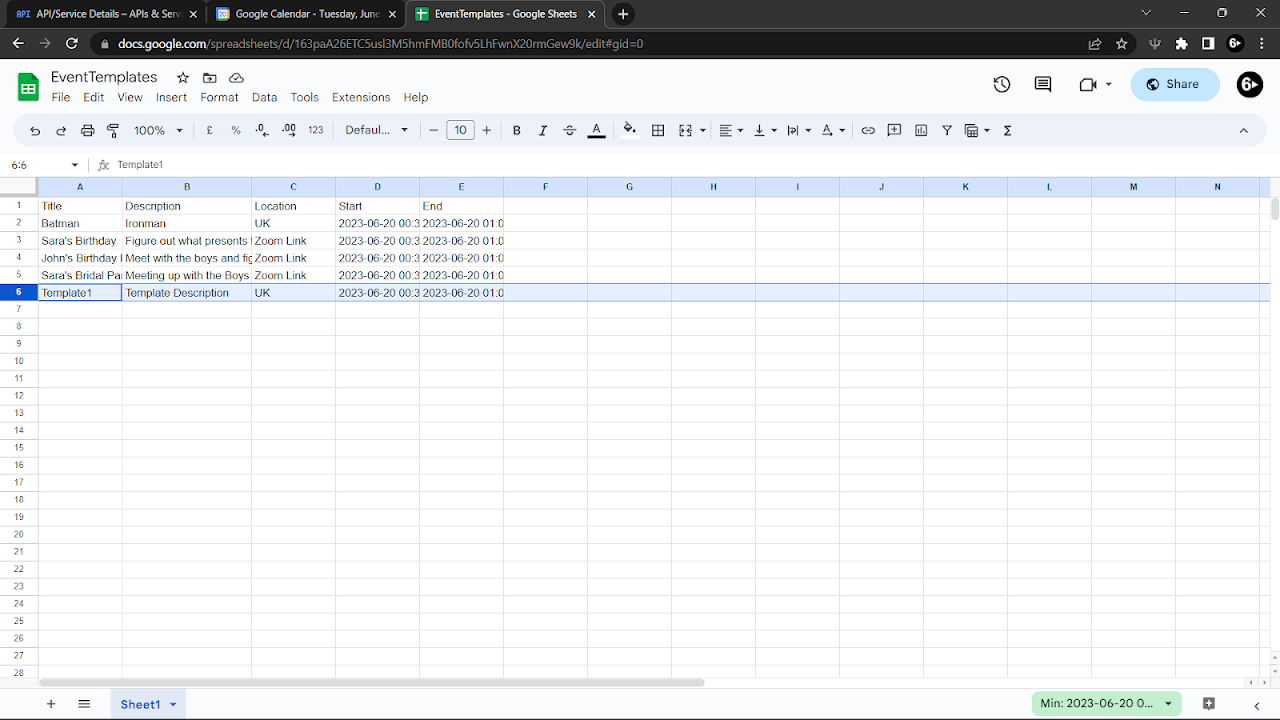
Step 2: Go to your Google Sheets™ and create a new spreadsheet file. Put the first row header to be: Title, Description, Location, Start, End.
Step 3: Copy the Sheet ID in the URL after the slash following 'd' and before the slash before 'edit'. For example; "spreadsheets/d/163paA26ETC5usl3M5hmFMB0fofv5LhFwnX20rmGew9k/edit".
The Sheet ID is 163paA26ETC5usl3M5hmFMB0fofv5LhFwnX20rmGew9k.
Step 4: Copy the name of the sheet located at the bottom, such as Sheet1.
Step 5: In our add-on, go to settings and paste the values from Step 3 and Step 4. Then click on Try To Connect, and then click on Confirm Settings to link the Add-on with the Google Sheet™.

Now, you can use our Google Calendar™ Add-on to create events with your templates. You can also edit/delete templates in your Google Sheet™ directly.

Feature 1: Create a new event by selecting a template or inputting data and clicking 'Confirm Create Event'.
Feature 2: Create a new template and store it for later use by clicking 'Create Template Here'.
Feature 3: Edit a created event with stored templates by selecting the template from the dropdown and clicking 'Transfer Data To Event'. Use the data in an event as a template by clicking 'Transfer Data From Event' and then 'Submit As Template' to store it.

Please go to our website for a detailed walkthrough,
https://eventtemplatesadd-on.blogspot.com/

Quality of Life Update (31/05/26):
- New Reminder feature.
- New Guest and Location List feature.
- Added Colour Label feature.
- User Experience and Performance Optimised.

Quality of Life Update (28/02/26):
- Minor bug fixes.

Quality of Life Update (06/07/25):
- Refined Automatic Timezone functionality.
- Minor bug fixes.
- User Experience and Performance Optimised.

Quality of Life Update (04/08/24):
- User Experience and Performance Optimised.
- New Time Zone feature (automatic and manual configuration options).
- Minor Bug Fixes.

Google Calendar™ and Google Sheet™ is a trademark of Google LLC
Additional information
sell
PricingБез парично заплащане
code
Developer
Нетърговец
email
Поддръжка
lock
Декларация за поверителност
description
Общи условия
flag
Подаване на сигналFlag as inappropriate




Търсене
Изчистване на търсенето
Затваряне на търсенето
Приложения на Google
Главно меню