
Google Workspace Marketplace


Add, Copy, Insert, Duplicate, Slip, Paste Slides
One slide or several can be cloned at once to multiple presentations: Google Drive folders, Google Classroom assignments, interactive digital notebooks, Class Drive folders, student presentations
דף האפליקציה עודכן בתאריך:14 בנובמבר 2025
האפליקציה פועלת עם:
+21K


סקירה כללית
➤ ➤ ➤ FEATURES ➤ ➤ ➤

1) Choose slide quantity
Either one or multiple slides can be added to the target presentations

2) Choose target folder(s)
Due to an intuitive folder selection window, target folder(s) can be easily selected

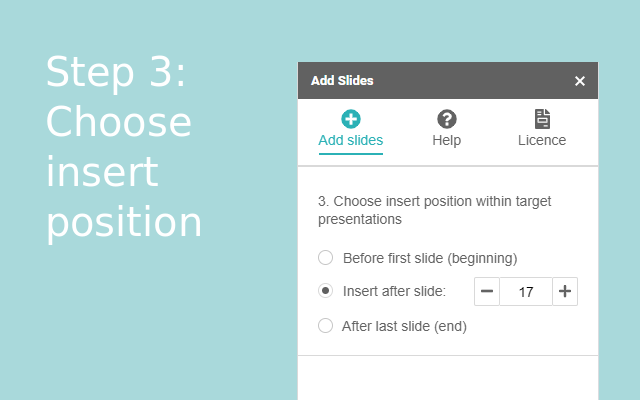
3) Choose insert position
Three options are available: "beginning", "after slide ..." and "end"


 ➤ ➤ ➤ ISSUES ➤ ➤ ➤

1) Only the "Help" menu item does show up
This issue can not be fixed by us. Just reload the page, then all menu items will show up.

2) The error message "drive.google.com refuses to connect" shows up within the sidebar
This issue can also not be fixed by us. The cause for this error message is that multiple users are logged in within the browser.
Solution 1:
Just log out with all users, except the one which should be used to work with the addon.
Solution 2:
Use a different browser or the incognito mode.

2) The sidebar is completely blank
Again, the cause for this error is outside the add slides addon. The cause for this error message is that multiple users are logged in within the browser.
Solution 1:
Just log out with all users, except the one which should be used to work with the addon.
Solution 2:
Use a different browser or the incognito mode.


 ➤ ➤ ➤ SUPPORT ➤ ➤ ➤

Our website offers a FAQ section, with answered questions from other users. In addition you will find a contact form, to get in touch with us.

We are grateful for any feedback and feature requests :)
מידע נוסף
sell
תמחורמטא נתונים לא זמינים
code
מפתח
email
lock
מדיניות הפרטיות
description
תנאים והגבלות
flag
דיווחסימון כבלתי הולמת




חיפוש
ניקוי החיפוש
סגירת החיפוש
אפליקציות Google
התפריט הראשי