
Google Workspace Marketplace


AI4Sheets: AI, GPT, Claude, Gemini, Email Finder
AI Copilot for Sheets™! Use OpenAI GPT, Claude, Gemini, Perplexity and Deepseek.
Clay-like GTM features including LinkedIn Scraper, Email Finder/Verifier & Data Enrichment tools.
정보 업데이트:2025년 10월 20일
호환 기기:
7천+



개요
Unlock the power of Artificial Intelligence and automate data enrichment directly within Google Sheets™ with AI4Sheets!

Go beyond simple formulas and leverage leading Large Language Models (LLMs) and powerful data tools to boost your productivity, generate insights, automate tasks, and enrich your spreadsheets like never before.

Core AI Features (Bring Your Own API Key):

- Multi-Provider Support: Connect seamlessly with OpenAI (GPT-4o, GPT-4.1, O-series models), Anthropic (Claude 3.5 Sonnet, Claude 3 Haiku), Google (Gemini 2.0 Flash, Gemini 2.5 Previews), DeepSeek, and Perplexity (for AI web search). Manage API keys easily in the sidebar.

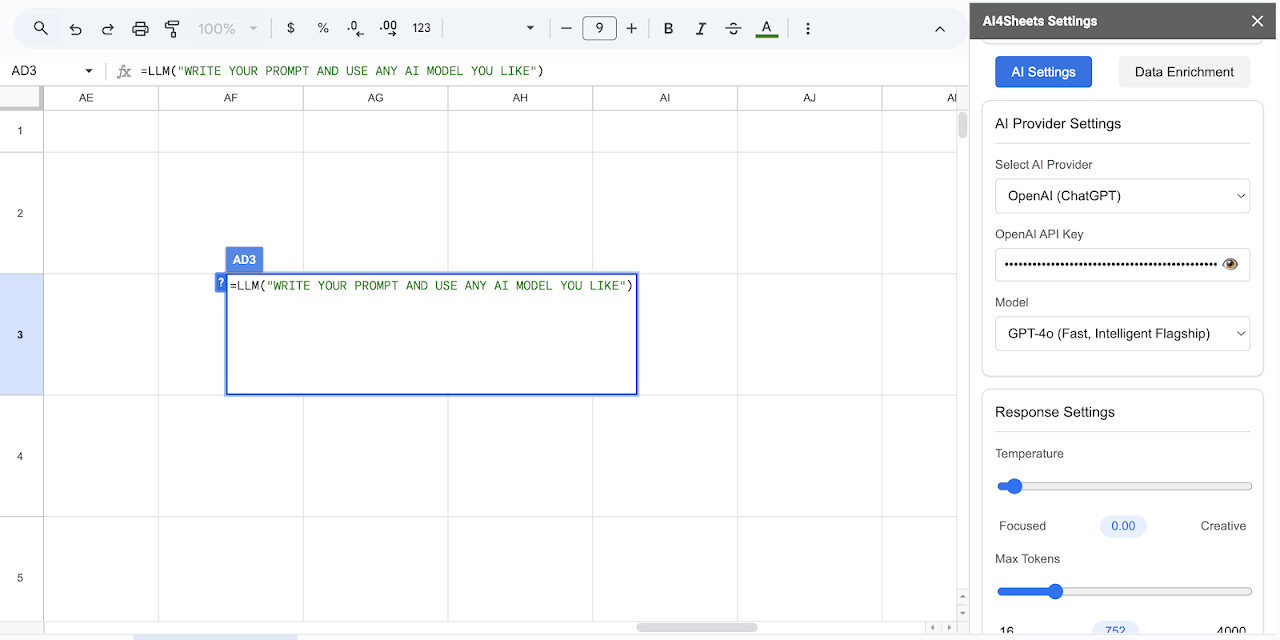
- Flexible AI Control: Use the versatile =LLM() function for any custom prompt, or utilize specialized functions for common tasks.

- Customizable Responses: Adjust Temperature (creativity vs. focus) and Max Tokens (response length) in the sidebar settings for fine-tuned AI output.

- Powerful AI Functions:
  - =LLM(prompt, [model], [temp], [tokens]): Your main function for any AI task. Override sidebar settings directly.
  - =LLM_SUM(text): Generate concise summaries.
  - =LLM_TR(text, language): Translate text accurately.
  - =LLM_SENT(text): Perform sentiment analysis (Positive/Negative/Neutral).
  - =LLM_EXP(points): Expand bullet points into paragraphs.
  - =LLM_REW(text, style): Rewrite content in different tones or styles.
  - =LLM_TREND(range): Analyze numerical data for trends.
  - =LLM_INS(range): Generate actionable insights from your data.
  - =LLM_CLEAN(data): Standardize and clean messy text data.
  - =LLM_SEARCH(query): Get up-to-date answers from the web using OpenAI search.

Data Enrichment & Automation Tools (Premium Features):

Supercharge your workflows with tools designed for sales, marketing, and research (Requires Apify and/or Icypeas API keys):

- Find Company LinkedIn URLs: Automatically discover company LinkedIn pages from a list of domains/company names.
- Find People LinkedIn Profiles: Locate specific people (e.g., CEO, Founder) at companies based on domain and title.
- Scrape LinkedIn Profiles: Extract detailed information (name, title, company, skills, etc.) from a list of LinkedIn profile URLs.
- Scrape LinkedIn Company Pages: Gather comprehensive data (website, industry, employee count, description, etc.) from LinkedIn company page URLs.
- Find Emails (Icypeas): Look up professional email addresses based on names and company domains.
- Verify Emails (Icypeas): Check the validity of email addresses in bulk.

Getting Started:

1. Install the AI4Sheets add-on.
2. Open any Google Sheet™ and launch AI4Sheets from the Extensions menu.
3. Open the sidebar settings ("AI Settings" tab).
4. Enter the API key(s) for the AI providers or data services (Apify, Icypeas) you want to use.
5. Start using the =LLM...() functions in your cells or access Data Enrichment tools via the sidebar ("Data Enrichment" tab).

Subscription:

AI4Sheets offers a free trial period to explore its capabilities. Continued access to premium features (including all Data Enrichment tools) requires an affordable subscription. Manage your subscription easily via the sidebar.

Perfect For:

- Sales Teams: Lead generation, prospecting, finding contact information.
- Marketers: Content creation, competitor analysis, data enrichment, sentiment analysis.
- Researchers: Data gathering, text summarization, information extraction.
- Data Analysts: Data cleaning, trend analysis, generating insights.
- Content Creators: Writing assistance, rewriting, translation.
- Anyone looking to automate tasks, enhance productivity, and leverage AI & web scraping within Google Sheets™.

Support:

Find tutorials and contact information in the "Help & Support" section of the add-on sidebar.

Trademark Notice:
Google Sheets™ and Google Gemini™ are trademarks of Google LLC.
추가정보




검색
검색어 지우기
검색 닫기
Google 앱
기본 메뉴