
Google Workspace Marketplace


AI Sheets
AI tools for content creation in Google Sheets™ — write, extract, and summarize with your own API key.
应用详情更新日期:2026年3月7日
适用于:
128



概览
AI Sheets brings professional AI automation to Google Sheets™—built for content teams who want control over their costs and data.

Make significant savings compared to subscription AI tools. Your API keys connect directly to OpenAI™ or Anthropic™—no middleman, no usage markup, complete privacy.

Built by a growth marketer who lives in spreadsheets, AI Sheets is designed for content professionals, SEO teams, and researchers who need AI-powered workflows without vendor lock-in.

✨ NEW IN VERSION 2.0
Choose your AI provider: OpenAI™ (GPT-4™, GPT-5™) or Anthropic™ (Claude 4.5™). Switch between providers based on speed, cost, or output quality.


💰 CONTROL YOUR COSTS
Pay AI providers directly — no middleman markup.
- Start with as little as $5 (most users spend less than $2/month)
- No subscription: only pay for what you actually use
- Direct API pricing from OpenAI™ and Anthropic™

Compare: Subscription tools charge $49–$99/month for the same underlying models.


🔒 YOUR DATA STAYS PRIVATE
Direct API connection means:
- Your content goes straight to OpenAI/Anthropic
- No third-party servers processing your data
- No vendor storing your prompts or outputs
- Complete control over your information

You own your API keys. You control who sees your data.

Sign up for your API key at:
https://platform.openai.com/api-keys
https://platform.claude.com/settings/keys


🎯 BUILT FOR CONTENT & SEO WORKFLOWS
Nine specialized functions designed for real marketing tasks:

Content Generation
- AI_PROMPT: General prompt to create anything from blog ideas, social captions to ad copy.
- AI_LIST: Bulk-generate variations (headlines, product names, CTAs)
- VIDEO_SCRIPT: Create spoken-word scripts with custom length and tone

Data Extraction & Research
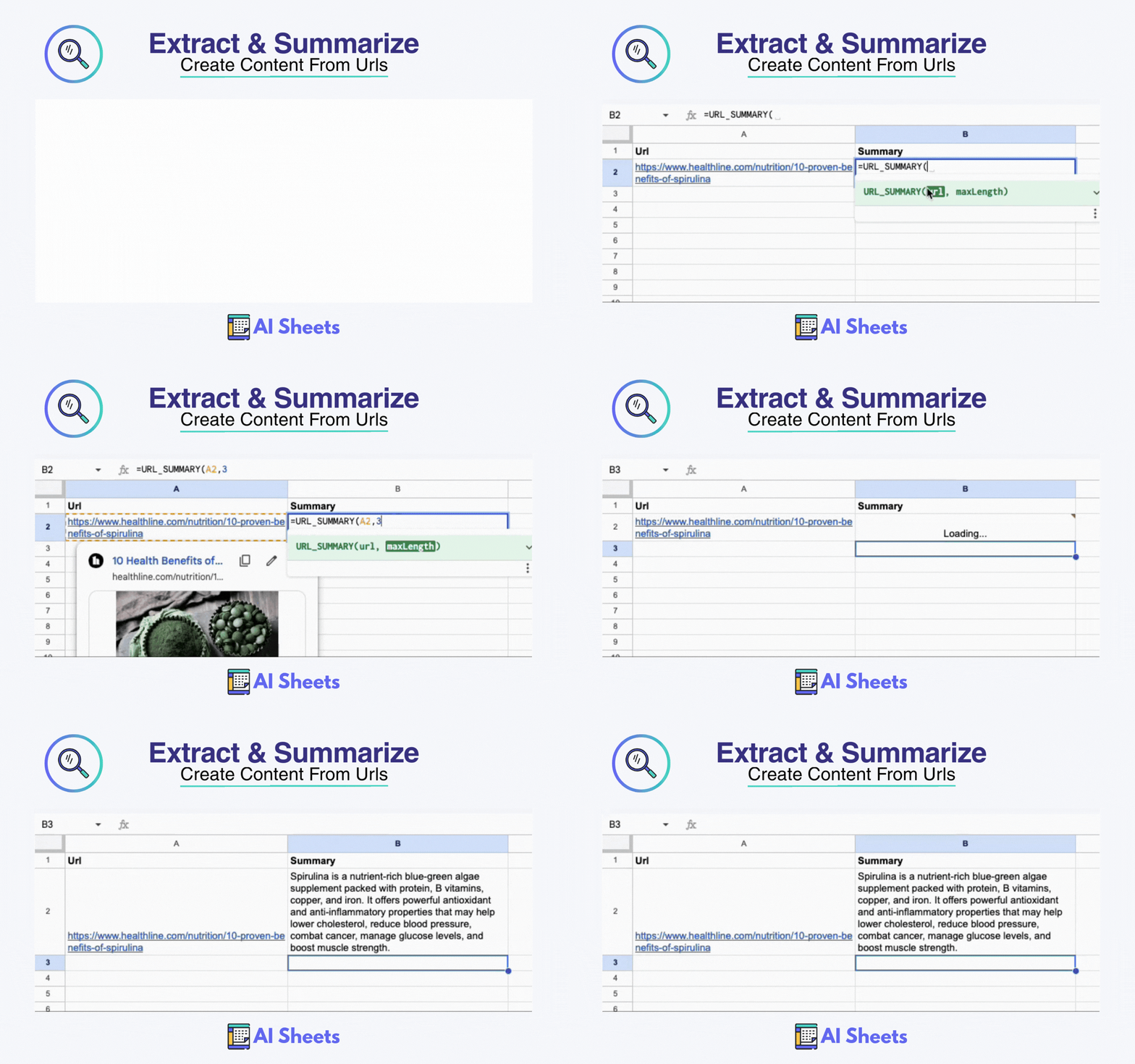
- URL_SUMMARY: Summarize articles, competitor pages, research papers
- EXTRACT: Pull emails, company names, keywords from text
- SEO_EXTRACT: Extract title tags, meta descriptions, headers from URLs

Formatting & Translation
- TRANSLATE: Multi-language support for international teams
- FORMAT: Standardize capitalization (Title Case, UPPERCASE, lowercase)
- ASSIGN_TAGS: Auto-categorize content with relevant labels


⚡ KEY FEATURES
✓ Auto-Replace: Convert AI formulas to editable text automatically
✓ Smart Caching: Reduce redundant API calls to save time and money
✓ Dual AI Providers: Switch between OpenAI and Anthropic based on task
✓ No Learning Curve: Simple spreadsheet formulas, not complex automation


🚀 HOW IT WORKS
1. Install from Google Workspace™ Marketplace
2. Open AI Settings: Extensions> AI Sheets> Settings
3. Add your OpenAI™ and/or Anthropic™ API key
4. Choose your preferred AI provider in settings
4. Use custom functions directly in your spreadsheet

Example: =AI_PROMPT("Write a product description for " & A2)


👥 WHO IT'S FOR
Perfect for:
- Content marketers managing editorial calendars
- SEO teams doing bulk competitor analysis
- Researchers summarizing multiple sources
- Social media managers creating variations
- Anyone who manages content workflows in spreadsheets


💡 WHY CHOOSE AI SHEETS
Specialist Tool
Purpose-built functions for content and SEO work—not generic AI chat.

Cost Control
Use your own API keys and pay providers directly. Save hundreds per year.

Data Privacy
Direct connection to AI providers. No middleman processing your content.

Professional Quality
Built by a growth marketer who understands content workflows.


Free to install. Use your own API keys. No subscriptions. No markup.

More information: alicemrongovius.com/ai-sheets

---

Google Sheets™ and Google Workspace™ are trademarks of Google LLC. OpenAI™, GPT-4™, and GPT-5™ are trademarks of OpenAI. Anthropic™ and Claude™ are trademarks of Anthropic PBC. AI Sheets is not affiliated with, endorsed by, or sponsored by Google LLC, OpenAI, or Anthropic PBC.
其他信息




搜索
清除搜索内容
关闭搜索框
Google 应用
主菜单