
Google Workspace Marketplace


AI Sheets - AI for Google Sheets™
AI Sheets is AI for Google Sheets™—simple, intuitive, and built to help you get 10x more done without ever leaving your spreadsheet.
Listing updated:৯ জুলাই, ২০২৫
Works with:
৩ হা+


এক নজরে
👉GET STARTED: Install → Open a Google Sheet → Extensions → AI Sheets → Launch 🚀
NEW:
=email(): Scrapes email addresses directly from any backlink or website URL.
=name(): Scraps the first name from the email. If that's not available, it smartly pulls the organization name to help you personalize outreach. Personalizing emails with the first name improves response rates.
=org(): Scraped the company or publication name from the email. Great for optimizing subject lines and increasing open rates.
✨ AI Sheets is AI for Google Sheets™—AI Sheets helps you get 10x more done without leaving your spreadsheet. From auto-filling data to bulk translations and batch content creation, everything happens in seconds.
POWERFUL AI FOR GOOGLE SHEETS FUNCTIONS + TEMPLATES
POWERFUL AI FOR GOOGLE SHEETS FUNCTIONS
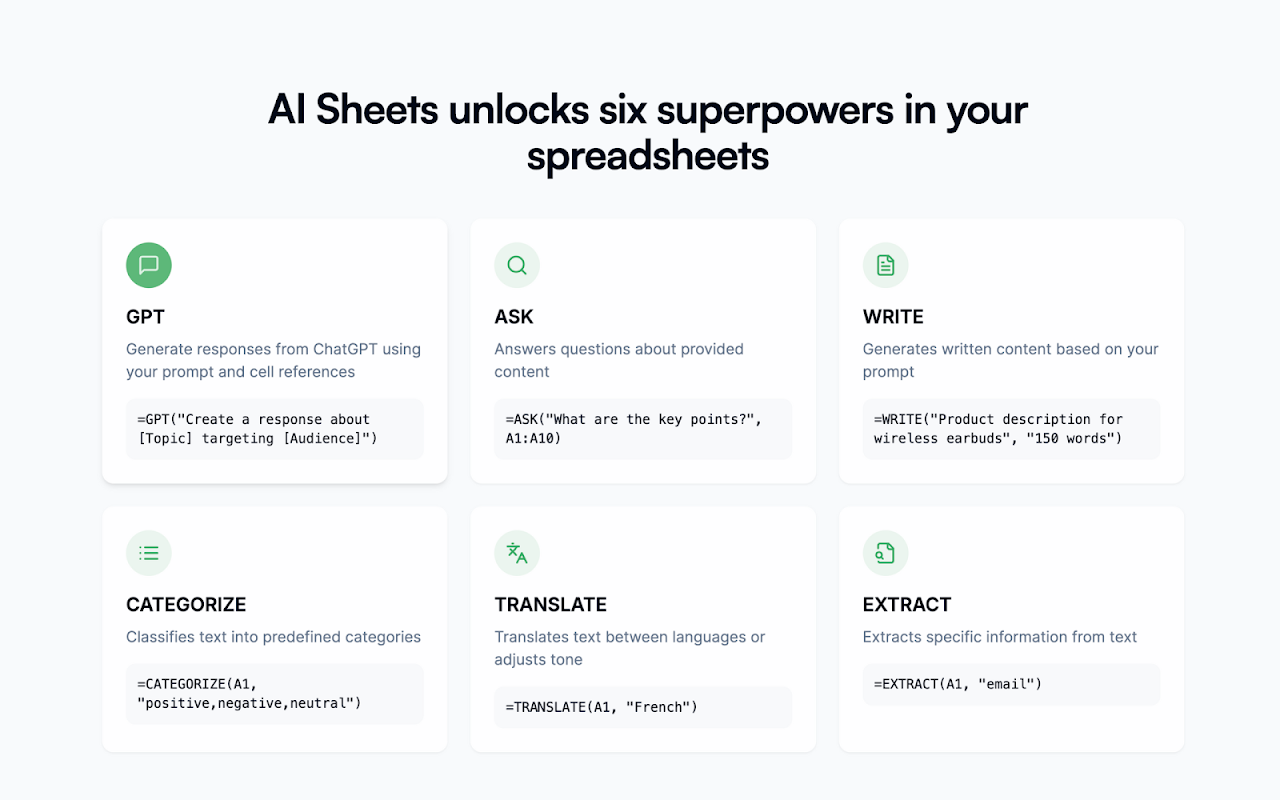
🤖=GPT() - Reference cell data and create custom AI prompts tailored to your specific needs.
🖼 =GPTIMAGE - Generate images
🔢 =GPTLIST - Generate lists
🔍=GPTEXTRACT() - Instantly pull structured information from unstructured text, whether emails, phone numbers, dates, entities, or anything else.
✏️=GPTWRITE() - Generate professional content at scale based on your specifications.
📋=GPTCATEGORIZE() - Intelligently classify text into meaningful categories. Automatically sort customer feedback, product reviews, support tickets, or expenses without manual intervention.
🌏=GPTTRANSLATE() - Seamlessly convert content between 80+ languages.
❓=GPTASK() - Query your spreadsheet data using natural language. Get answers about specific content in cells or ranges without complex formulas, extracting valuable insights with simple questions.
WHY AI SHEETS?
⚡ Run AI prompts to 100k+ rows, referencing your own data, to save hours of work.
🔗 Categorize or classify rows based on text
🧘♀️ No app-switching or copy-pasting—everything runs in Google Sheets™.
🚀 Custom-built AI for fast, structured spreadsheet results.
🌎 Supports 80+ languages for multilingual prompts.
How it works
1️⃣ Install the add-on
2️⃣ Activate your 7 day trial (Extensions → AI Sheets → Activate free trial)
3️⃣ Open a spreadsheet → Extensions → AI Sheets → Settings to add your license code
Get started
👉 In a cell, simply write =gpt(prompt, value) to use AI sheets
For example: =gpt("translate to spanish", D24)
MOST POPULAR USE CASES:
MARKETING, E-COMMERCE, SEO
• Create ad copy and captions at scale while observing tone guidelines.
• Create keyword-optimized SEO product descriptions for thousands of SKUs.
• Translate multilingual marketing and product listings into multiple languages.
OPERATIONS
• Categorize thousands of expense line items instantly.
• Automate web research
• Analyze sentiment from customer support interactions to flag potential issues.
Get it all done in seconds, not hours, with AI Sheets.
AI SHEETS’ AI-POWERED TEMPLATES:
• Google Sheets™ Calendar Template
• Content Calendar Template Google Sheets™
• Social Media Calendar Template Google Sheets™
• Weekly Budget Template Google Sheets™
• Profit and Loss Template Google Sheets™
• Expense Report Template Google Sheets™
• Balance Sheet Template Google Sheets™
• And much more Google Sheets™ AI Templates.
LEARN MORE:
🌏 Website: www.aisheets.app
✉️Email: support@aisheets.app
Additional information
sell
PricingFree of charge trial
code
Developer
নন-ট্রেডার
email
সমর্থন
lock
গোপনীয়তা নীতি
description
পরিষেবার শর্তাদি
flag
রিপোর্ট করুনFlag as inappropriate




সার্চ করুন
সার্চ মুছুন
সার্চ বন্ধ করুন
Google অ্যাপ্লিকেশানগুলি
প্রধান মেনু