
Google Workspace Marketplace

AMTA Lexicography Assistant
Transform Google Sheets™ into a lexicography workstation. Extract domain terms, compute corpus statistics, extract collocations, and draft RAG definitions with Gemini, Groq, & open APIs.
Listing updated:November 16, 2026
Works with:
No reviews
114




Overview
AMTA Lexicography Assistant is an advanced computational lexicography workstation built for terminologists, lexicographers, academic translators, and domain researchers[1]. Grounded in the AI-augmented Method of Triangulation Approach (AMTA), it turns Google Sheets™ into an end-to-end lexicographical environment, automating the most labor-intensive phases of technical term extraction, statistical validation, collocation profiling, and definition drafting[1].
By uniting Corpus Linguistics, Academic Retrieval APIs, and Multi-Provider Generative AI, AMTA eliminates hallucinations and produces structured, publication-grade terminological resources with academic rigor[1].

🌟 KEY FEATURES & CAPABILITIES
1. Multi-Source Academic Terminology Extraction
Discover and ingest high-density technical terms directly from authoritative literature databases[1]:
Global Academic Networks: Search and extract candidate terms from Semantic Scholar, arXiv, OpenAlex, Europe PMC, CORE API, Scopus, and Google Scholar (via SerpApi)[1].
Intelligent Subdomain Classification: Automatically categorize extracted or user-supplied manual terms into precise discipline-specific branches (e.g., classifying "Convolutional Neural Network" under Deep Learning rather than broad AI)[1].
Custom Filtering: Target multi-word expressions, filter generic academic stopwords, and capture domain acronyms with expansion mappings[1].
2. Corpus Statistics & Statistical Keyness
Validate terms against real-world academic evidence rather than intuition[1]:
Log-Likelihood Keyness: Measure term specificity and domain-boundedness by contrasting your target texts against general academic norms[1].
Reference Frequency Validation: Benchmark frequency distributions against the integrated BAWE (British Academic Written English) reference corpus[1].
3. Tri-Class Collocations & Flexible Generation Modes
Generate authentic lexical environments across grammatical word classes[1]:
Tri-Class Collocation Extraction: Automatically extracts and structures collocations across three distinct grammatical classes—Noun, Verb, and Adjective (2+2+2 structure, up to 6 per cell)[1].

Three Operational Modes:
Paper-Grounded Mode: Reads the seminal paper in Column F (or open-access abstracts) and strictly extracts attested, verbatim pairings[1].
Direct-LLM Mode: Generates established combinations in an academic register, protected by an optional two-pass consensus check that keeps only pairings agreed upon by independent samples[1].
Hybrid Mode: Combines generation with live text attestation against reachable sources, explicitly labeling evidence provenance[1].
4. Grounded RAG Definitions & Multilingual Equivalents
Evidence-Grounded RAG: Prevents hallucination by extracting context from seminal paper abstracts and full-text literature before drafting definitions[1].
Non-Circular Drafting: Prompts enforce strict lexicographical standards—forbidding headword circularity and self-critiquing drafts before final output[1].
Multilingual Translation: Produces accurate target-language equivalents (supporting Arabic, French, Spanish, German, Chinese, Japanese, Russian, Portuguese, and Hindi) alongside authentic usage examples[1].
5. Multi-LLM Architecture with Auto-Resume Pacing
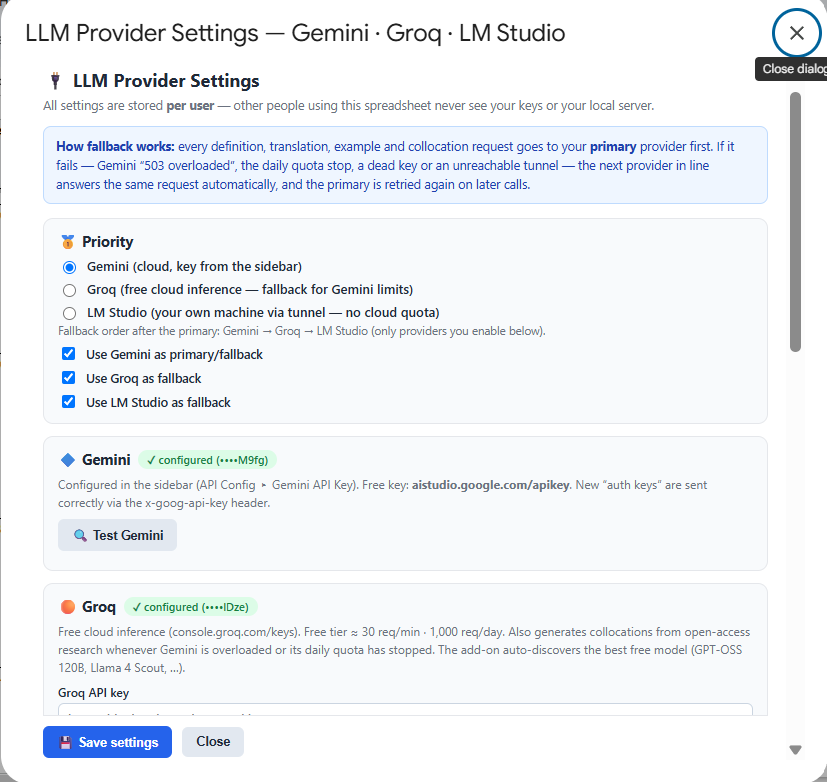
Provider Flexibility: Connect your choice of Google Gemini, Groq (Llama/GPT-OSS), or local private models via LM Studio (over secure HTTPS tunnels)[1].
Intelligent Fallback: Seamlessly shifts down provider chains if a model experiences transient downtime or 503 high-demand saturation[1].
Auto-Resume Batch Processing: Intelligently pauses at Google Apps Script’s runtime budget, observes provider-specific cooldowns (e.g., Gemini vs. Groq), and relaunches automatically until entire term lists are completed without data loss[1].
6. Export Ready for Dictionary Writing Systems (DWS)
Lexonomy-Compatible XML: One-click export into clean, hierarchical XML formatted for import into Lexonomy and standard Dictionary Writing Systems[1].
Structured Data Export: Save your entire dictionary directly to your Google Drive in JSON or CSV format for NLP pipelines and corpus analysis[1].
Integrated Audit Log: Complies with academic methodology by tracking data provenance and API actions in a dedicated AMTA_Audit_Log sheet[1].

👥 WHO IS THIS FOR?
Lexicographers & Terminologists: Automate tedious lemma harvesting and first-draft definitions to focus on editorial curation[1].
Translators & LSP Researchers: Build verified bilingual terminology banks with authentic context sentences and collocations[1].
Academic Educators: Rapidly compile specialized, curriculum-aligned glossaries for university courses[1].

Computational Linguists: Conduct keyness analysis and extract phraseological data directly inside a spreadsheet[1].

🔒 PRIVACY, SECURITY, & API REQUIREMENTS
Zero Central Data Collection: The add-on does not run an external intermediary server. All API calls execute directly between your Google Sheets session and the respective academic or AI endpoints[1].

Per-User Scoped Properties: User credentials and API keys are stored strictly in your private Google account’s UserProperties—never exposed to other collaborators sharing the same spreadsheet[1].
Least-Privilege Drive Access: Requests only drive.file access, meaning it can only view and manage the specific files it creates (exports and uploaded corpus backups)[1].
Configurable APIs: Bring your own free or paid API keys (Gemini, Groq, Semantic Scholar, OpenAlex, CORE, SerpApi). Open-access services like arXiv and Europe PMC require no API keys[1].

📚 ACADEMIC CITATION
If you use this tool or its underlying methodology in published academic research, please cite the foundational framework[1]:
Mandour, W. (2025, December 23). AI-augmented Method of Triangulation Approach for Specialized Lexicography. OSF. https://doi.org/10.17605/OSF.IO/8QB9V[[1](https://www.google.com/url?sa=E&q=https%3A%2F%2Fvertexaisearch.cloud.google.com%2Fgrounding-api-redirect%2FAUZIYQE5kVWCE5gQI5AmwOmybmd4oM_DMYIzG1lHO3Z57RLlmzQY0g8wgw8hwdOG20Em3ir_JQgsn5kuQKsY0nh5EQngvHTJ5pjoBRFhbs8t49byv2Wf924JoTxTj_KpX-Tv64HjivCNWO4L3f7k8DMMwE7XBHSZhoxNJgs%3D)]
Additional information
sell
PricingFree of charge
code
Developer
Non-trader
email
Support
lock
Privacy policy
description
Terms of service
flag
ReportFlag as inappropriate





Search
Clear search
Close search
Google apps
Main menu