
Google Workspace Marketplace


AnyMerge QR Code Generator
Generate QR codes directly from Google Sheets™.
Listing updated:May 6, 2026
Works with:
3M+
Overview
Generate QR codes directly from Google Sheets™.

Select spreadsheet data and create single or bulk QR codes in seconds.

Use QR Code Generator to:
* Generate one or hundreds of QR codes at once
* Save QR codes to Google Docs™ (great for printing)
* Save QR codes as PNG files in Google Drive™
* Add labels below QR codes using a second column
* Shorten long URLs with Bitly before generating QR codes
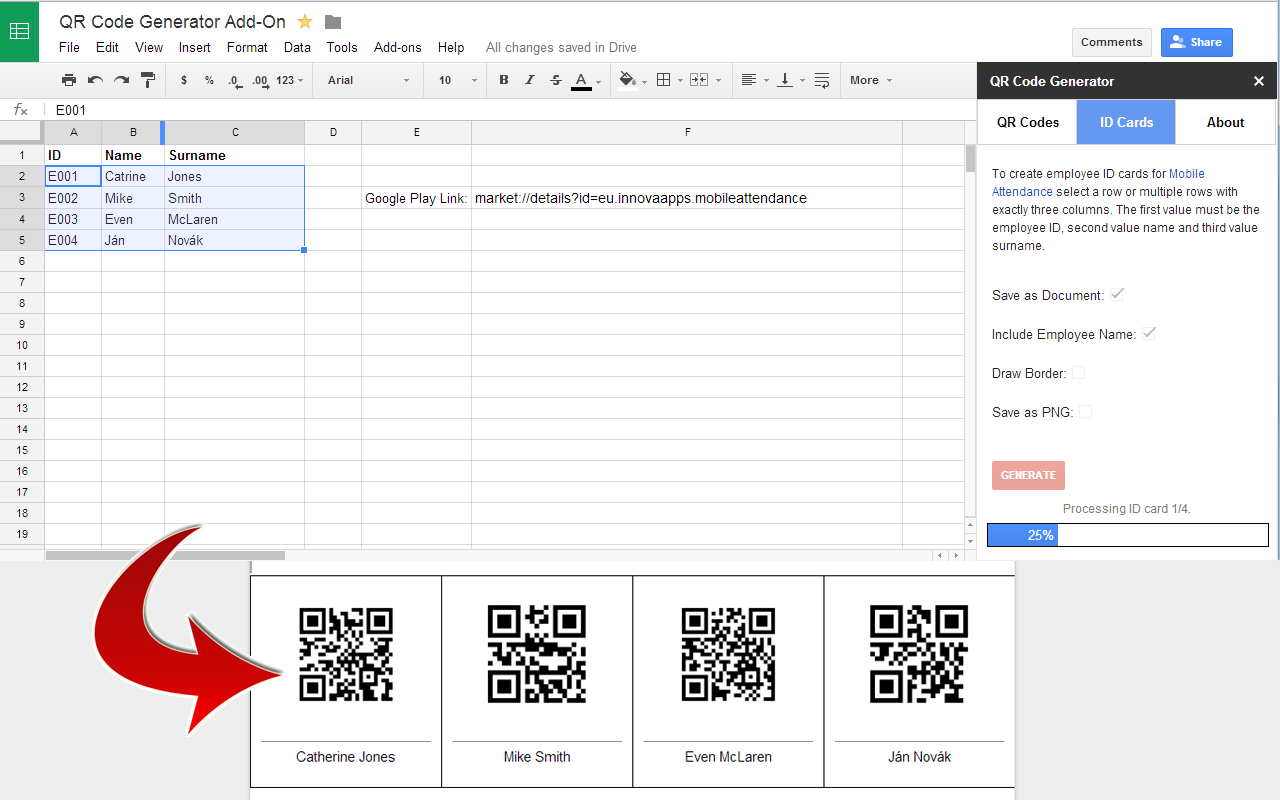
* Create advanced templates for membership cards, ID cards, vouchers, event tickets, and more.

Perfect for:
* Product labels
* Event badges
* Inventory and asset tracking
* Membership cards
* ID cards

Templates
Take QR code generation further with templates.

Create:
* Membership cards
* Event tickets
* ID cards
* Vouchers
* Product labels

You can even merge images into templates to create photo ID cards or membership cards.

Start generating QR codes directly from Google Sheets™ today.


Google Sheets™, Google Docs™, and Google Drive™ are trademarks of Google LLC.
Additional information
sell
PricingFree of charge trial
code
Developer
email
Support
lock
Privacy policy
description
Terms of service
flag
ReportFlag as inappropriate





Search
Clear search
Close search
Google apps
Main menu