
Google Workspace Marketplace


AnyMerge QR Code Generator
Generate QR codes directly from Google Sheets™.
정보 업데이트:2026년 6월 17일
호환 기기:
338만+
개요
Generate QR codes directly from Google Sheets™.

Select spreadsheet data and create single or bulk QR codes in seconds.

Use QR Code Generator to:
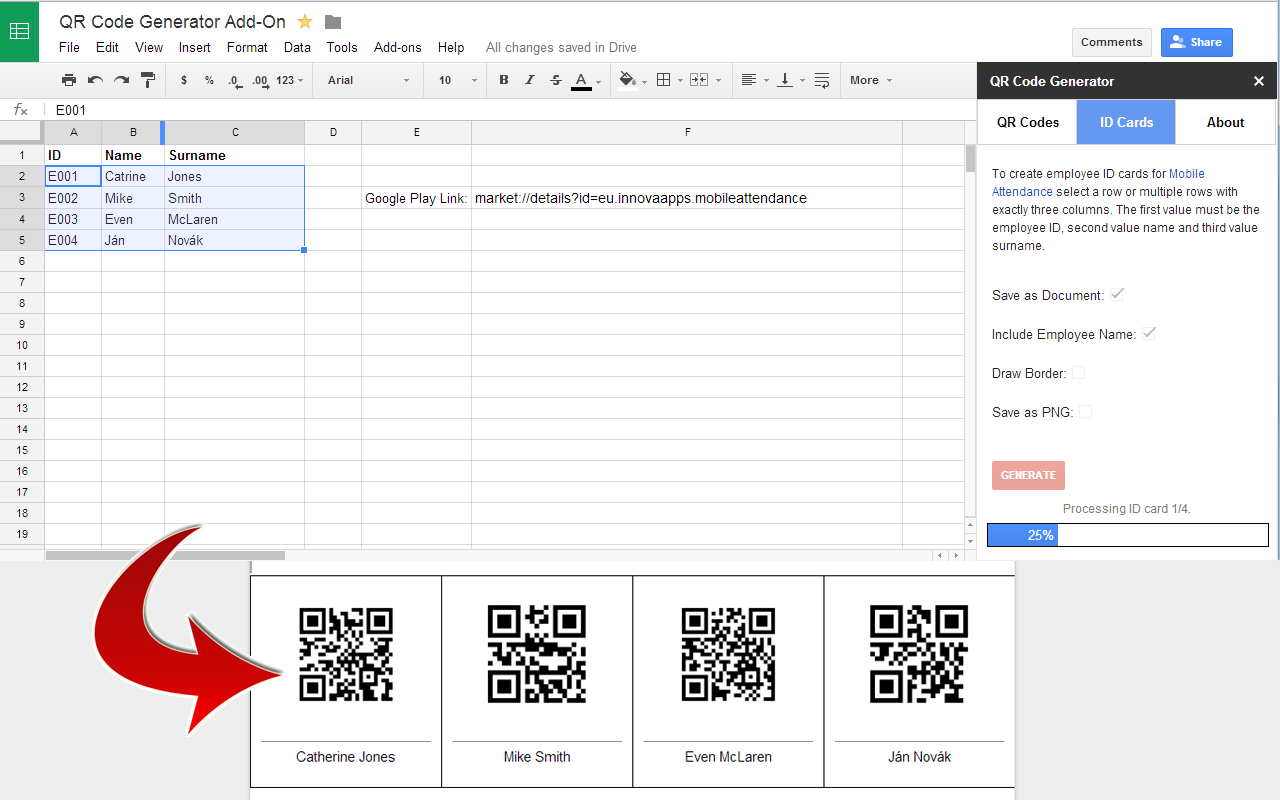
* Generate one or hundreds of QR codes at once
* Save QR codes to Google Docs™ (great for printing)
* Save QR codes as PNG files in Google Drive™
* Add labels below QR codes using a second column
* Shorten long URLs with Bitly before generating QR codes
* Create advanced templates for membership cards, ID cards, vouchers, event tickets, and more.

Perfect for:
* Product labels
* Event badges
* Inventory and asset tracking
* Membership cards
* ID cards

Templates
Take QR code generation further with templates.

Create:
* Membership cards
* Event tickets
* ID cards
* Vouchers
* Product labels

You can even merge images into templates to create photo ID cards or membership cards.

Start generating QR codes directly from Google Sheets™ today.


Google Sheets™, Google Docs™, and Google Drive™ are trademarks of Google LLC.
추가정보







검색
검색어 지우기
검색 닫기
Google 앱
기본 메뉴