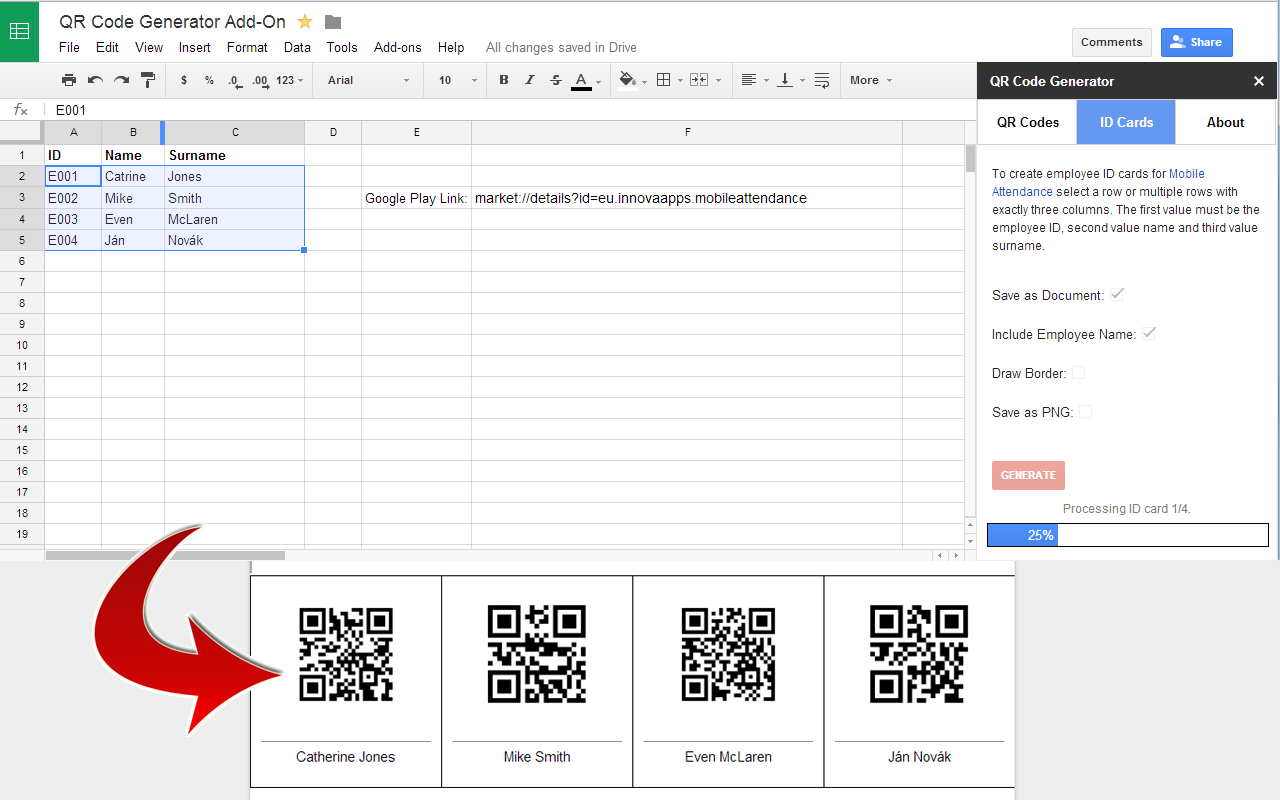
Generate QR codes and barcodes directly from Google Sheets™.
Deweloper:
Pozycja zaktualizowana:13 października 2026
Współpracuje z:
3 mln+
Omówienie
NEW: Now supports barcodes!

AnyMerge QR Code Generator now supports 12 barcode formats. Generate QR codes and barcodes directly from your Google Sheets™ data.

Generate QR Codes and Barcodes from Google Sheets™

AnyMerge QR Code Generator makes it easy to create QR codes and barcodes from spreadsheet values. Generate a single code or process an entire range of cells at once.

Use templates to simplify repetitive tasks and generate codes using predefined configurations.

Key Features

QR Codes and Barcodes – Choose between QR codes and 12 supported barcode formats.

Templates – Create and reuse templates for frequently used code generation tasks.

Live Preview – Preview generated codes before exporting, including labels.

Bulk Generation – Generate multiple codes from a selected range of spreadsheet cells.

Custom Labels – Add text below codes using values from an adjacent column.

Google Docs™ Export – Save generated codes in a single Google Docs™ document.

PNG Export – Save individual codes as PNG image files in Google Drive™.

QR Code Size – Adjust QR code dimensions to suit your needs.

Bitly Integration – Optionally shorten URLs before generating QR codes.

Supported Barcode Formats

Code 128, EAN-13, EAN-8, UPC-A, UPC-E, Code 39, Code 93, ITF, ITF-14, MSI, Pharmacode, and Codabar.

Common Uses

Create product labels, inventory barcodes, asset tags, event tickets, membership cards, and marketing materials using data already stored in Google Sheets™.

Get Started

Select your spreadsheet data, choose QR Codes or Barcodes, preview the results, and click Generate. Save your frequently used configurations as templates to reuse them later.
Dodatkowe informacje
CenyBezpłatny okres próbny
Deweloper
Pomoc
Polityka prywatności
Warunki korzystania z usługi
Aplikacja AnyMerge QR Code Generator poprosi o uprawnienia wymienione poniżej. Więcej informacji
Aplikacja AnyMerge QR Code Generator będzie potrzebowała dostępu do Twojego konta Google
Pozwoli to aplikacji AnyMerge QR Code Generator na:
Wyświetlanie, edytowanie, tworzenie i usuwanie wszystkich Twoich dokumentów z Dokumentów Google
Wyświetlanie, edytowanie, tworzenie i usuwanie tylko określonych plików na Dysku Google używanych w tej aplikacji
Wyświetlanie arkuszy kalkulacyjnych, w których zainstalowano tę aplikację, i zarządzanie nimi
Wyświetlanie i uruchamianie treści internetowych firm zewnętrznych w okienkach i na paskach bocznych aplikacji Google
Łączenie z usługą zewnętrzną
Zezwalanie na uruchamianie tej aplikacji podczas swojej nieobecności
Wyświetlanie podstawowego adresu e-mail Twojego konta Google
Wyświetlanie prywatnych informacji o Tobie, w tym tych udostępnionych przez Ciebie publicznie
Opinie
Język:
Sortuj według:
Google nie weryfikuje opinii ani ocen. Więcej informacji o opiniach
Brak komentarzy
Szukaj
Wyczyść wyszukiwanie
Zamknij wyszukiwanie
Aplikacje Google
Menu główne