
Google Workspace Marketplace


Attio for Sheets™
Sync Attio contacts and companies into Google Sheets™ with one click.
Vermelding geüpdatet:30 juli 2026
Werkt met:
Geen reviews
14
Overzicht
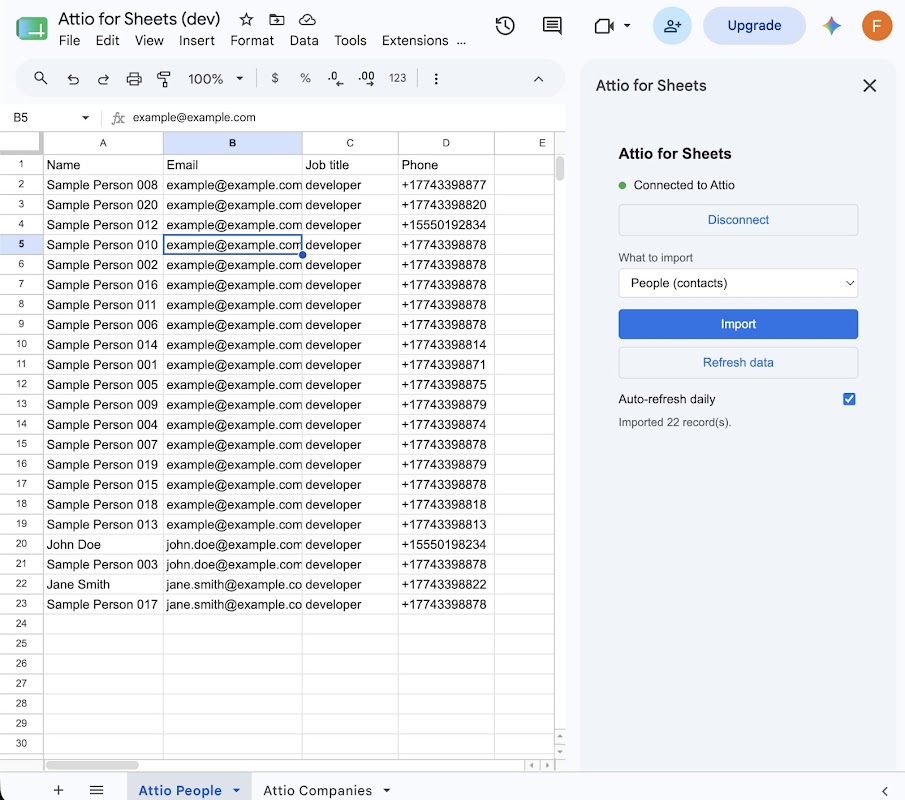
Attio for Sheets™ lets you pull your Attio CRM data — People, Companies — directly into Google Sheets™ in seconds. No CSV exports, no stale copy-pastes, no extra subscriptions.

Connect once. Authenticate your Attio account with a single OAuth flow. Your credentials are stored securely in your own Google account; no data ever touches our servers.

Import what you need. Pick People or Companies from the sidebar and click Import. Attio for Sheets™ writes a clean table — name, email, job title, phone for People; name, domain, description, categories, employee range for Companies — into a dedicated sheet.

Keep it fresh. Hit Refresh to re-pull the latest Attio data whenever you need it. Or enable the daily auto-refresh toggle to wake up to an up-to-date spreadsheet every morning.

Free tier — no strings. Import up to 100 rows per object type, all fields, no payment required. Great for small teams and trying before you commit.

Why spreadsheets? Because Attio is where your CRM lives, and Sheets™ is where your pipeline reports, investor updates, and ad-hoc analysis happen. Attio for Sheets™ is the bridge — your CRM data, in the format every stakeholder already knows.

Built for Attio users who are tired of the manual CSV → re-import loop.

Google Sheets™ is a trademark of Google LLC.
Meer informatie
sell
KostenKosteloos met betaalde functies
code
Ontwikkelaar
Geen handelaar
email
Support
lock
Privacybeleid
description
Servicevoorwaarden
flag
RapportMarkeren als ongepast



Zoeken
Zoekopdracht wissen
Zoekfunctie sluiten
Google-apps
Hoofdmenu