
Google Workspace Marketplace


BetterMerge Mail Merge for Gmail™ & Google Sheets™
Send personalized emails from Gmail™ to a list in Google Sheets™. Attachments, open and click tracking, follow-ups, scheduling, and an AI writing assistant. Free plan: 50 emails a day.
Készítette:
Adatlap frissítve:2026. október 17.
A következőkkel működik:
19 E+



Áttekintés
BetterMerge sends personalized emails from your own Gmail™ account, using a sheet in Google Sheets™ as your contact list. Write one template with merge tags like {{First Name}}, and every person on your list gets an email written for them. Each row's status, opens, and clicks are written back to your sheet.

Start free with 50 emails a day, open and click tracking included. 19,000+ installs since 2021.

━━━━━━━━━━━━━━━━━━━━

What you can do

• Personalize every email: subject, body, links, and images on every plan. Per-recipient CC/BCC on Lite and up. Per-recipient attachments from Google Drive™ (each person gets their own invoice, certificate, or offer letter) on Plus and Pro.

• Write faster with the AI Assistant: draft a template from a short instruction, or rewrite what you have to make it shorter, friendlier, or more persuasive. Run a spam check and fix flagged issues in one click. Every plan includes monthly AI credits.

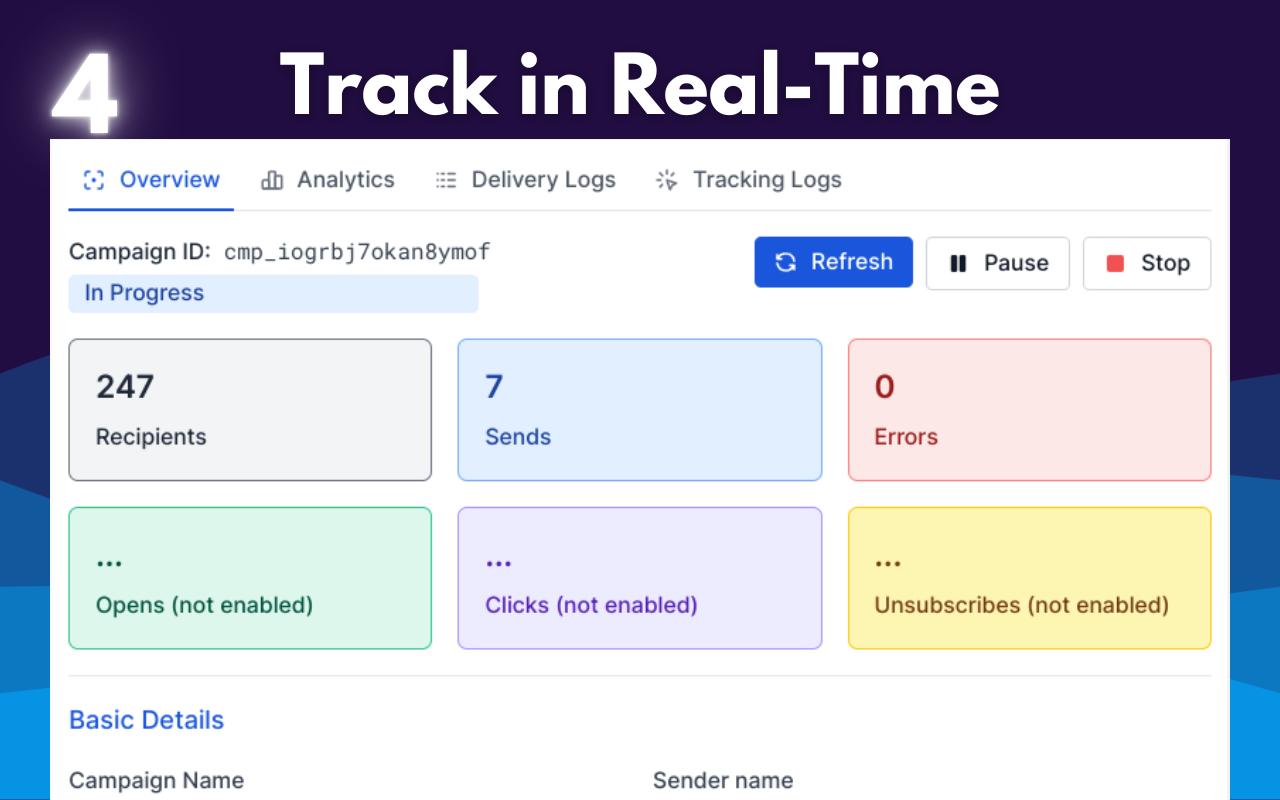
• See who engaged: open and click tracking on every plan, with results in your sheet and in campaign reports. Reply and bounce tracking on Plus and Pro.

• Follow up on what people did: send the next email only to people who opened, clicked, or didn't reply.

• Schedule and pace sending: schedule a campaign and spread large lists across days (Lite and up). Set send windows, sending days, daily caps, and delays between emails (Plus and up).

• Send with confidence: send a test of any row to yourself first. Pause, resume, or stop a campaign at any time. Unsubscribe links and unsubscribe tracking are built in. Verify addresses before sending (Pro).

━━━━━━━━━━━━━━━━━━━━

How it works

1. Click Install at the top of this page.
2. Open your Google Sheet. Add a header row and an email column.
3. Open BetterMerge from the Extensions menu and write your template, or ask the AI Assistant for a first draft.
4. Preview each row, send yourself a test, then start the campaign or schedule it for later.

Step-by-step tutorial: https://bettermerge.com/docs/getting-started/beginner-tutorial

━━━━━━━━━━━━━━━━━━━━

Your inbox stays private

BetterMerge asks Google only for permission to send email. It can't read, search, or delete anything in your Gmail. Emails go out from your own account, so replies come straight back to you.

━━━━━━━━━━━━━━━━━━━━

In Google Sheets and on the web

Run campaigns from the add-on inside Google Sheets, or from the web dashboard at https://app.bettermerge.com, where you can also manage templates, contacts, reports, and team seats. One account, the same campaigns in both.

━━━━━━━━━━━━━━━━━━━━

What people send with it

• Invoices and payment or rent reminders, each with the person's own PDF attached
• Certificates, offer letters, and grade reports
• Event invitations, with a follow-up to people who haven't opened
• Sales and partnership outreach, with follow-ups to people who didn't reply
• Recruiting outreach and candidate updates
• School, club, and member announcements
• Fundraising appeals and donor thank-you emails

Small businesses, freelancers, sales and recruiting teams, schools, nonprofits, and event organizers use it: anyone who sends tens to thousands of personal emails rather than a designed newsletter.

━━━━━━━━━━━━━━━━━━━━

Plans

Free: 50 emails a day, 5 campaigns a month, open and click tracking, and the AI Assistant.

Paid plans (Lite, Plus, Pro) raise the daily limit up to 2,000 emails, within Gmail's own limits (500 a day for @gmail.com, 2,000 for Google Workspace™), and add scheduling, attachments, follow-ups, personalized attachments, delivery automation, and email verification.

Plans and prices: https://bettermerge.com/pricing

━━━━━━━━━━━━━━━━━━━━

What's new

October 2026
• AI Assistant and spam check, included in every plan
• Test emails: send any row to yourself before you start
• Campaign drafts that save themselves
• Clearer daily sending limits, and a start dialog that flags anything missing

September 2026
• Open and click tracking on the Free plan
• A refreshed add-on and web dashboard

Full changelog: https://bettermerge.com/changelog

━━━━━━━━━━━━━━━━━━━━

Switching from another mail merge add-on?

Your existing sheet works with BetterMerge as it is. Compare plans and limits: https://bettermerge.com/vs

━━━━━━━━━━━━━━━━━━━━

Help

• Help center: https://bettermerge.com/docs
• Video tutorials: https://www.youtube.com/playlist?list=PLQKF2cBzie9MP9jXoO7ludwcDgYA4KIy5
• Support: support@bettermerge.com
• Website: https://bettermerge.com

If BetterMerge saves you time, a review on this page helps other people find it.

Gmail™, Google Sheets™, Google Drive™, and Google Workspace™ are trademarks of Google LLC.Kiegészítő adatok
sell
ÁrakDíjmentes alkalmazás fizetős funkciókkal
code
Fejlesztő
Nem végez kereskedelmi tevékenységet
email
Ügyfélszolgálat
lock
Adatvédelmi irányelvek
description
Általános Szerződési Feltételek
flag
JelentésMegjelölés kifogásolhatóként







Keresés
Keresés törlése
A keresés bezárása
Google-alkalmazások
Főmenü