
Google Workspace Marketplace


Budget-Time - Bank Imports, Budgets & Debt Payoff
Auto-import bank transactions, balances & investments into your own Google Sheets™ spreadsheet. Budget wizard, debt payoff plans, bill tracking. 2 weeks free.
정보 업데이트:2026년 9월 3일
호환 기기:
32


개요
Finally know where your money goes - in a spreadsheet you own.

Budget-Time connects your banks (12,000+ institutions via Plaid, the same service used by Venmo and Chime) and imports transactions, balances, interest rates, and investments straight into your Google Sheets™ spreadsheet. No CSV exports. No copy-paste. No logging into five banking apps.

WHAT YOU GET
- Automatic transaction import with smart categorization plus your own rules
- Live balances, credit limits, utilization, and interest rates (APR)
- Budget Wizard - answer a few questions, get a full 12-month budget
- Budget vs Actual - see plan against reality, every month, automatically
- Get-Out-of-Debt plan - snowball & avalanche payoff orders with real math
- Payments tracker - due dates, minimum payments, auto-checked when paid
- Subscriptions finder - every recurring charge in one place, with how to cancel
- Investment holdings & transactions with live prices
- Daily autofetch - your sheet updates itself while you sleep
- 12 themes, dark mode included
- Works in the Google Sheets™ files you already use

PRIVATE BY DESIGN
Your bank credentials go to Plaid - never to us. Your financial data flows directly into YOUR spreadsheet - we never store transactions, balances, or account numbers on our servers. Cancel anytime and your data stays in your sheet, because it was always yours.

TRY IT FREE FOR 2 WEEKS
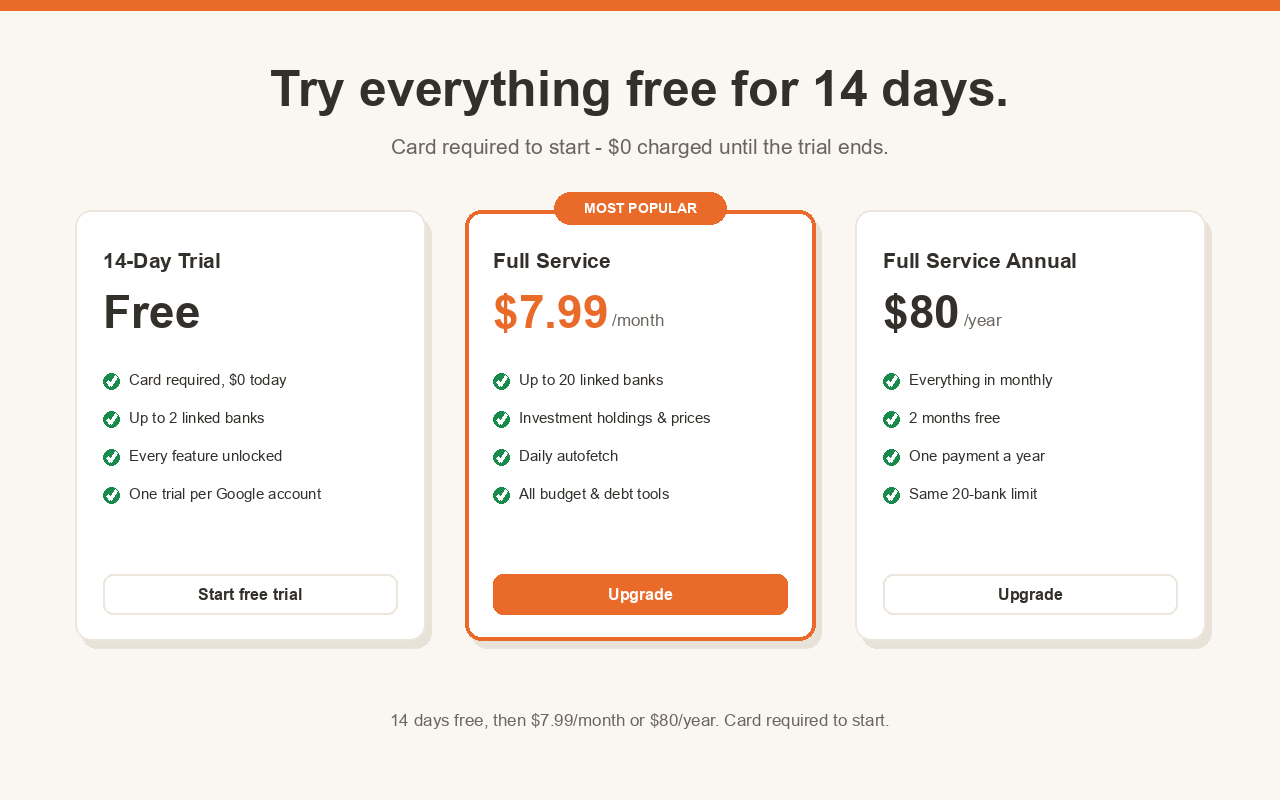
Every feature, up to 2 banks, nothing charged for 14 days. Link your banks first, then start the trial when you're ready to import - $0 today, cancel anytime before day 14 and pay nothing. Then Full Service is $7.99/month or $80/year (2 months free) with up to 20 linked banks and investments.

SET UP IN MINUTES
1. Install, open a Google Sheets™ file, choose Extensions -> Budget-Time
2. Link your bank in the secure window
3. Watch your transactions fill the sheet - then run the Budget Wizard

Questions? support@budget-time.com - Docs: budget-time.com/docs - Privacy: budget-time.com/privacy

Google Sheets™ and Google Workspace Marketplace™ are trademarks of Google LLC.
추가정보




검색
검색어 지우기
검색 닫기
Google 앱
기본 메뉴