
Google Workspace Marketplace


CAD Viewer for Drive™
A professional 2D CAD viewer for Google Drive™ handling DWG, DXF, and SVG files natively with real-time sharing and commenting.
Oppføring oppdatert:23. januar 2026
Fungerer med:
6k+



Oversikt
CAD Viewer is a professional-grade visualization and collaboration agent designed specifically for engineering and architectural drawings in Google Drive™.

✓ No AutoCAD installation required. ✓ Native Google Drive™ integration. ✓ Real-time Collaboration.

Built on a high-precision vector engine, CAD Viewer allows you to visualize, inspect, annotate, and collaborate on 2D CAD drawings directly within your browser.

Say goodbye to expensive software licenses just to view a drawing.

CAD Viewer renders your DXF, DWG, and SVG files instantly with complete layer control.

ℹ Learn more on https://cadviewer.co

FEATURES
📐 Universal 2D CAD Support

Seamlessly view industry-standard CAD formats used in architecture, construction, and engineering directly from your cloud storage.

Supported Formats: DWG, DXF, SVG.

Version Compatibility: Supports files from older AutoCAD versions up to the latest releases.

Vector Precision: Crisp zooming and panning without loss of quality, regardless of drawing size.

🤝 Collaboration & Annotation

Move beyond simple viewing; transform your workflow into a collaborative workspace.

Real-time Commenting: Leave feedback, revision notes, or questions directly on specific areas of the drawing.

Secure Sharing: Share access to drawings with colleagues or clients without sending attachments.

Threaded Discussions: Resolve design queries efficiently with reply threads linked to specific coordinates.

🛠 Advanced Inspection Tools

Turn your browser into a capable CAD inspection tool.

Layer Management: Toggle visibility of specific layers (e.g., electrical, plumbing, structural) to isolate systems.

Navigation: Pan, zoom, and rotate with intuitive controls designed for technical drawings.

Object Properties: Click on elements to view metadata, line types, and layer assignments.

📏 Measurement & Scale

Precision Measurement: Measure lengths, areas, and perimeters directly on the drawing.

Scale Calibration: Calibrate the viewer to the drawing's scale for accurate takeaways.

Coordinate Tracking: View X/Y coordinates in real-time as you navigate.

☁️ For Google Drive™ Integration

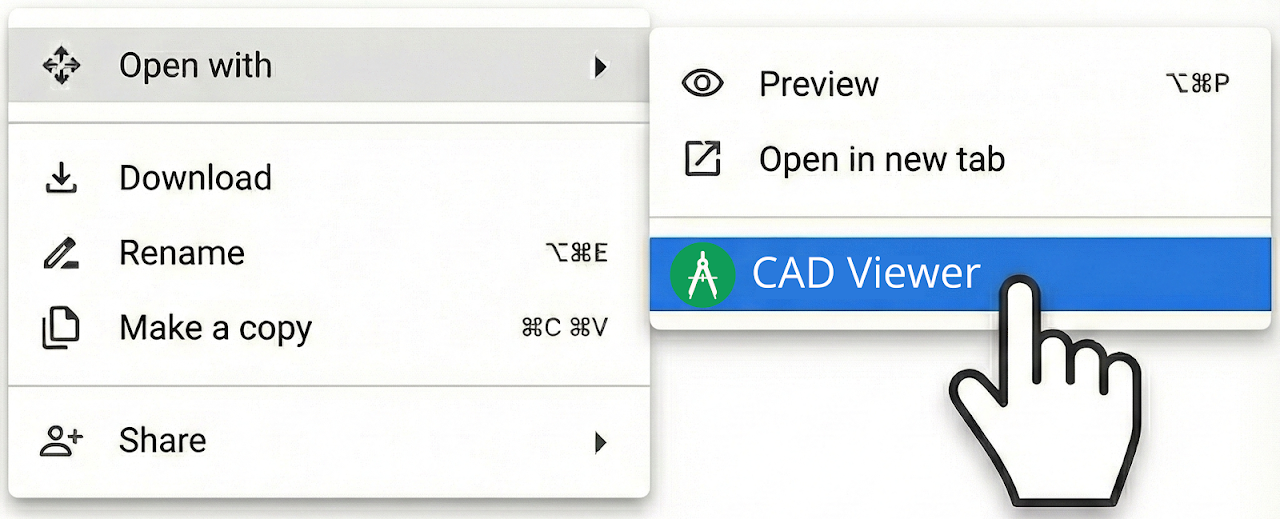
"Open With" Functionality: Right-click any DWG or DXF file in Drive and open it instantly.

Zero Footprint: View heavy CAD files without downloading them or installing desktop CAD software.

Cloud Security: Keep your proprietary drawings secure in the cloud; no local downloads required for viewing.

● QUICK TUTORIAL
1️⃣ Upload a CAD file (e.g., .DWG or .DXF) to Google Drive. 2️⃣ Right-click the file and select "Open with" > "CAD Viewer". 3️⃣ Use the layer manager to filter views or the comment tool to leave feedback for your team.

● PRICING
CAD Viewer offers a robust Free version for essential viewing and simple navigation. The Pro plan unlocks advanced measurement tools, layer management, and unlimited collaboration features.

● OUR USERS ARE
Architects: Review floor plans and elevations on the go without launching heavy software.

Civil Engineers: Inspect site plans and utility layouts directly from the cloud.

Contractors: Access the latest drawing revisions and measurements on-site.

Project Managers: Leave comments and review progress without needing CAD training.

This add-on was developed by Rhovium.com
Tilleggsinformasjon
sell
PriserKostnadsfritt med enkelte betalte funksjoner
code
Utvikler
Ikke næringsdrivende
email
Brukerstøtte
lock
Personvernregler
description
Vilkår for bruk
flag
RapportérRapporter som upassende




Søk
Slett søket
Lukk søkefunksjonen
Google-apper
Hovedmeny