A solution that makes creating and storing event templates on Google Calendar quick and easy.
Listing updated:September 3, 2025
Works with:
9K+
Overview
Imagine you have many events that occur regularly, like birthdays, meetings or even workout sessions. Instead of manually adding all the details every time, EventTemplates lets you create templates for these events. Think of templates as pre-designed forms that you can reuse whenever you need to schedule a similar event again. Using EventTemplates is as simple as a few clicks. 
Step 1: Install our Add-on. 
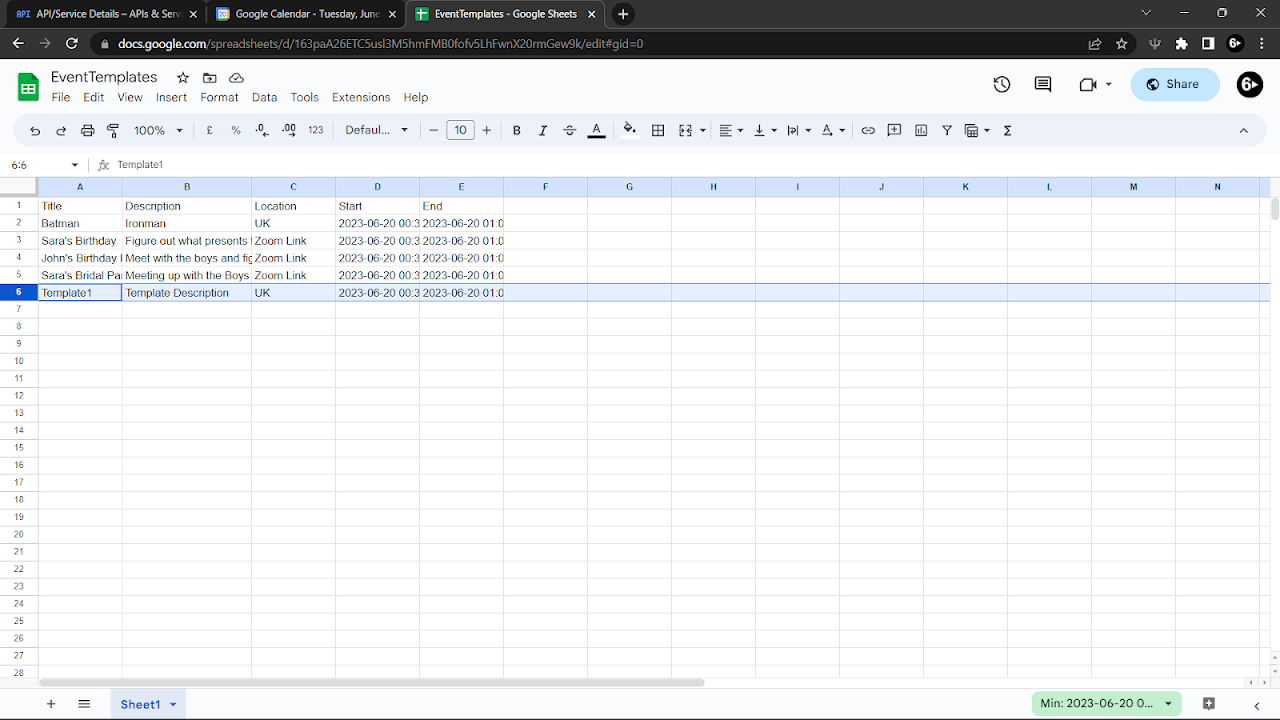
Step 2: Go to your Google Sheets and create a new spreadsheet file. Put the first row header to be: Title, Description, Location, Start, End. 
Step 3: Copy the Sheet ID in the URL after the slash following 'd' and before the slash before 'edit'. For example; "spreadsheets/d/163paA26ETC5usl3M5hmFMB0fofv5LhFwnX20rmGew9k/edit". 
The Sheet ID is 163paA26ETC5usl3M5hmFMB0fofv5LhFwnX20rmGew9k. 
Step 4: Copy the name of the sheet located at the bottom, such as Sheet1. 
Step 5: In our add-on, go to settings and paste the values from Step 3 and Step 4. Then click on Try To Connect, and then click on Confirm Settings to link the Add-on with the Google Sheet. 

Now, you can use our Google Calendar Add-on to create events with your templates. You can also edit/delete templates in your Google Sheet directly. 

Feature 1: Create a new event by selecting a template or inputting data and clicking 'Confirm Create Event'. 
Feature 2: Create a new template and store it for later use by clicking 'Create Template Here'. 
Feature 3: Edit a created event with stored templates by selecting the template from the dropdown and clicking 'Transfer Data To Event'. Use the data in an event as a template by clicking 'Transfer Data From Event' and then 'Submit As Template' to store it.

Please go to our website for a detailed walkthrough, 
https://eventtemplatesadd-on.blogspot.com/

Quality of Life Update (06/07/25): 
- Refined Automatic Timezone functionality.
- Minor bug fixes.
- User Experience and Performance Optimised.

Quality of Life Update (04/08/24): 
- User Experience and Performance Optimised. 
- New Time Zone feature (automatic and manual configuration options).
- Minor Bug Fixes.

Additional information
PricingFree of charge
Developer
Privacy policy
Terms of service
Calendar EventTemplates will ask for the permissions shown below. Learn more
Calendar EventTemplates will need access to your Google account
This will allow Calendar EventTemplates to :
See, edit, create, and delete all your Google Sheets spreadsheets
See, edit, share, and permanently delete all the calendars you can access using Google Calendar
See and download any calendar you can access using your Google Calendar
See your primary Google Account email address
See your personal info, including any personal info you've made publicly available
Reviews
Language:
Sort by:
Google doesn't verify reviews or ratings. Learn more about reviews
Profile Picture
David Carter
September 11, 2025
This is a fantastic app. however the time zone consistently does not line up. have checked the sheet and the app but is schedules the time wrong. last month it was out by 1hr and now it is out by 10hrs. If this could be fixed it would be spectacular. suggestion for scheduling would be to have to date always start on the current date instead of hang to drill forward from when the template was created. I have read your reply and appreciate your attention, however it is still not working, in fact it is worse. I am in Australia Sheet set to +10 Time zone set to +10 Google Calendar set to +10 I use the drop down and select an event, The time on this example is 3.30am start, the preview shows a 3.30am start but it populates the calendar at a 1.30pm start. I have a7 week rotating roster with various start time and this app is perfect to plan out my roster into the calendar saving heaps of time, but if it putting the time in wrong, it takes muck longer than manual entry. i really appreciate the effort you guys have gone to to provide a free solution and truly wished it worked as I love the app when it works. Kind Regards David Thanks for your attention to this matter, its still out by 1 hour e.g. start at 1.30pm but populated at 2.30pm, but I can work with that. Thanks again David
Is this review helpful?
Yes
No
Profile Picture
Benoit Lelièvre
October 29, 2025
Great addon but I wish we could configure more default settings from the template. Default label colour and default reminders are two configurations I need to set for pretty much every event I create, therefore the addon is of limited use to me as I still have to go back and edit the events after creation.
Is this review helpful?
Yes
No
Profile Picture
A User of Calendar EventTemplates
March 11, 2025
It isn't hard to set-up on the user end, but I can't get it to connect to my Sheet. I keep getting an Add-on error: Something went wrong while executing the add-on. I was looking forward to trying this out and am disappointed to uninstall it before even seeing it in action. I'd try it again once the bugs are fixed. Edit: I'm a dummy and did not notice the sheet was connected to my other Google account. Once connected to the same account as my calendar, it works fine. It would be cool if there was more features related to meeting dates and times. Like, something to incorporate clicking and dragging time for events directly on the calendar and having that time/date auto populate to the event. I am concerned setting a default date and time will only be useful once, but require constant maintenance to work right for future meetings.
Is this review helpful?
Yes
No
Profile Picture
Kevin Gordon Thomas
December 14, 2025
doesn't work in Canada? please help
Is this review helpful?
Yes
No
Profile Picture
Nicole Bivins
July 9, 2025
I cannot figure out how to update the timezone. When I go to the timezone in the add-on it just tells me what the current one is and has an "exit" time zone" button with no way to change it. I've confirmed the correct time zone is saved on my sheet but it keeps converting to "British summer time"
Is this review helpful?
Yes
No
Profile Picture
Unnamed
October 1, 2025
Please add a custom label color. Would've been the perfect template add on with that feature
Is this review helpful?
Yes
No
Profile Picture
Anthony Mok
July 23, 2023
The 'Calendar Event Templates' add-on provides a simple operation for scheduling recurring events on Google Calendar, perfectly integrated with Google Sheets, realizing quick creation, storage, and re-use of event templates. This add-on is deep in functionality, secure, and reliable, providing event editing and template conversion while ensuring data privacy. What's more commendable is that it's completely free, demonstrating the developers' commitment to simplifying users' lives. In summary, this add-on enhances scheduling efficiency, saves users' valuable time, and becomes indispensable once used. 「日曆事件範本」插件為Google日曆重複事件排程提供簡易操作,與Google表格完美結合,實現快速創建、存儲與重用事件範本。此插件功能深度且安全可靠,提供事件編輯和範本轉換,並保障數據隱私。更值得稱讚的是,它完全免費,證明了開發者致力於簡化用戶生活的理念。總的來說,此插件提升了排程效率,節省了用戶的寶貴時間,使用後將變得不可或缺。
Is this review helpful?
Yes
No
Profile Picture
MINENHLE BUTHELEZI
June 29, 2023
I can't believe this is free. With the help of the Calendar Event Templates, I can catch up on projects and navigate my way around meetings and upcoming projects with ease.
Is this review helpful?
Yes
No
Profile Picture
Dawid Jastrzebski
March 5, 2024
When I try to transfer template to an event im getting this error: Something went wrong while executing the add-on.
Is this review helpful?
Yes
No
Profile Picture
Daniels Hodanonoks
July 4, 2023
I don't usually write reviews but this is awesome. It's easy to use and saves me a lot of time.
Is this review helpful?
Yes
No
1-10 of 14
Search
Clear search
Close search
Google apps
Main menu