
Google Workspace Marketplace


Calendar Tools
Lets you to filter, search, export agenda reports to pdf, xlsx, bulk delete different events of your Google Calendar™.
정보 업데이트:2024년 10월 17일
3천+




개요
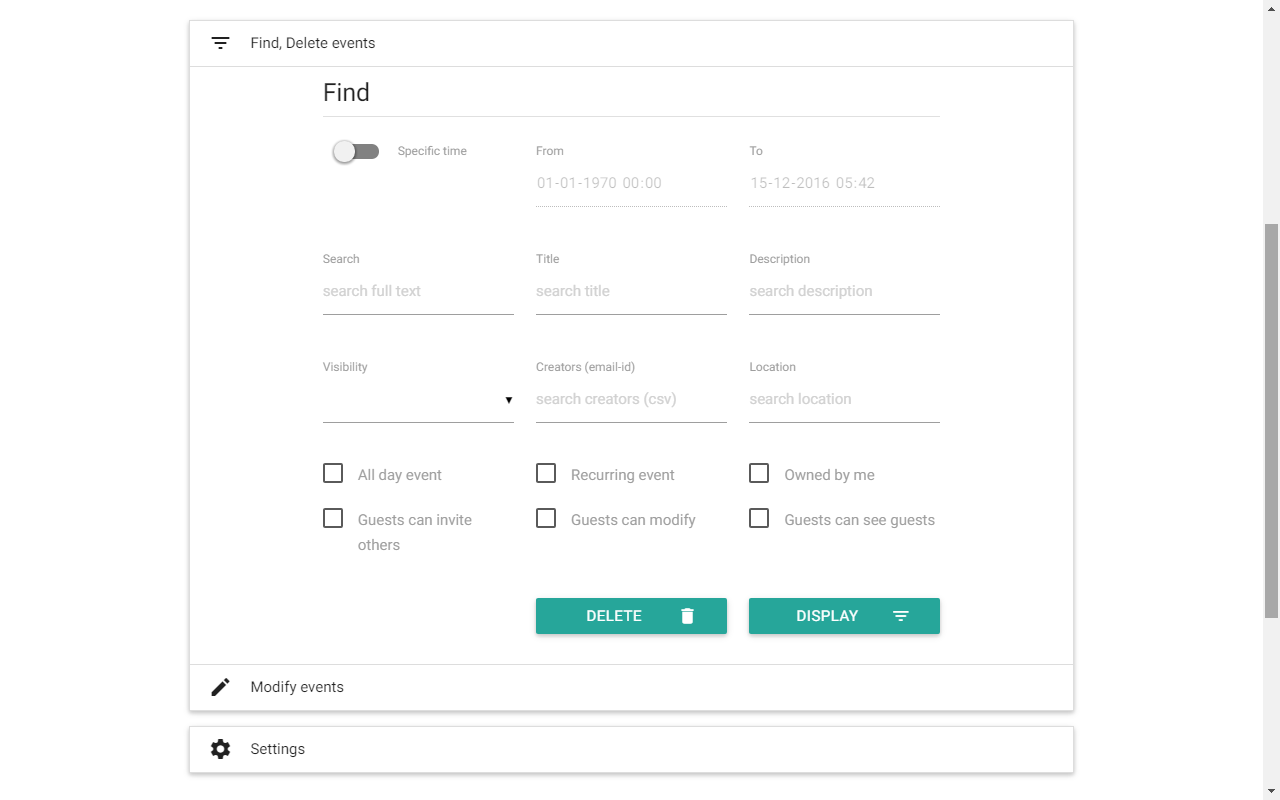
The Calendar Tools add-on for Google Calendar™ enhances your calendar management experience by providing robust features for filtering, searching, exporting agenda reports, and bulk deleting events directly from your Google Calendar™.

Features:

Search Events Based On:
- Any keywords
- Title
- Description
- Visibility
- Creators
- Location
- Date Time (From and To)
- All day event
- Recurring event
- Owned by me
- Guests can invite others
- Guests can modify
- Guests can see guests

Bulk Modify Events:
- Adjust Date Time (From and To)
- Edit Title
- Update Description
- Modify Visibility
- Change Location
- Add or Remove Guests by email ID
- Modify Guest Permissions (Modify, Invite Others, See Guests)

Bulk Delete Events Based On:
- Any keywords
- Title
- Description
- Visibility
- Creators
- Location
- Date Time (From and To)
- All day event
- Recurring event
- Owned by me
- Guests can modify
- Guests can invite others
- Guests can see guests

Sort Data Based On Fields:
- Arrange calendar events by various criteria to better organize and view your schedule.

Search and Export Reports To:
- PDF
- Excel (.xlsx)
- Print
- Copy to Clipboard

Free Version Limitations:

- Fully functional with only 2 event(s) processing: The trial version allows full access to features but limits processing to only 2 events.

Maximize your productivity with Calendar Tools for Google Calendar™. Simplify event management, streamline your schedule, and enhance your calendar organization. Upgrade to unlock unlimited event processing and additional features.

Video help: [Insert Video Link]

* Google services impose daily quotas and hard limitations on some features - https://developers.google.com/apps-script/guides/services/quotas

- Calendar Tools use and transfer of information received from Google APIs to any other app will adhere to Google API Services User Data Policy, including the Limited Use requirements.
추가정보



검색
검색어 지우기
검색 닫기
Google 앱
기본 메뉴