
Google Workspace Marketplace


CalWeave — Calendar & Sheets Sync
Two-way sync between Google Calendar™ and Google Sheets™ that won't time out, won't duplicate, and can never wipe your calendar.
Na-update ang listing noong:Agosto 12, 2026
Gumagana sa:
Walang review
1


Pangkalahatang-ideya
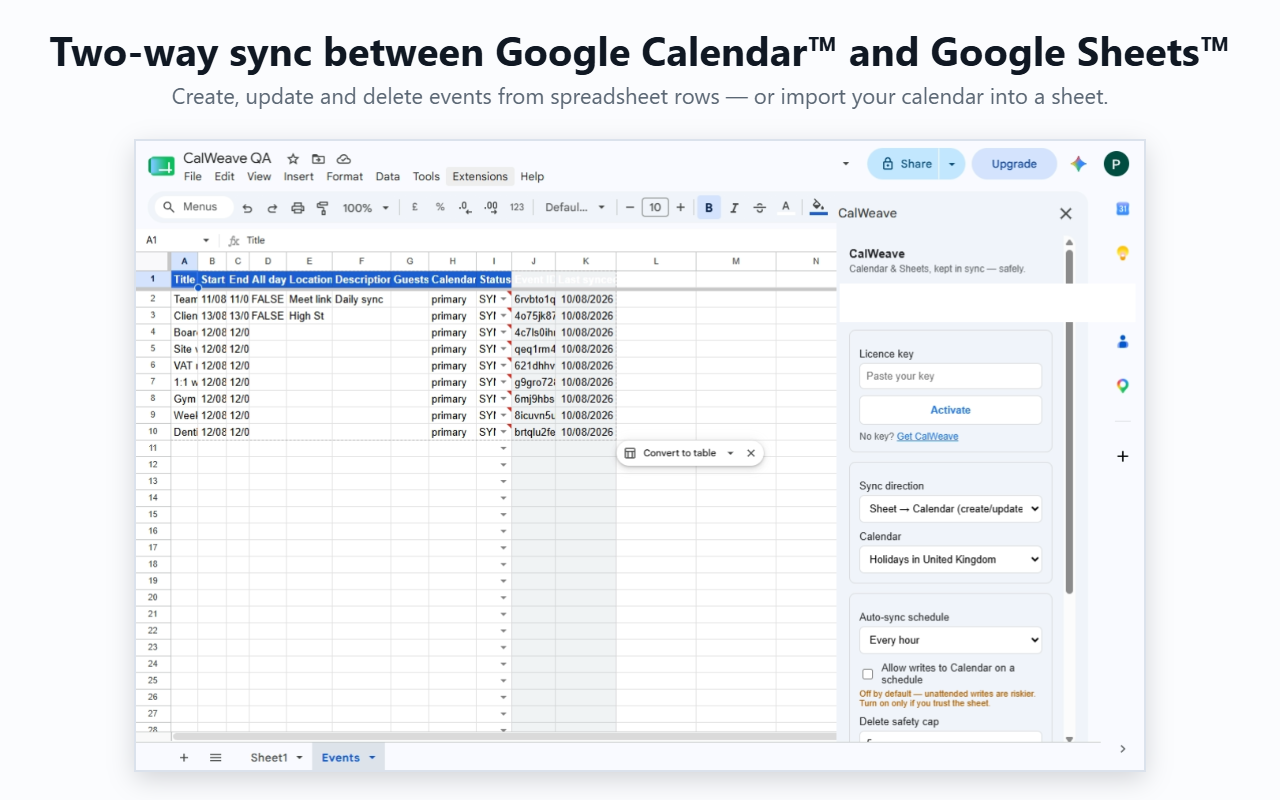
CalWeave keeps Google Calendar™ and Google Sheets™ in step — in either direction, or both — without the three failures that plague calendar sync tools: timeouts on big calendars, duplicate rows on every re-import, and accidental mass deletions.

WHAT IT DOES
• Import calendar events into a clean, structured sheet: title, start, end, all-day flag, location, description, guests, calendar and status — filtered by date range, keyword or colour. Perfect for time tracking, client billing and reporting.
• Create, update and delete calendar events from spreadsheet rows. Type rows, mark them NEW, press Sync.
• Preview before anything is written. See exactly what a sync would create, update or delete — before it happens.
• Auto-sync on a schedule (hourly or daily), with calendar writes off by default for unattended runs.

WHY IT'S SAFE
• Delete safety cap: a single sync can never delete more events than the cap you set (default 5). A broken formula or a runaway sheet cannot empty your calendar — CalWeave stops and asks first.
• No duplicates: rows are matched to events by ID, so re-syncing updates in place instead of piling up copies. Unchanged rows are skipped entirely.
• No timeouts: large imports run in batches and resume automatically in the background until they finish.

PRIVATE BY DESIGN
Your calendar and spreadsheet data is processed inside your own Google account and never stored on external servers. The add-on requests the narrowest possible permissions, including access to only the single spreadsheet it is installed in.

PRICING
Free 14-day trial with every feature included — no card required. Then $24/year.

GETTING STARTED
Install, open a Google Sheets™ spreadsheet, choose Extensions → CalWeave → Open CalWeave, and use the one-click sample sheet to watch a sync work before touching real data. Setup takes about two minutes.

Google Calendar™ and Google Sheets™ are trademarks of Google LLC.
Karagdagang impormasyon
sell
PagpepresyoLibreng trial
code
email
Suporta
lock
Patakaran sa privacy
description
Mga tuntunin ng serbisyo
flag





Search
I-clear ang paghahanap
Isara ang paghahanap
Mga app ng Google
Pangunahing menu