
Google Workspace Marketplace

CertifyAll
Auto-generate PDF certificates when students pass your Google Forms™ quiz. Connect a Slides™ template, set a passing score, and CertifyAll handles the rest.
Listing updated:September 11, 2026
Works with:
120




Overview
CertifyAll automatically generates personalized PDF certificates from Google Slides™ templates when respondents submit your Google Forms™.

Perfect for teachers, trainers, HR managers, and anyone who needs to issue certificates at scale — without manual work.

━━━━━━━━━━━━━━━━━━━━━━━━━━━━━━

HOW IT WORKS

1. Create a certificate template in Google Slides™ using {{placeholders}} like {{name}}, {{date}}, {{score}}
2. Open your Google Forms™ → Extensions → CertifyAll → Open
3. Paste your Slides™ template URL
4. Map placeholders to form fields
5. Set a passing score (for quizzes)
6. Activate — done!

Every time someone submits your form and meets the passing score, CertifyAll automatically:
✓ Generates a personalized certificate from your template
✓ Exports it as a PDF
✓ Emails it to the respondent
✓ Saves a copy to your Google Drive™

━━━━━━━━━━━━━━━━━━━━━━━━━━━━━━

USE CASES

• Course completion certificates
• Quiz and exam pass certificates
• Training and compliance certification
• Workshop and webinar attendance
• Employee recognition
• Professional development (PD) hours
• Event participation certificates

━━━━━━━━━━━━━━━━━━━━━━━━━━━━━━

BUILT-IN PLACEHOLDERS

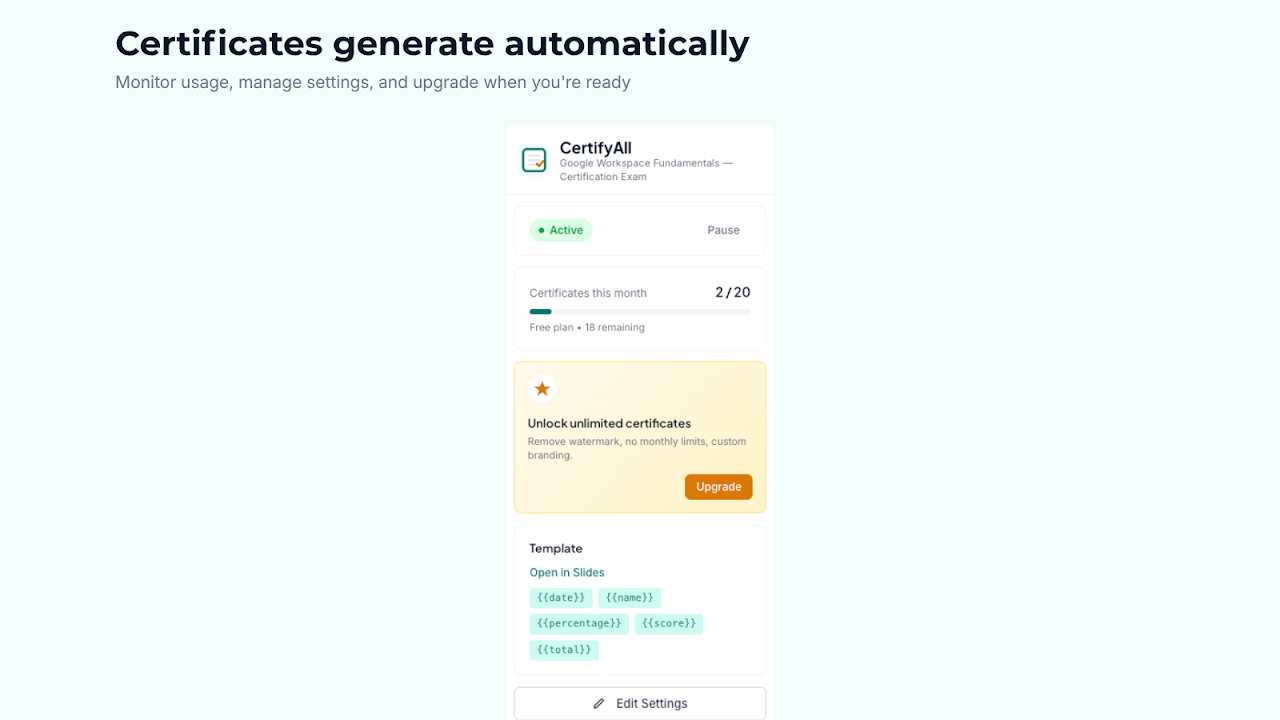
CertifyAll automatically fills these placeholders in your template:
• {{email}} — respondent's email address
• {{date}} — certificate issue date
• {{score}} — quiz score
• {{total}} — total possible points
• {{percentage}} — score percentage
• {{form_title}} — your form's title
• {{timestamp}} — submission date and time

Plus unlimited custom placeholders — add any {{placeholder}} to your template and map it to a form field.

━━━━━━━━━━━━━━━━━━━━━━━━━━━━━━

FEATURES

Free plan:
• 20 certificates per month
• Automatic PDF generation
• Email delivery to respondents
• Google Drive™ storage
• Quiz score threshold
• Unlimited custom placeholders

Pro plan ($5.99/month):
• Unlimited certificates
• No watermark
• Custom branding
• Priority support

━━━━━━━━━━━━━━━━━━━━━━━━━━━━━━

WHY CERTIFYALL?

• Set up in under 2 minutes — paste a template URL, map fields, activate
• Fully automatic — certificates generate and send without any manual work
• Works with any Google Slides™ design — use your own branding and layout
• Quiz-aware — only sends certificates to respondents who pass
• Saves to Drive™ — every certificate is backed up in a dedicated folder
• No student accounts needed — respondents just submit the form

━━━━━━━━━━━━━━━━━━━━━━━━━━━━━━

GETTING STARTED

1. Install CertifyAll from the Google Workspace Marketplace™
2. Open any Google Forms™
3. Go to Extensions → CertifyAll → Open
4. Follow the 3-step setup in the sidebar
5. Submit a test response to see it work

Need a template? Create a Google Slides™ presentation, design your certificate, and add {{placeholders}} where you want dynamic text. That's it.

━━━━━━━━━━━━━━━━━━━━━━━━━━━━━━

SUPPORT

• Help center: https://certifyall.app/support
• Email: support@certifyall.app

━━━━━━━━━━━━━━━━━━━━━━━━━━━━━━

PRIVACY & SECURITY

CertifyAll only accesses the current form you're working with and files it creates. We don't store your data on external servers. All certificates are generated and stored in your own Google Drive™.

Privacy policy: https://certifyall.app/privacy
Terms of service: https://certifyall.app/terms

Google Workspace™, Google Forms™, Google Slides™, Google Drive™, and Gmail™ are trademarks of Google LLC.Additional information
sell
PricingFree of charge with paid features
code
Developer
Non-trader
email
Support
lock
Privacy policy
description
Terms of service
flag
ReportFlag as inappropriate




Search
Clear search
Close search
Google apps
Main menu