
Google Workspace Marketplace


Change Case - Quick & Easy
Convert selected text to Uppercase, Lowercase, Title Case, Sentence Case, Proper Case, or Inverse Case instantly.
Listing updated:February 22, 2026
Works with:
188K+



Overview
Change Case - Quick & Easy is a simple and powerful add-on for Google Sheets™ that helps you convert text case instantly with just one click 🚀

🚫 No formulas.
🚫 No scripts.
🚫 No manual editing.

Just select your text and apply the required text case.


🔹 Supported Text Case Conversions 🔹

✅ Uppercase
✅ Lowercase
✅ Title Case
✅ Sentence Case
✅ Proper Case
✅ Inverse Case

✨ Works perfectly on:

☑️ Single cells
☑️ Multiple cells
☑️ Full rows
☑️ Full columns
☑️ Any selected range


🔹 How to use Change Case - Quick & Easy 🔹
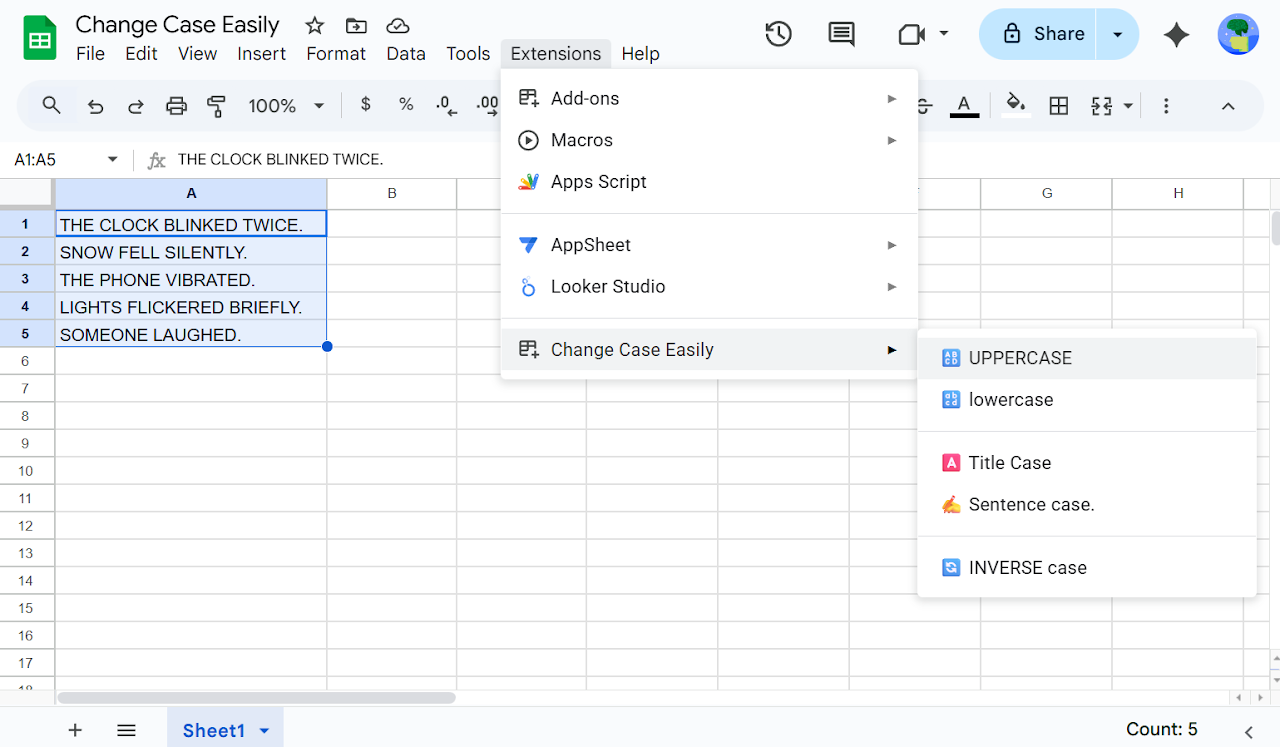
1) Select text in Google Sheets™
2) Go to Extensions > Change Case - Quick & Easy
3) Click the case option you want
🎉 Text is converted instantly

🔍 Problems this add-on solves

❓ How to convert text to Uppercase in Google Sheets
❓ How to convert text to Lowercase in Google Sheets
❓ How to apply Title Case in Google Sheets
❓ How to apply Sentence Case in Google Sheets
❓ How to apply Proper Case in Google Sheets
❓ How to invert text case in Google Sheets
❓ How to change text case without formulas


🔎 Common search queries this add-on matches

🔍 Change case in Google Sheets
🔍 Convert text case Google Sheets
🔍 Uppercase Lowercase Google Sheets
🔍 Title Case Google Sheets
🔍 Sentence Case Google Sheets
🔍 Proper Case Google Sheets
🔍 Inverse Case Google Sheets
🔍 Text formatting Google Sheets
🔍 Google Sheets text tools

👌 Ideal for:

➡️ Cleaning imported data
➡️ Fixing capitalization issues
➡️ Formatting names and titles
➡️ Content writing and editing
➡️ Marketing and SEO work
➡️ Students, teachers, and professionals


💡 Why use Change Case - Quick & Easy?

✔ One-click text case conversion
✔ No formulas, no setup
✔ Fast and reliable
✔ Works on any selected text
✔ Saves time on repetitive formatting

If you frequently need to convert text to Uppercase, Lowercase, Title Case, Sentence Case, Proper Case, or Inverse Case in Google Sheets™, Change Case - Quick & Easy is the easiest and fastest solution.
Additional information
sell
PricingFree of charge trial
code
Developer
email
Support
lock
Privacy policy
description
Terms of service
flag
ReportFlag as inappropriate






Search
Clear search
Close search
Google apps
Main menu