
Google Workspace Marketplace

Change Case - Quick & Easy
Convert selected text to Uppercase, Lowercase, Title Case, Sentence Case, Proper Case, or Inverse Case instantly.
วันที่อัปเดตข้อมูล:22 กุมภาพันธ์ 2569
ใช้งานได้กับ
184K+



ภาพรวม
Change Case - Quick & Easy is a simple and powerful add-on for Google Sheets™ that helps you convert text case instantly with just one click 🚀

🚫 No formulas.
🚫 No scripts.
🚫 No manual editing.

Just select your text and apply the required text case.


🔹 Supported Text Case Conversions 🔹

✅ Uppercase
✅ Lowercase
✅ Title Case
✅ Sentence Case
✅ Proper Case
✅ Inverse Case

✨ Works perfectly on:

☑️ Single cells
☑️ Multiple cells
☑️ Full rows
☑️ Full columns
☑️ Any selected range


🔹 How to use Change Case - Quick & Easy 🔹
1) Select text in Google Sheets™
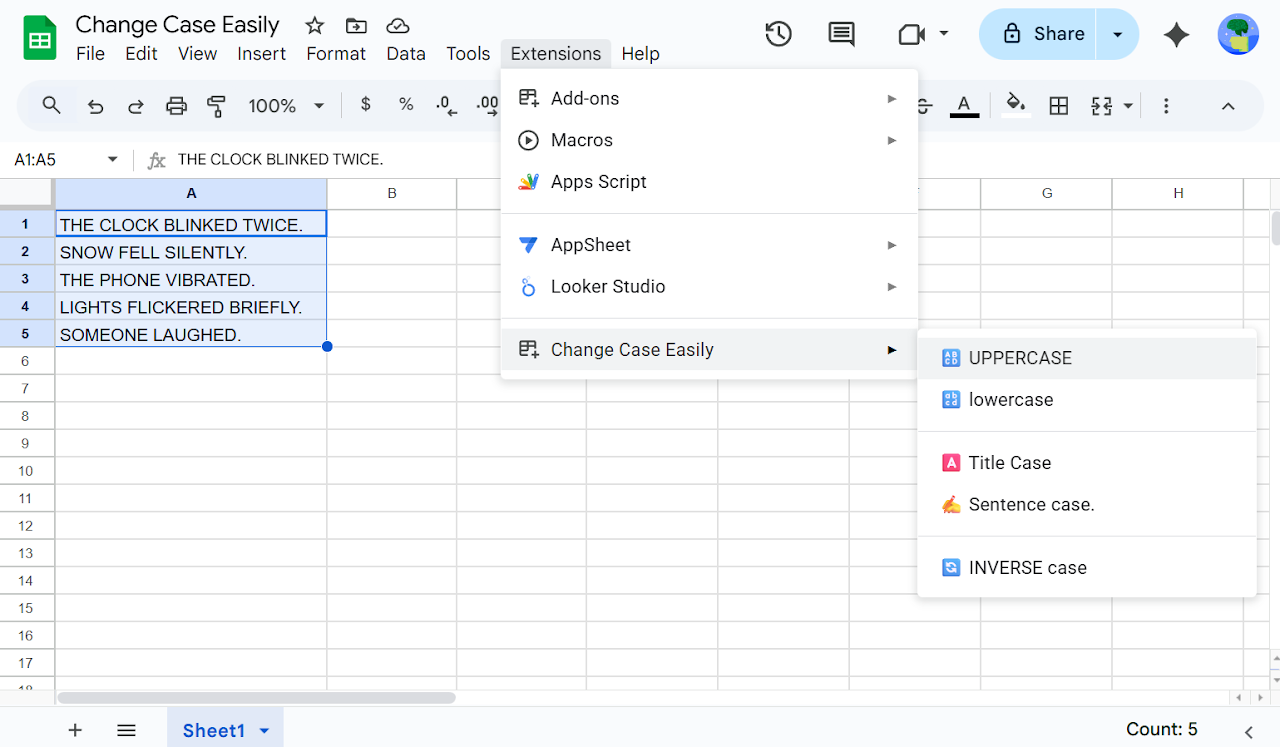
2) Go to Extensions > Change Case - Quick & Easy
3) Click the case option you want
🎉 Text is converted instantly

🔍 Problems this add-on solves

❓ How to convert text to Uppercase in Google Sheets
❓ How to convert text to Lowercase in Google Sheets
❓ How to apply Title Case in Google Sheets
❓ How to apply Sentence Case in Google Sheets
❓ How to apply Proper Case in Google Sheets
❓ How to invert text case in Google Sheets
❓ How to change text case without formulas


🔎 Common search queries this add-on matches

🔍 Change case in Google Sheets
🔍 Convert text case Google Sheets
🔍 Uppercase Lowercase Google Sheets
🔍 Title Case Google Sheets
🔍 Sentence Case Google Sheets
🔍 Proper Case Google Sheets
🔍 Inverse Case Google Sheets
🔍 Text formatting Google Sheets
🔍 Google Sheets text tools

👌 Ideal for:

➡️ Cleaning imported data
➡️ Fixing capitalization issues
➡️ Formatting names and titles
➡️ Content writing and editing
➡️ Marketing and SEO work
➡️ Students, teachers, and professionals


💡 Why use Change Case - Quick & Easy?

✔ One-click text case conversion
✔ No formulas, no setup
✔ Fast and reliable
✔ Works on any selected text
✔ Saves time on repetitive formatting

If you frequently need to convert text to Uppercase, Lowercase, Title Case, Sentence Case, Proper Case, or Inverse Case in Google Sheets™, Change Case - Quick & Easy is the easiest and fastest solution.
ข้อมูลเพิ่มเติม
sell
ราคาช่วงทดลองใช้แบบไม่มีค่าใช้จ่าย
code
นักพัฒนาซอฟต์แวร์
email
การสนับสนุน
lock
นโยบายความเป็นส่วนตัว
description
ข้อกำหนดในการให้บริการ
flag




ค้นหา
ล้างการค้นหา
ปิดการค้นหา
แอป Google
เมนูหลัก