
Google Workspace Marketplace


ChaseDocs
Chase client documents over WhatsApp, checked automatically, straight into your own Google Drive™
정보 업데이트:2026년 9월 21일
리뷰 없음
3


개요
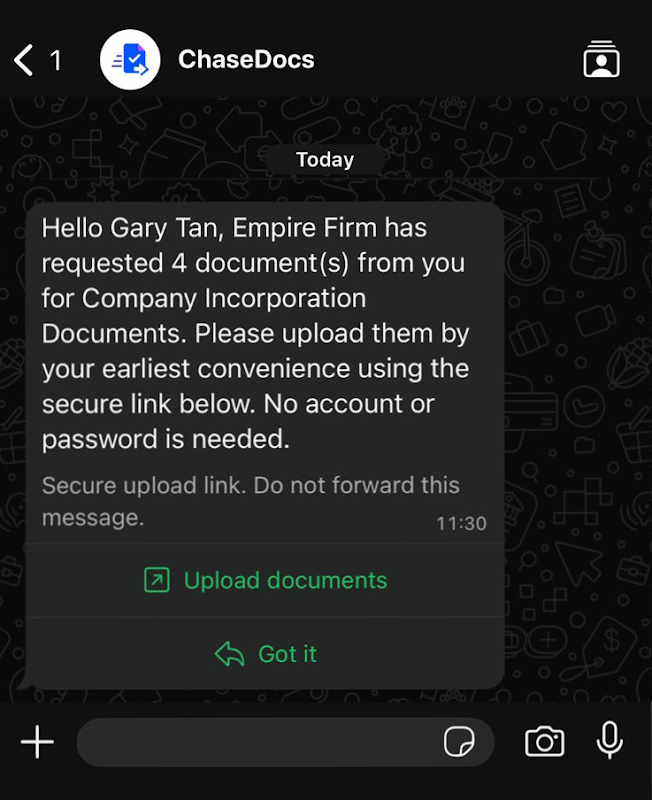
ChaseDocs is a client document-collection tool for professional firms and agencies. You send one branded, no-login link; your client uploads files and answers questions from their phone; automated reminders chase them until everything is in; and AI reads every upload to check it is the right document, for the right period, readable and complete — then names it for you.

**The problem it solves.** Most firms collect documents the same way: an email thread, then a WhatsApp message, then another WhatsApp message. Files end up buried in chats, nobody is sure what is still outstanding, and someone on the team loses hours a week to chasing. ChaseDocs replaces that with a structured request and a single link. The message still goes over WhatsApp; the files never do.

**How it works**

1. Build a checklist — documents to upload and questions to answer. Save it as a template and reuse it for every client.
2. Send it over WhatsApp or email, chosen per request. Your client gets a branded link that needs no account and no password.
3. They upload from their phone. Progress saves as they go, so they can stop and come back.
4. Reminders go out automatically until the checklist is complete, and stop when it is.
5. AI checks each upload and flags problems before you look. You accept it, or send it back with a note.

**What makes it different**

**Messaging-native.** Requests and reminders go out over WhatsApp — the channel most clients actually answer — not only email. Email is a first-class channel too; choose per request.

**AI validation on every upload.** Each file is read and checked for document type, the period it covers, readability and completeness — including whether an ID or passport expires too close to the date you are collecting for — then auto-named. A human still approves; the AI does the first pass, so you are not opening twenty files to find the one that is wrong.

**Your cloud, not ours.** Uploads route into your firm's own connected storage (Google Drive™ today; Dropbox, OneDrive and S3 to follow). ChaseDocs keeps the checklist, the validation result and a pointer to the file — never the documents themselves. It takes a transient, encrypted copy for the AI check and deletes it immediately after. If you would rather not connect storage, a short-retention encrypted fallback is available.

**No-login client portal.** A tokenised magic link, branded to your firm, built mobile-first. No account, no password, no app to install.

**Who uses it.** Any firm that chases clients for documents on a recurring basis: travel agencies and tour operators (passenger passports, visas, health certificates), education providers and study-abroad consultancies (student passports, transcripts, test results), accounting firms and bookkeepers (bank statements, tax forms, KYC), digital agencies (copy, briefs, client photos), and corporate immigration and relocation firms (assignee passports, degree certificates, employer packs).

**Works anywhere.** Document types are data, not built-in country templates, so a firm in Kuala Lumpur, London or Chicago sets it up the same way.
추가정보



검색
검색어 지우기
검색 닫기
Google 앱
기본 메뉴