
Google Workspace Marketplace


Check My Leads
Phone Number Validation & Email Verification Software
Fiche mise à jour le :25 septembre 2026
Compatible avec :
651


Présentation
Check My Leads — Email and Phone Verification for Google Sheets

Check My Leads is a Google Sheets add-on that helps users verify email addresses and validate phone numbers directly from a spreadsheet.

The add-on is designed for users who maintain contact or prospect lists and want additional information about email addresses and phone numbers before conducting outreach.

Features
Email Verification

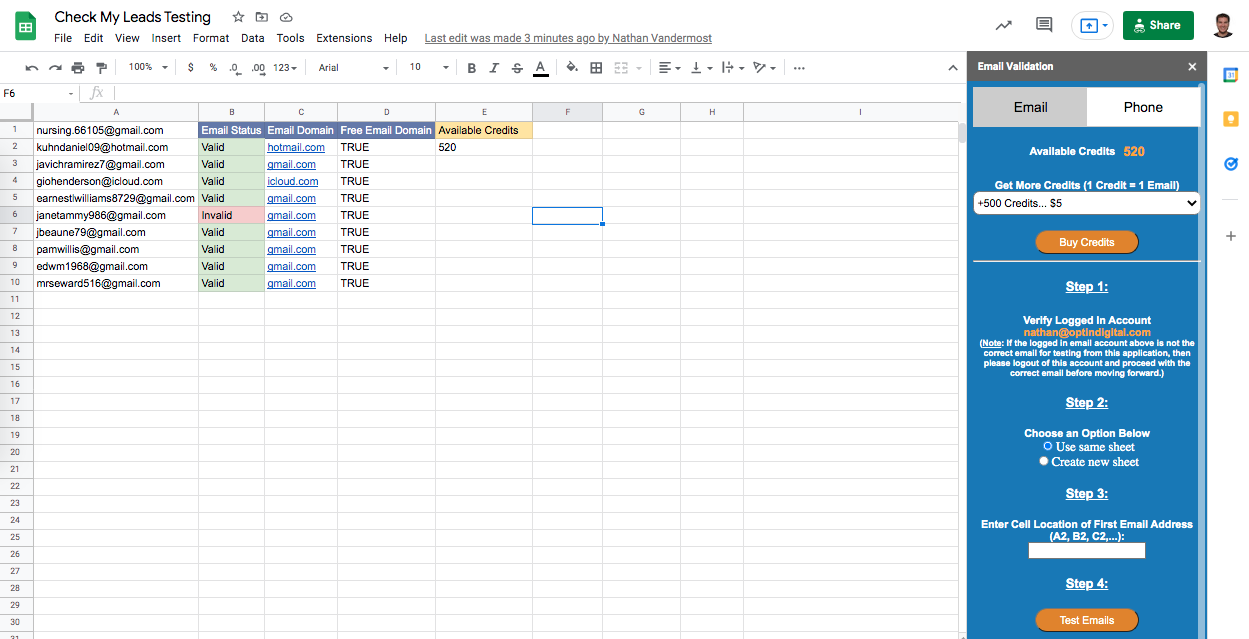
Check email addresses and receive a verification status such as:

Valid — The email address passed the available verification checks.

Invalid — The email address failed one or more verification checks, such as email syntax, domain, or mailbox validation.

Accept All (Catch-All) — The domain accepts email without confirming individual mailboxes. These addresses may still result in delivery failures.

Risky — The email address passed validation but has characteristics that may present increased deliverability risk.

Unknown — Verification could not determine a definitive result. Retrying the address later may produce a different result.

Email verification does not guarantee email delivery. Delivery can be affected by factors outside the verification process.

Phone Number Validation
Validate phone numbers and receive information about the number, including its validation status and available phone type information.

Phone types may include:

Cell — Number identified as a mobile/wireless number.

Landline — Number identified as a landline.

VOIP — Number identified as Voice over IP.

Phone validation and phone-type information do not guarantee that a particular call or SMS message will be successfully delivered.

How It Works
1. Install and open Check My Leads in Google Sheets.
2. Select the email addresses or phone numbers you want to verify.
3. Choose the appropriate verification option.
4. Check My Leads processes the selected information and returns the available verification results to your spreadsheet.

Pricing
Check My Leads uses a pay-as-you-go credit model. There is no recurring monthly subscription.

1 credit = 1 email verification OR 1 phone-number validation.

New accounts receive 25 free credits.

Available credit packages:

$10 one-time purchase — 800 credits
$50 one-time purchase — 4,400 credits
$250 one-time purchase — 28,600 credits

Purchased credits do not expire.

Purchasing Credits
Credits can be purchased from within the Check My Leads add-on.

1. Open Check My Leads in Google Sheets.
2. Select a credit package.
3. Select Buy Credits.
4. Complete the payment process.
5. Purchased credits are added to your Check My Leads account.

Check My Leads, not Google, is the seller of the credit packages.

Refund Policy
Credit purchases are final and non-refundable.

Support
For questions or assistance with Check My Leads, contact:

support@checkmyleads.com

CheckMyLeads website and support information are available at:

checkmyleads.com
Informations supplémentaires
sell
TarifsEssai sans frais
code
Développeur
Non-professionnel
email
Assistance
lock
Règles de confidentialité
description
Conditions d'utilisation
flag
SignalerSignaler comme inappropriée






Recherche
Effacer la recherche
Fermer le champ de recherche
Applications Google
Menu principal