
Google Workspace Marketplace


Choice Eliminator, Form™ Limiter, Form™ Timer
Form timer, form limiter and choice eliminator for Google Forms™. Timed quizzes, scheduled open and close, response limits, and a report of who finished on time.
Listing updated:September 21, 2026
Works with:
21K+


Overview
Form Timer turns a Google Forms™ form into a timed quiz, a scheduled registration or a sign-up sheet with limited places. Set it up once in the sidebar, share one link, and the form looks after itself.

⏱️ COUNTDOWN TIMER FOR QUIZZES AND EXAMS
• Every respondent gets a personal countdown that starts when they press Start.
• The timer keeps running if they reload the page or close the tab, so nobody gets extra time.
• When time runs out the form closes for that person. Or allow late submissions and have them marked as late: your choice.
• A clear "press Submit now" warning in the last minute.

👋 YOUR OWN START PAGE
• Write the instructions respondents read before they begin.
• Add your logo and pick your color.
• Respondents see the rules up front: how much time they have and what happens when it ends.

🔐 WHO CAN TAKE IT, AND HOW OFTEN
• Let anyone with the link in, or allow only the email addresses on your list.
• Set the number of attempts per person.
• Optionally record when a respondent leaves the tab during the test. Respondents are told about it before they start.

📊 RESULTS: WHO FINISHED ON TIME
• On time, late (and by how many minutes), still working, started but never submitted, submitted without the timer.
• Time taken by each respondent.
• Start times are recorded by the timer page and submit times by Google Forms™, not by the respondent's browser.
• Copy the table or download it as CSV.

📅 FORM SCHEDULER
• Pick an opening and a closing date and time, in your own time zone.
• The form opens and closes by itself, to the minute.
• Write your own messages for people who come too early or too late.

🔢 RESPONSE LIMIT
• Close the form automatically after a set number of responses: 30 seats, 100 tickets, 12 volunteers.
• Replace the default "closed" text with your own.

✂️ CHOICE ELIMINATOR
• Set how many times each option can be picked in multiple choice, dropdown and checkbox questions.
• A full option disappears from the form, so time slots and seats cannot be double-booked.
• Show the places left right in the form: "Monday 9:00 (2 left)".
• Reset the counts for a new round without deleting your responses.
• Section navigation and quiz answer keys stay intact.

📱 SHARE AND STAY INFORMED
• QR code for the form link and for the timer link, ready to download.
• Get an email when the form closes or when every option of a question is taken.

🎯 HOW PEOPLE USE IT
• Teachers: timed quizzes, tests and exams, with a report of who was late.
• HR and training teams: timed assessments for candidates and staff.
• Event organisers: registrations that open on Friday at 9:00 and close when the seats are gone.
• Schools and clubs: parent-teacher meeting slots, workshop sign-ups, volunteer shifts.

⚙️ HOW IT WORKS
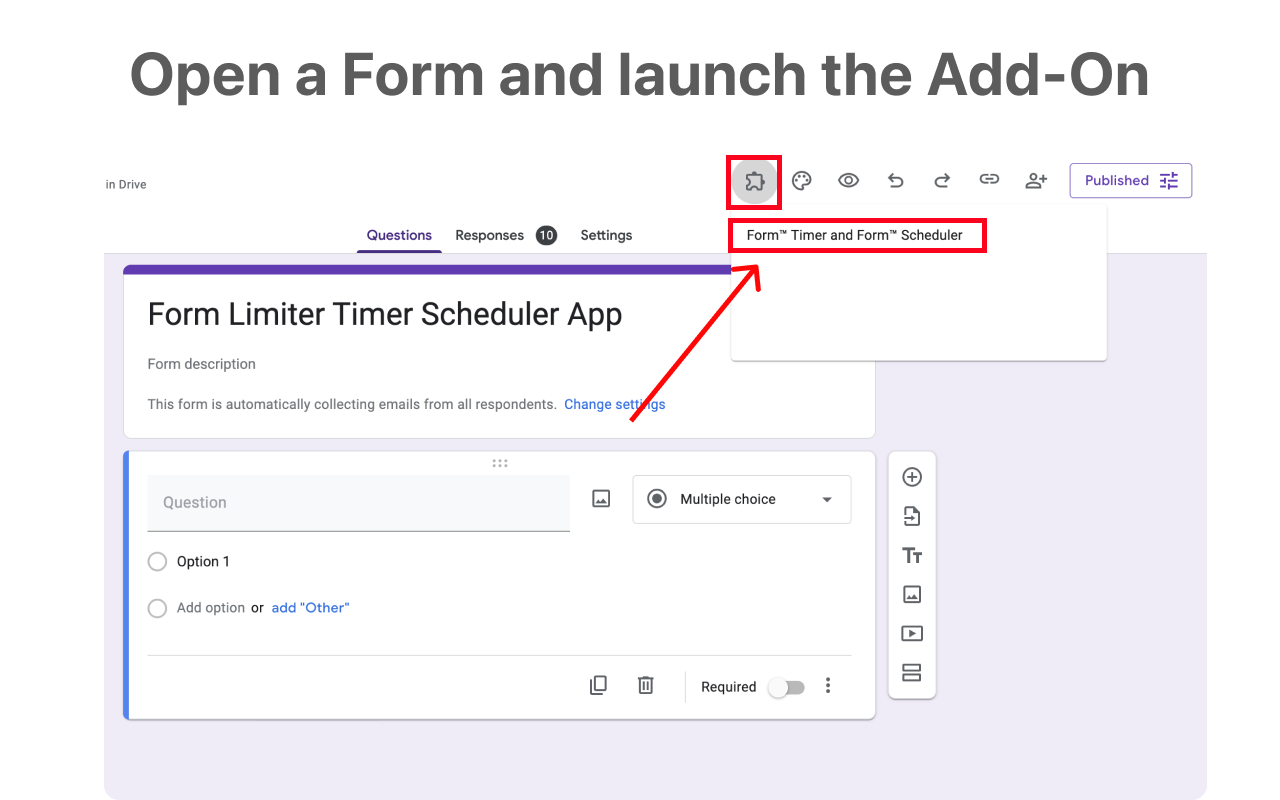
1. Open your form, click the Add-ons icon and launch Form Timer.
2. Switch on what you need: Time Limit, Form Scheduling, Response Limit, Choice Eliminator.
3. Click Save and share the link the add-on gives you. For the timer, share the timer link instead of the regular form link.

💳 PRICING
Install the add-on and set everything up free of charge. Applying the settings to your form requires a Premium plan, monthly or annual. Cancel any time.

🔒 PRIVACY
• The add-on works only with the form you open it in. It does not read your other files.
• For the timer we store the respondent's email address and start time. Allowed email lists are stored as hashes, not as readable addresses.
• The add-on connects to our service to check your plan, run the timer page and send the emails you asked for.

💬 SUPPORT
Questions or a feature you miss? Use "Talk to a human" in the sidebar or write to us. We answer personally.

Google Forms™ is a trademark of Google LLC.
Additional information
sell
PricingFree of charge with paid features
code
Developer
Non-trader
email
Support
lock
Privacy policy
description
Terms of service
flag
ReportFlag as inappropriate






Search
Clear search
Close search
Google apps
Main menu