
Google Workspace Marketplace


CityLookup
Extract city from addresses, ZIP codes & postcodes in Sheets™
应用详情更新日期:2026年4月17日
适用于:
8861+



概览
Clean and normalize address and location data in Google Sheets™.

Convert address lists, ZIP codes, and postcodes into clean city, state, and country data -- directly inside Google Sheets™. No scripts, APIs, or manual cleanup required.

CityLookup includes three functions:

1️⃣ CITYLOOKUP(input) - outputs a city name from any address or location text

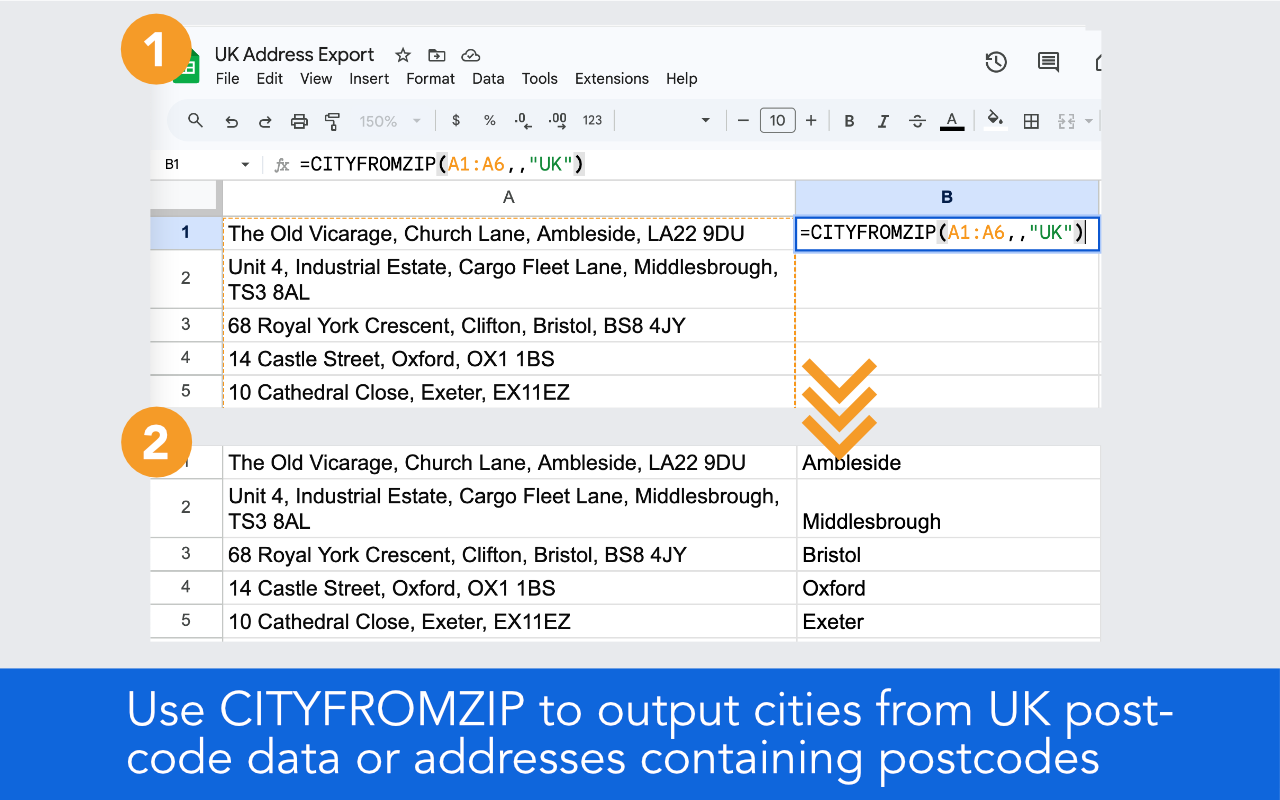
2️⃣ CITYFROMZIP(input, full_option, country) - outputs a city name for the ZIP code or postcode contained within the input. Supports US (default), UK, and Canada

3️⃣ NEARESTCITY(lat, long) - outputs the city closest to the inputted US lat/long coordinates

CITYLOOKUP Details
----------------------------------
Call CITYLOOKUP on a single cell:
=CITYLOOKUP(A1)

If cell A1 contains "123 Main St Chicago IL" it will output:
Chicago

Call it over a range to process multiple rows at once:
=CITYLOOKUP(A1:A10)

Call CITYLOOKUP with an (optional) second argument of 1, and the output will include the complete city, state / province, and country. For example, if cell A1 contains "123 Main St Chicago IL" and you call CityLookup like this:
=CITYLOOKUP(A1, 1)

It will output:
Chicago, IL United States

CITYLOOKUP works on any address format and finds and matches cities worldwide, with strong coverage of smaller cities in the US.

CITYFROMZIP Details (US, Canada, UK)
---------------------------------------------------------------
Call CITYFROMZIP on a single cell:
=CITYFROMZIP(A1)

If cell A1 contains "90210" it will output:
Beverly Hills

Call it over a range to process multiple rows at once:
=CITYFROMZIP(A1:A10)

CITYFROMZIP works with bare ZIP codes or full address strings.

CITYFROMZIP supports three countries:
(1) US (default): =CITYFROMZIP(A1:A10)
(2) UK postcodes: =CITYFROMZIP(A1:A10, ,"UK")
(3) Canadian postal codes: =CITYFROMZIP(A1:A10, ,"CA")

Pass an optional second argument of 1 to return city and state or province together:
=CITYFROMZIP(A1, 1) returns "Chicago, IL"
=CITYFROMZIP(A1, 1, "CA") returns "Toronto, ON"

For UK postcodes, CITYFROMZIP returns the Royal Mail post town. For Canadian postal codes, CITYFROMZIP returns the nearest service city; accuracy may vary for rural areas. For US ZIP codes that span multiple cities, CITYFROMZIP returns the largest city covered by that ZIP code.

NEARESTCITY Details
-----------------------------------
For US geolocation data, NEARESTCITY(lat, long) outputs the city closest to the coordinates inputted:
=NEARESTCITY(A1, B1)

Pass an optional third argument of 1 to return city and state:
=NEARESTCITY(A1, B1, 1) returns "Nashville, TN"

NEARESTCITY currently works with US geocoordinates only. In cases where the inputted latitude and longitude lies close to the edge of a bordering city, the closer city will be returned. This means geopoints at the very edge of a city's boundary may return the adjacent city.

Uses and benefits:
* Clean CRM or customer exports
* Prepare mailing or donor lists
* Segment leads or customers by location
* Parse or split addresses into separate columns by city, state, zip code or postcode
* Standardize vendor or partner data
* Normalize and categorize address and location data
* Extract city from address in any spreadsheet
* Analyze and dedupe real estate listings across multiple web sites
* Consolidate and standardize separate input files prior to analyzing or plotting on a map
* De-dupe addresses
* Match city data from separate web sites
* Lookup state, province, or country information for a list of cities

CityLookup does not provide geocoding; it simply finds and outputs clean city, state, and country information. CityLookup can be used as an alternative to geocode APIs for city-level data because its full output will plot on most mapping services.

CityLookup currently finds and matches the largest cities across the world, and many smaller cities in the US. If CityLookup isn't finding your city, please suggest it via the Support link at the bottom of this page.
其他信息




搜索
清除搜索内容
关闭搜索框
Google 应用
主菜单