
Google Workspace Marketplace


CodeStyler
Format source code in Google Docs™ with syntax highlighting and clean code block styling
应用详情更新日期:2026年6月13日
适用于:
137


概览
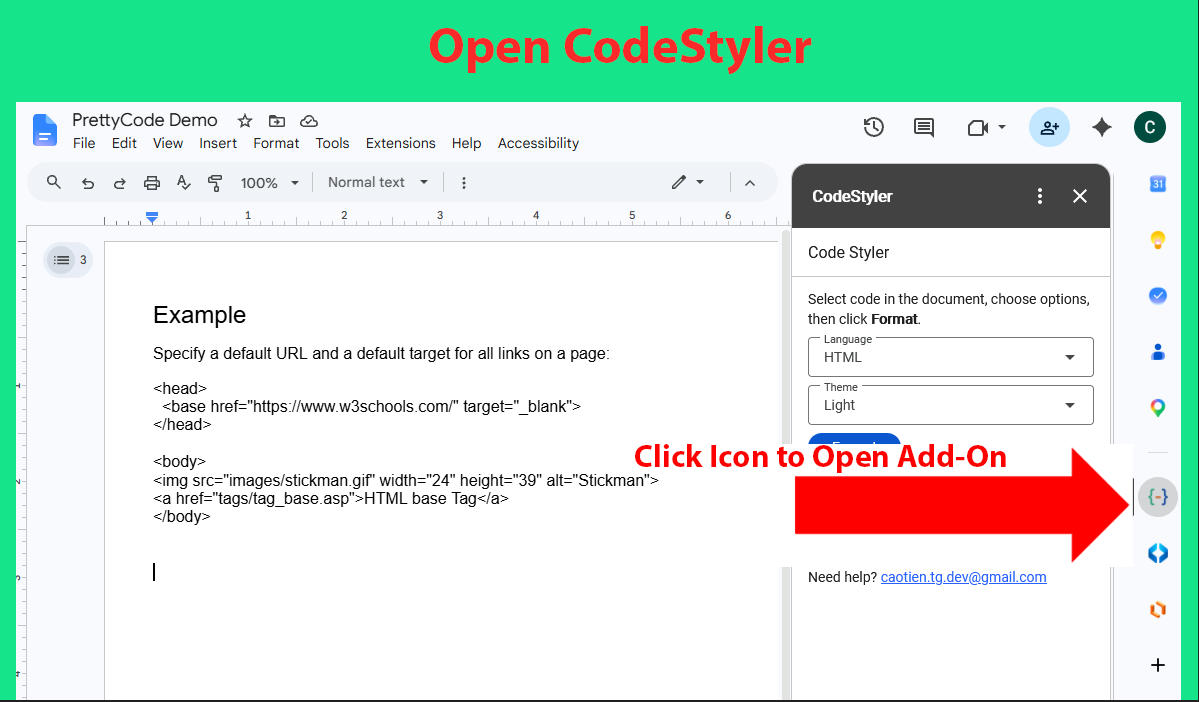
CodeStyler is a lightweight add-on that helps you format source code into clean, readable, and professional-looking code blocks in Google Docs™.

Simply select your code, choose a programming language and style, and CodeStyler will apply syntax highlighting and formatting directly in your document.

Features:
• Syntax highlighting for source code
• Clean and readable code block formatting
• Support for multiple programming languages
• Quick formatting with a simple user interface
• Seamless integration with Google Docs™

Ideal for:
• Developers
• Technical writers
• Teachers and students
• Software documentation
• Programming tutorials

CodeStyler makes it easy to present code snippets clearly and professionally in Google Docs™.

Google Docs™ is a trademark of Google LLC. CodeStyler is an independent application and is not affiliated with, endorsed by, or sponsored by Google LLC.
其他信息


搜索
清除搜索内容
关闭搜索框
Google 应用
主菜单