
Google Workspace Marketplace


Collavate Chatbot
You can approve documents in Google Chat!
应用详情更新日期:2025年9月23日
适用于:
没有评价
6182+


概览
Description
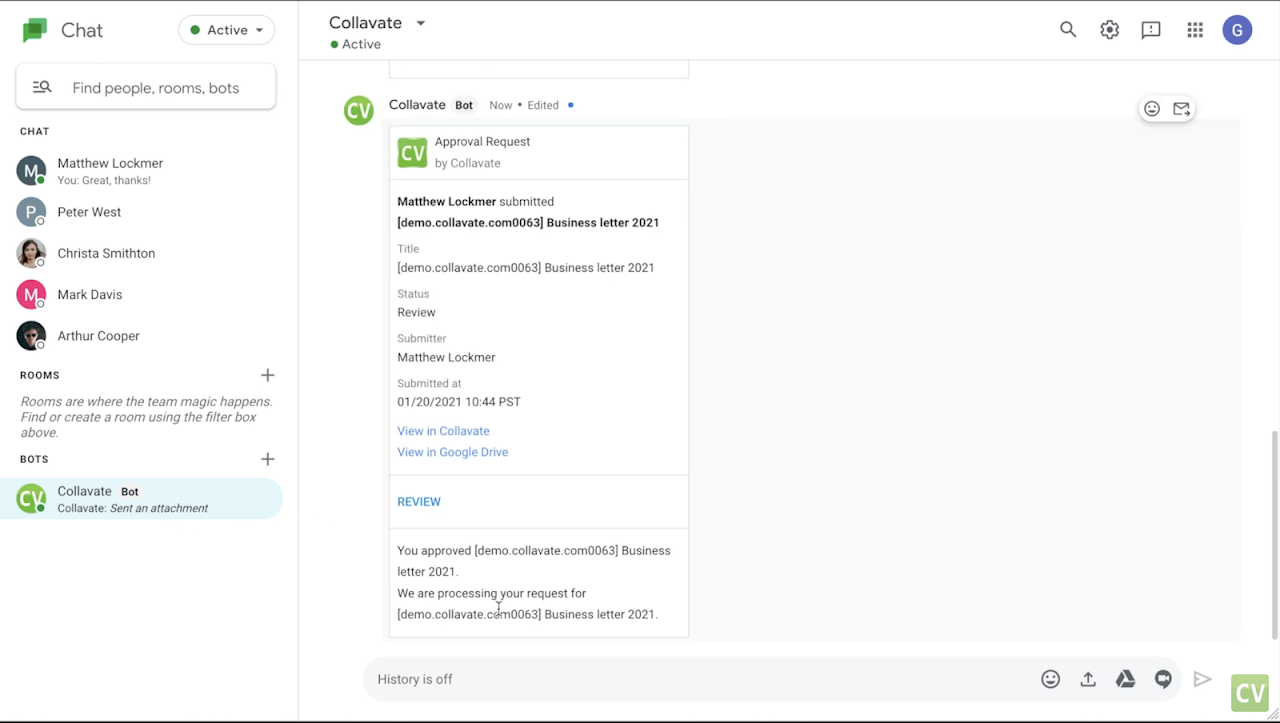
Collavate’s integration for Google Chat takes your document review workflow to the next level. Get instant notifications of all document submissions and activity including: comments, approvals, and rejections on all submissions you are attached to. Our Chatbot gives you a new way to quickly review and approve or reject documents directly from Google chat. You can also access Collavate directly with the link attached to the messages. You get all of the contextual information from the document process direct to your chat, so you can collaborate faster with your remote coworkers.

Key Features
Receive Approval Request notifications direct to your Google Chat. See all comments, approvals and rejections from other users on the submissions you follow. You can work directly in Collavate from the chat as well, simply follow the included link to open the Collavate web app and continue working from there.

Requirements
You need to have a Google Workspace subscription, as well as a Collavate account setup to integrate the chatbot into your Google Workspaces account. If you are unable to add the bot to your account, you may need to contact your administrator to ensure bots are enabled for your domain. Contact support@collavate.com with any other issues.
其他信息


搜索
清除搜索内容
关闭搜索框
Google 应用
主菜单