
Google Workspace Marketplace


Create Template Copies Easily
Create multiple blank Sheets™ and template Sheets™ copies at once in Google Sheets™. No duplicates. Fast and easy.
Listing updated:January 25, 2026
Works with:
No reviews
17


Overview
Create Template Copies Easily is a powerful productivity add-on for Google Sheets™ that helps you create multiple Sheets™ at once, create template Sheet™ copies, and bulk create Sheets™ using selected names 🚀.

This add-on is built for users who regularly need to create many Sheets™, duplicate template Sheets™, or create multiple blank Sheets™ in Google Sheets™ quickly and accurately.

No more clicking Add Sheet + repeatedly.
No more renaming Sheets™ one by one.
No more manual sheet duplication.
No more copy–paste sheet work in Google Sheets™.

🔹 Create Multiple Blank Sheets™ at Once 🔹

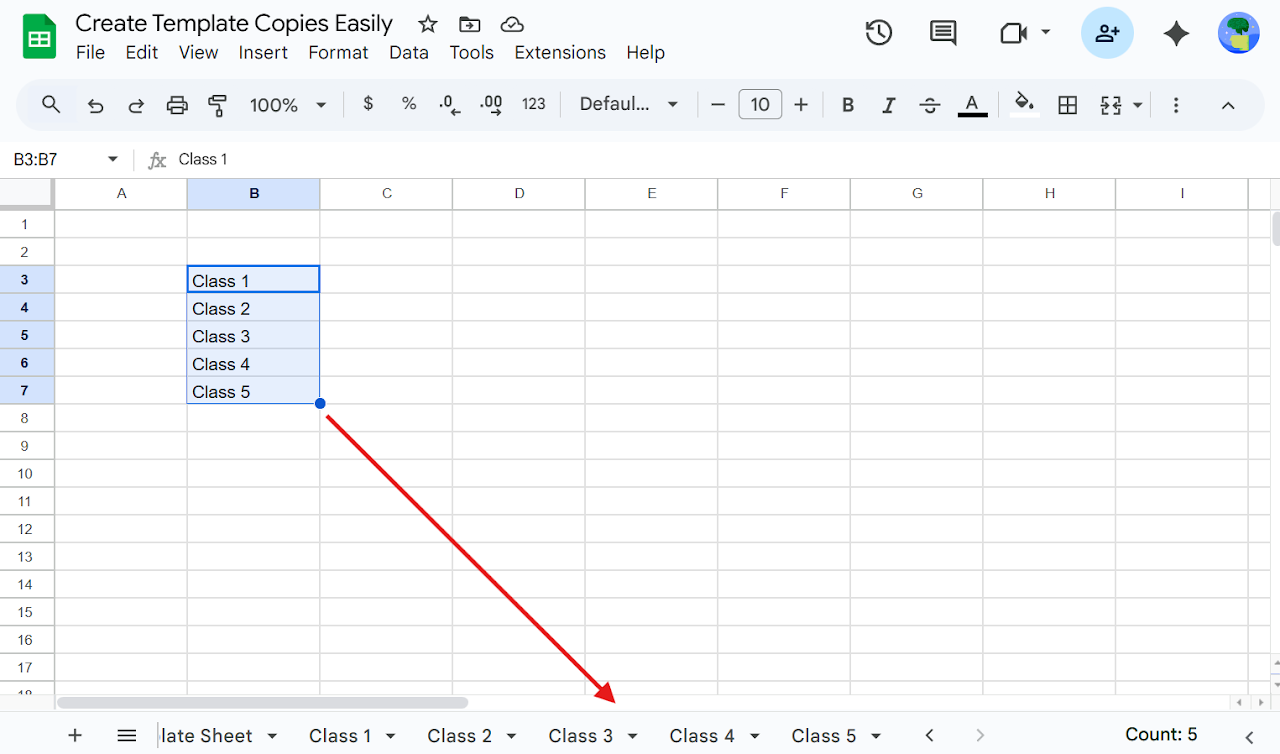
Instead of clicking Add Sheet + again and again, simply: Select a list of names → Extensions > Create Template Copies Easily > Create Blank Sheets™

With one click, you can:

✅ Create multiple blank Sheets™
✅ Create multiple empty Sheets™
✅ Create many Sheets™ at once
✅ Bulk create Sheets™
✅ Mass create Sheets™
✅ Create Sheets™ from selected names
✅ Create Sheets™ from a range
✅ Create Sheets™ from a list
✅ Automatically prevents duplicate Sheet™ names
✅ Safe bulk sheet creation in Google Sheets™
✅ Create Sheets™ using a list of names
✅ Create multiple empty Sheets™

🎯 Perfect for:

✅ Creating Sheets™ for employees
✅ Creating Sheets™ for projects
✅ Creating Sheets™ for clients
✅ Creating Sheets™ for classes or subjects
✅ Creating Sheets™ for students
✅ Creating Sheets™ for months, tasks, or reports
✅ Creating Sheets™ for tracking, planning, or management

🔹 Create Multiple Template Sheet™ Copies (Core Feature ⭐) 🔹

Need copies of an existing Sheet™ or template Sheet™?
Need to duplicate a Sheet™ with different names?
Need bulk template duplication in Google Sheets™?

This is where the add-on shines.

Select a list of names →
Go to Extensions > Create Template Copies Easily > Create Template Sheet™ Copies

📂 Choose a template Sheet™ from dropdown
📄 Create multiple template Sheet™ copies
📄 Create template tab copies
📄 Duplicate Sheets™ in bulk
📄 Copy Sheet™ with different names
📄 Create Sheet™ copies automatically
📄 One template copy per selected name

👌 Ideal for:

Managers creating template Sheets™ for each employee 👔
Teachers creating template Sheets™ for each class or student 🎓
Teams creating identical report Sheets™ 📊
Businesses creating reusable Sheet™ formats
Reusing Sheet™ layouts without manual duplication
Anyone needing bulk Sheet™ copy in Google Sheets™

🔍 Searches this add-on is built for

Create template Sheet™ copies
Create template tab copies
Duplicate Sheet™ with different names
Create multiple blank Sheets™
Create multiple empty Sheets™
Create many Sheets™ at once
Bulk create Sheets™ in Google Sheets™
Mass create Sheets™
Copy Sheet™ multiple times
Create Sheets™ from list
Create Sheets™ from range
Google Sheets™ template automation
Google Sheets™ bulk sheet creation

💡 Why use Create Template Copies Easily?

✔ Saves hours of manual work
✔ Eliminates repetitive sheet creation
✔ Prevents duplicate Sheets™
✔ Simple menu-based actions
✔ No formulas, no scripts, no setup
✔ Works directly inside Google Sheets™
✔ Fast bulk Sheet™ creation
✔ Reliable template Sheet™ duplication

If you often need to create multiple blank Sheets™, bulk create Sheets™, or create multiple template Sheet™ copies in Google Sheets™, this add-on is built exactly for your workflow.
Additional information
sell
PricingFree of charge trial
code
Developer
email
Support
lock
Privacy policy
description
Terms of service
flag
ReportFlag as inappropriate




Search
Clear search
Close search
Google apps
Main menu