
Google Workspace Marketplace


Create Template Copies Easily
Create multiple blank Sheets™ and template Sheets™ copies at once in Google Sheets™. No duplicates. Fast and easy.
Gawa ng:
Na-update ang listing noong:Enero 25, 2026
Gumagana sa:
Walang review
17


Pangkalahatang-ideya
Create Template Copies Easily is a powerful productivity add-on for Google Sheets™ that helps you create multiple Sheets™ at once, create template Sheet™ copies, and bulk create Sheets™ using selected names 🚀.

This add-on is built for users who regularly need to create many Sheets™, duplicate template Sheets™, or create multiple blank Sheets™ in Google Sheets™ quickly and accurately.

No more clicking Add Sheet + repeatedly.
No more renaming Sheets™ one by one.
No more manual sheet duplication.
No more copy–paste sheet work in Google Sheets™.

🔹 Create Multiple Blank Sheets™ at Once 🔹

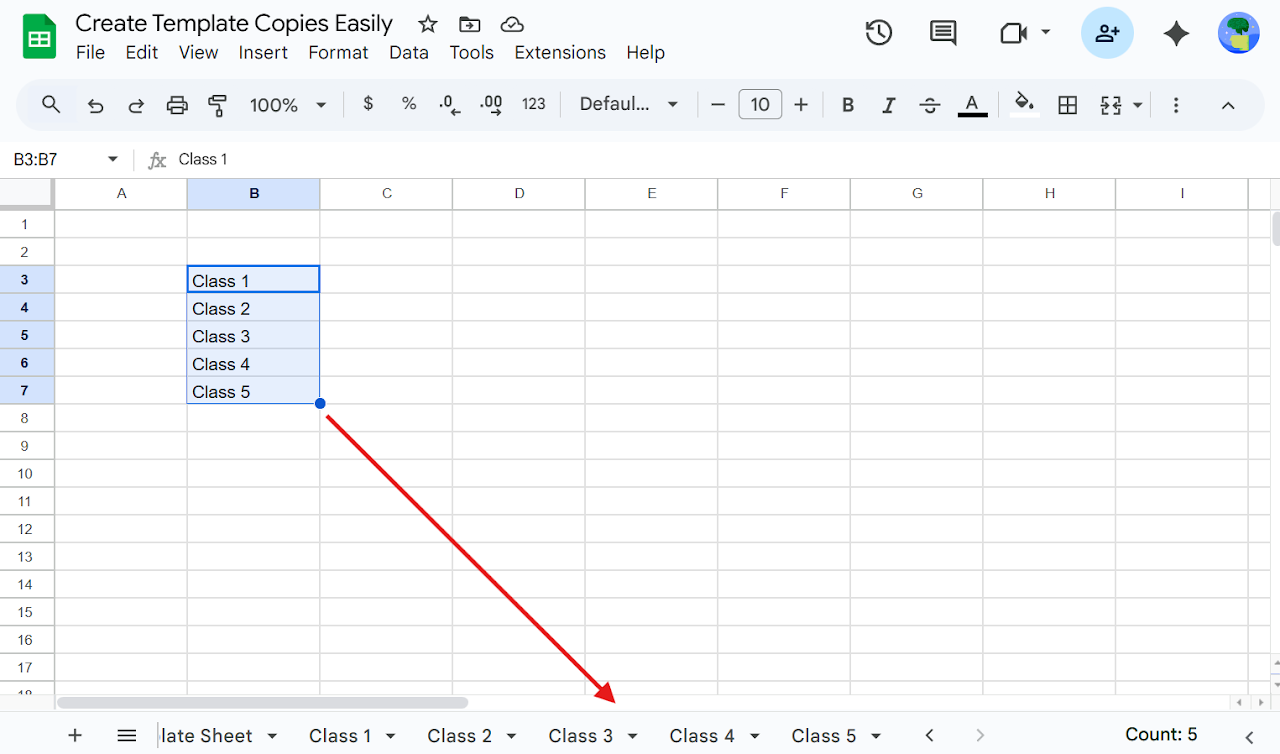
Instead of clicking Add Sheet + again and again, simply: Select a list of names → Extensions > Create Template Copies Easily > Create Blank Sheets™

With one click, you can:

✅ Create multiple blank Sheets™
✅ Create multiple empty Sheets™
✅ Create many Sheets™ at once
✅ Bulk create Sheets™
✅ Mass create Sheets™
✅ Create Sheets™ from selected names
✅ Create Sheets™ from a range
✅ Create Sheets™ from a list
✅ Automatically prevents duplicate Sheet™ names
✅ Safe bulk sheet creation in Google Sheets™
✅ Create Sheets™ using a list of names
✅ Create multiple empty Sheets™

🎯 Perfect for:

✅ Creating Sheets™ for employees
✅ Creating Sheets™ for projects
✅ Creating Sheets™ for clients
✅ Creating Sheets™ for classes or subjects
✅ Creating Sheets™ for students
✅ Creating Sheets™ for months, tasks, or reports
✅ Creating Sheets™ for tracking, planning, or management

🔹 Create Multiple Template Sheet™ Copies (Core Feature ⭐) 🔹

Need copies of an existing Sheet™ or template Sheet™?
Need to duplicate a Sheet™ with different names?
Need bulk template duplication in Google Sheets™?

This is where the add-on shines.

Select a list of names →
Go to Extensions > Create Template Copies Easily > Create Template Sheet™ Copies

📂 Choose a template Sheet™ from dropdown
📄 Create multiple template Sheet™ copies
📄 Create template tab copies
📄 Duplicate Sheets™ in bulk
📄 Copy Sheet™ with different names
📄 Create Sheet™ copies automatically
📄 One template copy per selected name

👌 Ideal for:

Managers creating template Sheets™ for each employee 👔
Teachers creating template Sheets™ for each class or student 🎓
Teams creating identical report Sheets™ 📊
Businesses creating reusable Sheet™ formats
Reusing Sheet™ layouts without manual duplication
Anyone needing bulk Sheet™ copy in Google Sheets™

🔍 Searches this add-on is built for

Create template Sheet™ copies
Create template tab copies
Duplicate Sheet™ with different names
Create multiple blank Sheets™
Create multiple empty Sheets™
Create many Sheets™ at once
Bulk create Sheets™ in Google Sheets™
Mass create Sheets™
Copy Sheet™ multiple times
Create Sheets™ from list
Create Sheets™ from range
Google Sheets™ template automation
Google Sheets™ bulk sheet creation

💡 Why use Create Template Copies Easily?

✔ Saves hours of manual work
✔ Eliminates repetitive sheet creation
✔ Prevents duplicate Sheets™
✔ Simple menu-based actions
✔ No formulas, no scripts, no setup
✔ Works directly inside Google Sheets™
✔ Fast bulk Sheet™ creation
✔ Reliable template Sheet™ duplication

If you often need to create multiple blank Sheets™, bulk create Sheets™, or create multiple template Sheet™ copies in Google Sheets™, this add-on is built exactly for your workflow.
Karagdagang impormasyon
sell
PagpepresyoLibreng trial
code
Developer
email
Suporta
lock
Patakaran sa privacy
description
Mga tuntunin ng serbisyo
flag




Search
I-clear ang paghahanap
Isara ang paghahanap
Mga app ng Google
Pangunahing menu