
Google Workspace Marketplace


CRM for Google Sheets™ - Telecrm
Streamline lead management with the Telecrm Add-on, facilitating real-time data synchronization between Google Sheets™ and your TeleCRM Workspace.
Eintrag aktualisiert:15. Mai 2026
Kompatibel mit:
13.176+




Überblick
The Telecrm Spreadsheet Connection Add-on is designed to streamline and automate the process of managing leads within your Telecrm Workspace directly from your Google Sheets™. It enables real-time data transfer between your Google Sheets™ and Telecrm, providing a seamless and efficient workflow.

Key Features:

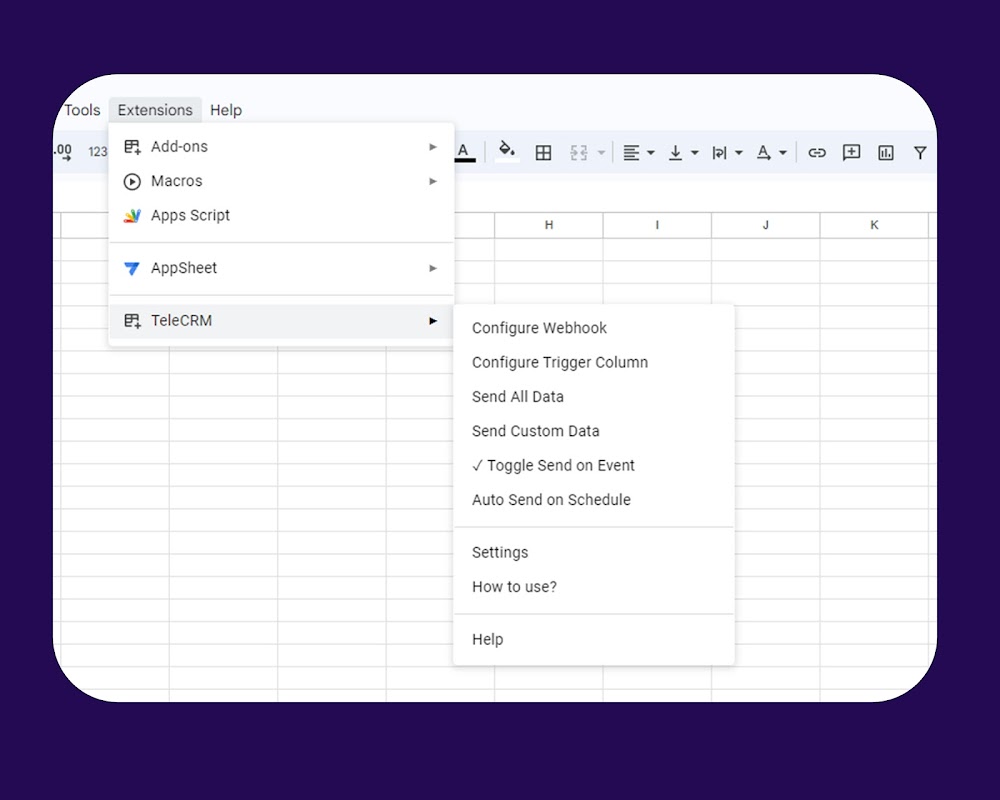
1. Webhook Key Configuration: With this add-on, you can easily set up your Telecrm Key for your Google Sheets™. The Key is used to identify your specific Telecrm workspace for lead management. If a Key is not found, a simple alert is triggered guiding you to the Configure Webhook option to provide it.

2. Send Sheet Data: This add-on provides the facility to send entire sheet data to Telecrm Workspace and keep it in sync. This requires that the Key is provided and is configured via the Configure Webhook menu.

3. Automatic Data Transfer: Once the Key is configured and the webhook is set up, any changes made in the Google Sheets™ are automatically sent to your Telecrm Workspace when Send On Event is enabled. The data transfer occurs through a specific URL created for your Key.

4. Error Alerts: The add-on ensures that you're always aware of any missing configurations. If the Key is not provided, the add-on will alert you and guide you to the Configure Webhook option. And, if there's a failure of data sent, it will show you the error.

How to Use:

1. Install the add-on from the marketplace.
2. Open the add-on and navigate to the Configure Webhook option.
3. Enter your Telecrm Key in the field provided and hit Save. You will find this Key in your Telecrm workspace inside Google Sheets™ integration's 'Configuration' tab.
4. If the Telecrm Key is already saved, the form will be pre-populated with it.
5. Once the Telecrm Key is configured, the add-on will handle the rest. Any changes made in the Google Sheets™ will automatically be sent to your Telecrm Workspace.
6. You can send data manually by clicking on Send All Data and Send Custom Data. Send All Data will send entire data from the active Sheet™ while Send Custom Data will ask you to enter the Start-End range.
7. You can also enable/disable Send On Event and Send on Schedule.

This add-on significantly reduces the manual work of transferring data between your Google Sheets™ and Telecrm, leading to increased productivity and better lead management.
Weitere Informationen
sell
PreiseKostenlos
code
Entwickler
Kein Händler
email
lock
Datenschutzerklärung
description
Nutzungsbedingungen
flag
MeldenAls unangemessen melden




Suche
Suche löschen
Suche schließen
Google-Apps
Hauptmenü