
Google Workspace Marketplace


Dividend Data
Get 30+ years of stock data directly in your spreadsheets. The ultimate Google Finance™ Add-on.
정보 업데이트:2026년 2월 18일
호환 기기:
172


개요
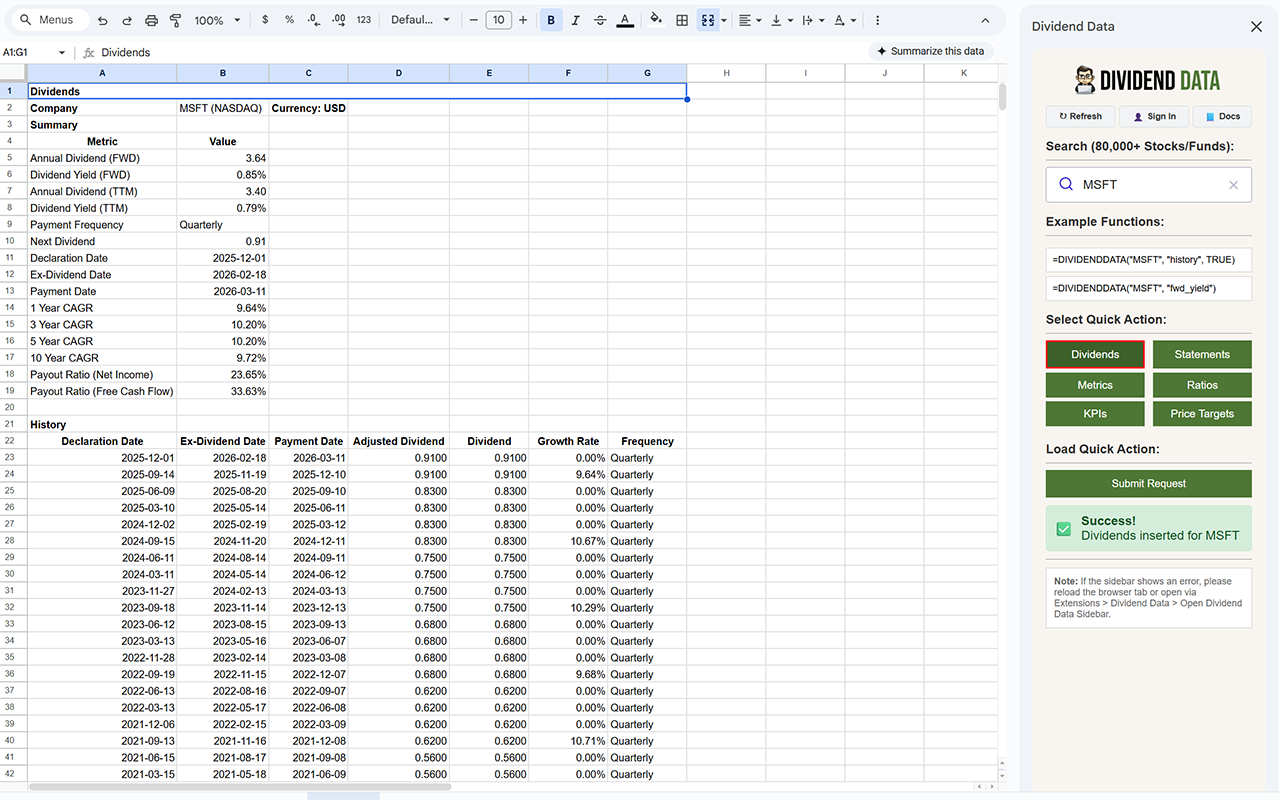
This add-on provides custom functions for fetching stock data from Dividend Data. It includes tools for dividends, statements, metrics, ratios, growth, quotes, profiles, funds, segments, KPIs, commodities, and batch quotes/dividends. To use, install the add-on in Google Sheets™ and use the functions in cells.

View our full documentation: https://github.com/divdatdev/Dividend-Data-Spreadsheet-Docs

1) DIVIDENDDATA
Description
Retrieves various dividend-related data for a single stock symbol. This function is useful for analyzing a company's dividend payments, yields, growth trends, and sustainability through payout ratios. It can return single values for quick metrics or tables for historical data.

2) DIVIDENDDATA_BATCH
Description
Retrieves batch dividend data for multiple stock symbols. This function is efficient for fetching dividend information across several tickers at once, such as latest payouts or historical tables. It supports both latest values and full history.

3) DIVIDENDDATA_STATEMENT
Description
Retrieves full financial statements for a stock. This function is useful for in-depth financial analysis, providing complete income statements, balance sheets, or cash flow statements over time. It supports filtering by period and year.

4) DIVIDENDDATA_METRICS
Description
Retrieves a specific metric from financial statements. This function allows targeted extraction of key financial figures like revenue or free cash flow, either as the latest value or historical table.

5) DIVIDENDDATA_RATIOS
Description
Retrieves a specific financial ratio or key metric for a stock. Useful for valuation, liquidity, and efficiency analysis, either latest value or historical.

6) DIVIDENDDATA_GROWTH
Description
Retrieves a specific growth metric for financial figures. Useful for trend analysis, like revenue or EPS growth rates over time.

7) DIVIDENDDATA_QUOTE
Description
Retrieves stock quote data, including current price, changes, or historical prices. Useful for real-time monitoring or historical analysis of stock performance.

8) DIVIDENDDATA_QUOTE_BATCH
Description
Retrieves batch quote data for multiple stocks. Efficient for monitoring prices or volumes across tickers.

9) DIVIDENDDATA_PROFILE
Description
Retrieves company profile information. Useful for overview details like market cap, sector, or description.

10) DIVIDENDDATA_FUND
Description
Retrieves data for ETFs or mutual funds. Useful for fund analysis, including holdings, expense ratios, or sector exposures.

11) DIVIDENDDATA_SEGMENTS
Description
Retrieves revenue segmentation data by product or geography. Useful for understanding revenue sources and diversification.

12) DIVIDENDDATA_KPIS
Description
Retrieves key performance indicators (KPIs). Useful for advanced metrics like subscriber counts, customer acquisition cost, or churn rates.

13) DIVIDENDDATA_COMMODITIES
Description
Retrieves commodities data, such as prices or history. Useful for tracking commodity markets like oil or gold.

14) DIVIDENDDATA_CRYPTO
Description
Retrieves cryptocurrency data, such as prices or history. Useful for tracking crypto markets like Bitcoin or Ethereum.

15) DIVIDENDDATA_PRICE_TARGET
Description
Retrieves analyst price targets for a stock. Returns summary metrics, consensus values, or news list. Useful for gauging market expectations and analyst opinions.

16) DIVIDENDDATA_ESTIMATES
Description
Retrieves analyst estimates for earnings and revenue. Returns a summary table of future estimates, specific metric history (estimates vs actuals), or single next-year values for quick watchlist building. Useful for forecasting future growth, valuation models, and gauging analyst expectations.


Google Finance™ is a trademark of Google LLC.
Google Sheets™ is a trademark of Google LLC.
추가정보





검색
검색어 지우기
검색 닫기
Google 앱
기본 메뉴