
Google Workspace Marketplace


DMerge Notifier
Mail merge from Google Sheets™: send personalized Emails, Slack & WhatsApp messages, and generate Google Docs™ or PDFs in bulk.
Listing updated:July 9, 2026
Works with:

2K+



Overview
Seamlessly send personalized Emails, Slack & WhatsApp messages — and generate personalized Google Docs™ and PDFs — directly from Google Sheets™ in bulk

DMerge Notifier is a powerful Google Workspace™ add-on designed to streamline communication and document creation. From a single spreadsheet you can send personalized Emails, Slack Direct Messages (DMs) and WhatsApp messages, and produce a tailored Google Doc™ or PDF for every recipient. Whether you're coordinating with your team, notifying clients, sending invoices and certificates, or sharing important updates, DMerge Notifier handles it with mail-merge personalization — saving you time and effort.

Features of DMerge Notifier
────────────────────
⇨ Bulk Messaging: Send personalized direct messages from Google Sheets™ to many recipients in just a few clicks — perfect for communicating with large groups effortlessly.

⇨ Multiple Platform Integrations: Send personalized Emails, Slack DMs and WhatsApp messages in bulk. Connect securely to the Slack API and WhatsApp Cloud API and send right from Google Sheets™ — no switching between platforms.

⇨ Google Doc™ & PDF Merge: Turn a Google Doc™ into a template and generate one personalized document per row — saved straight to a Drive™ folder of your choice. Output as Google Docs™ or PDFs, with custom file names built from your spreadsheet columns. Run it from the source spreadsheet, or open the add-on directly inside any Google Doc™ to use that document as the template.

⇨ Automatic Recipient Sharing: Optionally grant each recipient Viewer, Commenter or Editor access to their generated document — with the option to suppress Drive's™ default sharing email for a cleaner experience.

⇨ Merged Documents in Your Messages: The link to each recipient's generated Doc/PDF becomes a merge field you can drop into your Email, Slack or WhatsApp message — so people receive their personalized document and a message together.

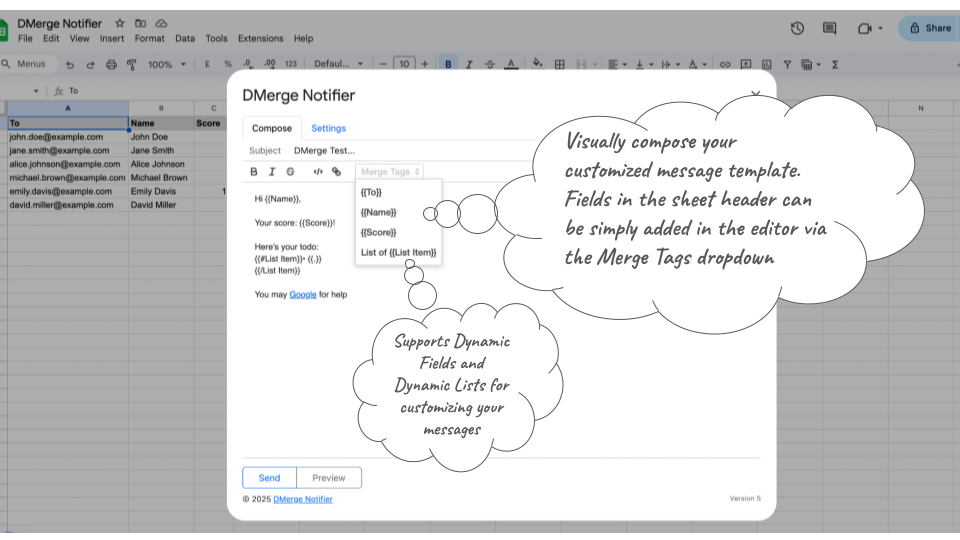
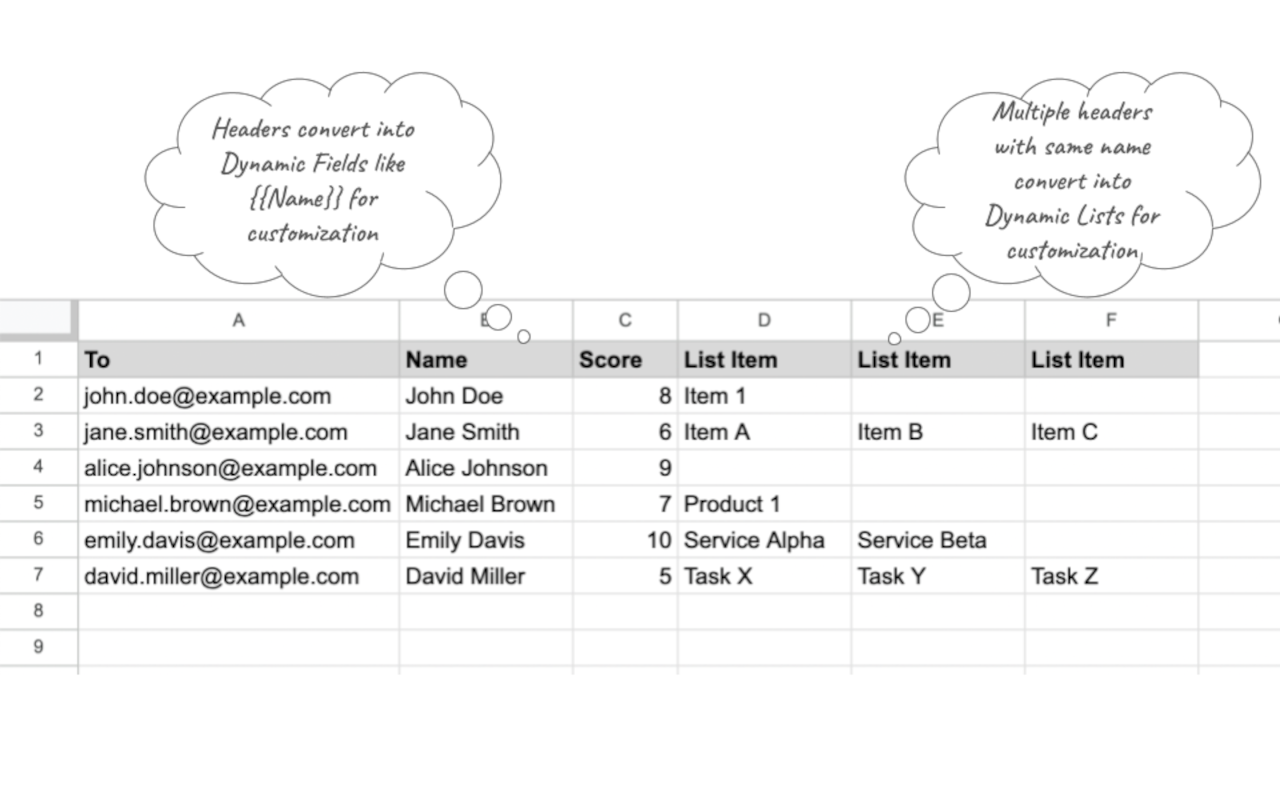
⇨ Dynamic Fields for Personalization: Use spreadsheet column headers as placeholders to personalize every message and document. Example: replace {{Name}} with the actual name from your sheet.

⇨ Support for Dynamic Lists: Build customized messages with itemized lists using repeated columns in the spreadsheet, rendered natively per channel (bulleted lists in Email, Slack and WhatsApp). Ideal for detailed or itemized notifications.

⇨ Display Formatting Preserved: Merged values keep the exact formatting shown in your sheet — percentages, currencies, dates and more come through just as they appear.

⇨ Preview before Sending: Visually preview your personalized content within the app, and send a controlled test message to yourself or a specific user before starting a bulk send.

⇨ Customizable Templates: Create reusable message and document templates with dynamic fields, reducing repetitive work and keeping everything consistent.

⇨ Scheduled Sending: Defer and automate sends on an hourly or daily schedule.

⇨ User-Friendly Interface: Intuitive, with step-by-step guidance, file/folder pickers and tooltips to help you get started quickly.

⇨ Lightweight and Secure: DMerge Notifier processes data within your Google Workspace™ using secure Google and platform APIs, keeping your data private.

Use Cases for DMerge Notifier
────────────────────
DMerge Notifier is a versatile tool that fits a wide variety of communication and document needs:

⇨ Personalized Documents at Scale: Generate invoices, certificates, offer letters, contracts and reports — one per recipient — and deliver each by email. Perfect for Finance, HR and Operations teams.

⇨ Team Notifications: Notify your team about announcements, meeting schedules or deadlines.

⇨ Event Reminders: Send personalized reminders with details such as event time and location — great for Educators and Event Planners.

⇨ Task Updates: Provide status updates to team members or collaborators, customized for each recipient.

⇨ Customer Outreach: Engage clients with tailored messages containing offers, updates or personalized greetings — perfect for Sales and Marketing teams.

⇨ Project Coordination: Share task lists, project statuses or key deliverables directly to Slack users. Ideal for Project Managers.

⇨ Onboarding and Training: Simplify employee or client onboarding with automated, personalized messages and documents containing links, resources and instructions. A handy tool for HR professionals.

⇨ Small Businesses and Startups: Automate communication and document generation without complex tools.

Getting Started
────────────────────
Install the Add-On: Add DMerge Notifier from the Google Workspace Marketplace.

Authorize the Add-On: Grant the required permissions to integrate with Google Sheets™, Google Docs™ and Drive™.

Set Up Your Spreadsheet: Add columns for recipient data (e.g. a "To" column for email, names and any dynamic fields).

Compose Your Message: Use {{column}} placeholders in your message template to personalize each message.

(Optional) Set Up Document Merge: Choose a Google Doc™ template and an output folder to generate a personalized Doc or PDF for each recipient — and optionally share it with them.

(Optional) Connect Slack or WhatsApp: Authorize DMerge Notifier to send on your behalf by adding your Slack bot token or WhatsApp Cloud API access token. No extra setup is needed to send Emails.

Preview Messages: Click "Preview" to review your personalized content and send a controlled test message before the bulk send.

Send: Click "Send" to deliver your personalized messages and documents to all recipients.

Data Privacy and Security
─────────────────
We prioritize your privacy and maintain high security standards:

No Data Storage: DMerge Notifier does not store or transmit your spreadsheet, document or messaging data to third-party servers. All processing occurs through Google and platform (Slack/WhatsApp) APIs.

Minimal Permissions: The add-on requests only the permissions needed for its core functionality. Document merge uses per-file Drive access (the files you pick or create), not broad access to your Drive.

Secure Connections: All interactions with Google and platform APIs use secure, encrypted channels.

User Control: You retain full control over your data and can revoke permissions at any time through your Google, Slack or Meta account settings.Additional information
sell
PricingFree of charge with paid features
code
Developer
Non-trader
email
Support
lock
Privacy policy
description
Terms of service
flag
ReportFlag as inappropriate






Search
Clear search
Close search
Google apps
Main menu