
Google Workspace Marketplace


DMerge Notifier
Mail merge from Google Sheets™: send personalized Emails, Slack & WhatsApp messages, and generate Google Docs™ or PDFs in bulk.
应用详情更新日期:2026年7月9日
适用于:

338



概览
Seamlessly send personalized Emails, Slack & WhatsApp messages — and generate personalized Google Docs™ and PDFs — directly from Google Sheets™ in bulk

DMerge Notifier is a powerful Google Workspace™ add-on designed to streamline communication and document creation. From a single spreadsheet you can send personalized Emails, Slack Direct Messages (DMs) and WhatsApp messages, and produce a tailored Google Doc™ or PDF for every recipient. Whether you're coordinating with your team, notifying clients, sending invoices and certificates, or sharing important updates, DMerge Notifier handles it with mail-merge personalization — saving you time and effort.

Features of DMerge Notifier
────────────────────
⇨ Bulk Messaging: Send personalized direct messages from Google Sheets™ to many recipients in just a few clicks — perfect for communicating with large groups effortlessly.

⇨ Multiple Platform Integrations: Send personalized Emails, Slack DMs and WhatsApp messages in bulk. Connect securely to the Slack API and WhatsApp Cloud API and send right from Google Sheets™ — no switching between platforms.

⇨ Google Doc™ & PDF Merge: Turn a Google Doc™ into a template and generate one personalized document per row — saved straight to a Drive™ folder of your choice. Output as Google Docs™ or PDFs, with custom file names built from your spreadsheet columns. Run it from the source spreadsheet, or open the add-on directly inside any Google Doc™ to use that document as the template.

⇨ Automatic Recipient Sharing: Optionally grant each recipient Viewer, Commenter or Editor access to their generated document — with the option to suppress Drive's™ default sharing email for a cleaner experience.

⇨ Merged Documents in Your Messages: The link to each recipient's generated Doc/PDF becomes a merge field you can drop into your Email, Slack or WhatsApp message — so people receive their personalized document and a message together.

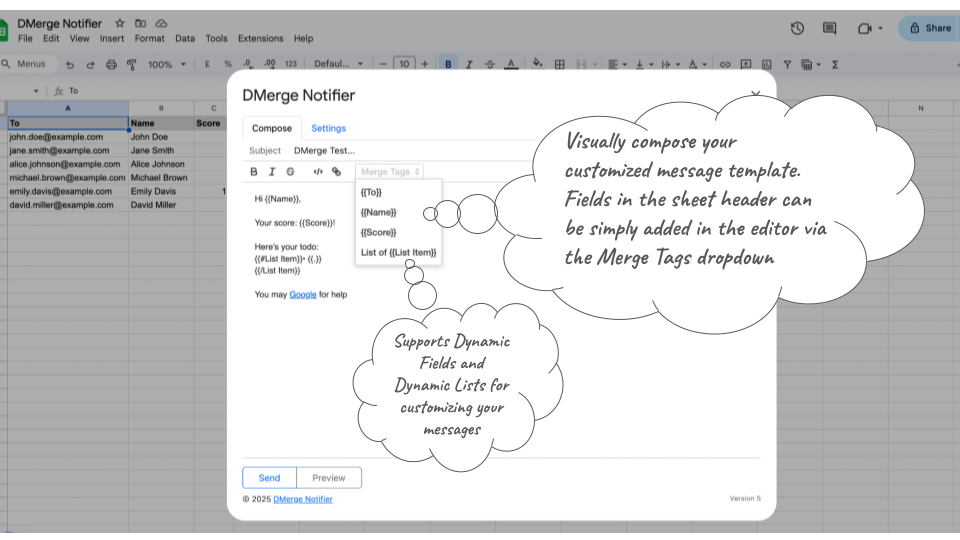
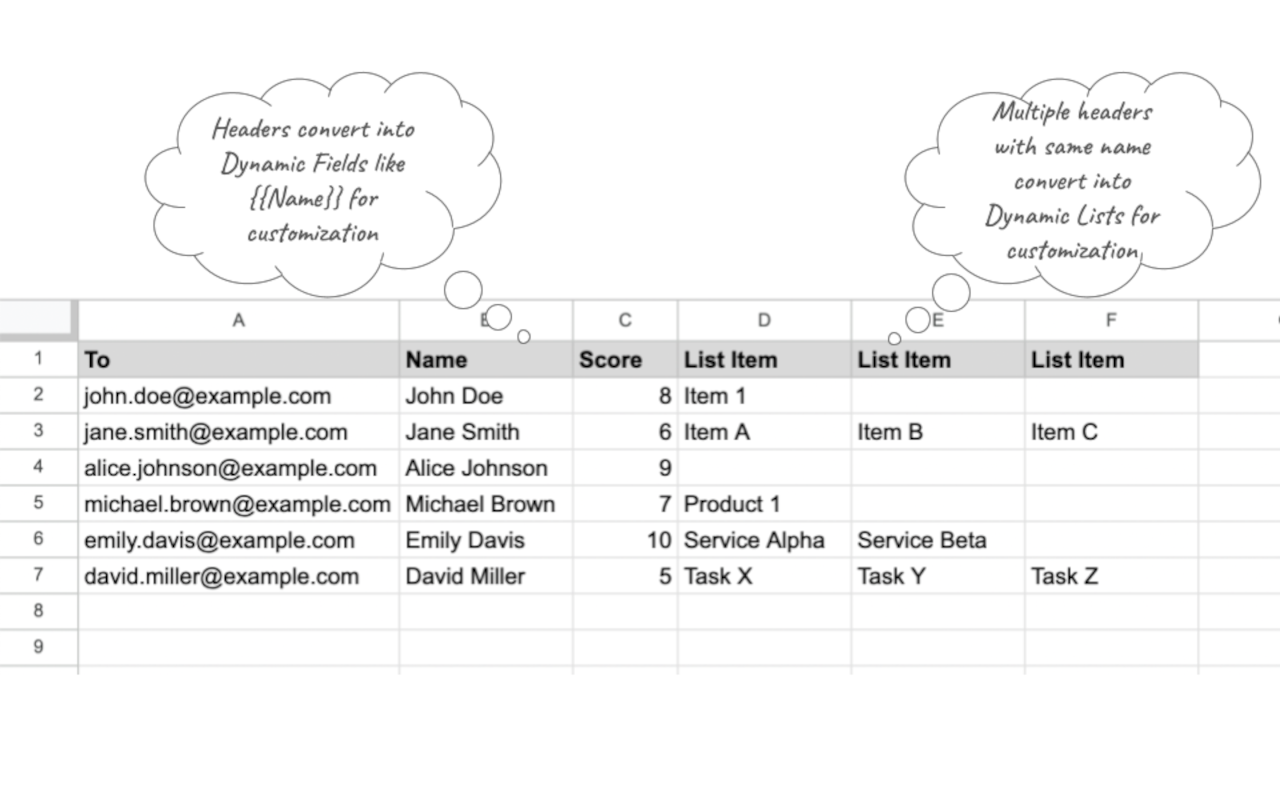
⇨ Dynamic Fields for Personalization: Use spreadsheet column headers as placeholders to personalize every message and document. Example: replace {{Name}} with the actual name from your sheet.

⇨ Support for Dynamic Lists: Build customized messages with itemized lists using repeated columns in the spreadsheet, rendered natively per channel (bulleted lists in Email, Slack and WhatsApp). Ideal for detailed or itemized notifications.

⇨ Display Formatting Preserved: Merged values keep the exact formatting shown in your sheet — percentages, currencies, dates and more come through just as they appear.

⇨ Preview before Sending: Visually preview your personalized content within the app, and send a controlled test message to yourself or a specific user before starting a bulk send.

⇨ Customizable Templates: Create reusable message and document templates with dynamic fields, reducing repetitive work and keeping everything consistent.

⇨ Scheduled Sending: Defer and automate sends on an hourly or daily schedule.

⇨ User-Friendly Interface: Intuitive, with step-by-step guidance, file/folder pickers and tooltips to help you get started quickly.

⇨ Lightweight and Secure: DMerge Notifier processes data within your Google Workspace™ using secure Google and platform APIs, keeping your data private.

Use Cases for DMerge Notifier
────────────────────
DMerge Notifier is a versatile tool that fits a wide variety of communication and document needs:

⇨ Personalized Documents at Scale: Generate invoices, certificates, offer letters, contracts and reports — one per recipient — and deliver each by email. Perfect for Finance, HR and Operations teams.

⇨ Team Notifications: Notify your team about announcements, meeting schedules or deadlines.

⇨ Event Reminders: Send personalized reminders with details such as event time and location — great for Educators and Event Planners.

⇨ Task Updates: Provide status updates to team members or collaborators, customized for each recipient.

⇨ Customer Outreach: Engage clients with tailored messages containing offers, updates or personalized greetings — perfect for Sales and Marketing teams.

⇨ Project Coordination: Share task lists, project statuses or key deliverables directly to Slack users. Ideal for Project Managers.

⇨ Onboarding and Training: Simplify employee or client onboarding with automated, personalized messages and documents containing links, resources and instructions. A handy tool for HR professionals.

⇨ Small Businesses and Startups: Automate communication and document generation without complex tools.

Getting Started
────────────────────
Install the Add-On: Add DMerge Notifier from the Google Workspace Marketplace.

Authorize the Add-On: Grant the required permissions to integrate with Google Sheets™, Google Docs™ and Drive™.

Set Up Your Spreadsheet: Add columns for recipient data (e.g. a "To" column for email, names and any dynamic fields).

Compose Your Message: Use {{column}} placeholders in your message template to personalize each message.

(Optional) Set Up Document Merge: Choose a Google Doc™ template and an output folder to generate a personalized Doc or PDF for each recipient — and optionally share it with them.

(Optional) Connect Slack or WhatsApp: Authorize DMerge Notifier to send on your behalf by adding your Slack bot token or WhatsApp Cloud API access token. No extra setup is needed to send Emails.

Preview Messages: Click "Preview" to review your personalized content and send a controlled test message before the bulk send.

Send: Click "Send" to deliver your personalized messages and documents to all recipients.

Data Privacy and Security
─────────────────
We prioritize your privacy and maintain high security standards:

No Data Storage: DMerge Notifier does not store or transmit your spreadsheet, document or messaging data to third-party servers. All processing occurs through Google and platform (Slack/WhatsApp) APIs.

Minimal Permissions: The add-on requests only the permissions needed for its core functionality. Document merge uses per-file Drive access (the files you pick or create), not broad access to your Drive.

Secure Connections: All interactions with Google and platform APIs use secure, encrypted channels.

User Control: You retain full control over your data and can revoke permissions at any time through your Google, Slack or Meta account settings.其他信息





搜索
清除搜索内容
关闭搜索框
Google 应用
主菜单