
Google Workspace Marketplace


Docu Merge - Generate docs from Google Sheet™ rows
Docu Merge is a Document & Mail Merge solution. Create PDFs, Google Docs™, and Word files, or send personalized bulk emails from Google Sheet™ rows. Alternative to YAMM, Publigo, & Document Studio.
Készítette:
Adatlap frissítve:2026. február 7.
A következőkkel működik:
7 E+


Áttekintés
Welcome to Docu Merge, your ultimate tool for streamlining document generation and Mail Merge email campaigns in Google Workspace™ using Document Merge. Whether you're creating contracts, invoices, reports, or sending personalized mass email campaigns, Docu Merge allows you to mass-produce customized documents and emails with just a few clicks.

With Docu Merge (A Document Merge and Mail Merge Solution), you can effortlessly merge rows from Google Sheets™ into tailored templates designed in Google Docs™ or directly into personalized Gmail™ messages. Generate documents in multiple formats such as PDF, Google Docs™, and Microsoft Word, or send bulk emails all while maintaining a seamless workflow. Choose where your documents are stored in Google Drive™, schedule your email sends, and set up a naming convention for automated, organized file management.

Save time, reduce errors, and increase productivity with Docu Merge—your go-to Document Merge and Mail Merge solution for efficient, personalized document and email generation.

This is an alternative to several other heavily priced addons such as Document Studio, Form Publisher, Publigo, and Yet Another Mail Merge (YAMM).

Launch Your First Mail Merge Campaign
https://formnotify.com/docs/docu-merge/mail-merge/mail-merge-introduction/

Get Started by Generating your first Document
https://formnotify.com/docs/docu-merge/generate-your-first-document/

Personalize Document Merge, replace expressions with actual Data from Google Sheets™
https://formnotify.com/docs/docu-merge/send-dynamic-data/

Embed Image from different Sources on the generated Document
https://formnotify.com/docs/docu-merge/embed-image/

Advanced use case to use Code to Personalize further
https://formnotify.com/docs/docu-merge/logical-constructs/

Privacy Policy
https://formnotify.com/policy/

Key Features: Mail Merge & Email Marketing
- Send personalized bulk emails using Gmail™ and Google Sheets™.
- Design professional emails with a built-in Visual Editor.
- Use {{Column Name}} expressions to personalize Subject, Preheader, and Body.
- Schedule email campaigns to be sent at a specific date and time.
- Automated periodic processing for new rows added to Google Sheets™.
- Full support for CC, BCC, and custom Reply-To addresses.
- Send Google Drive files as direct attachments (PDF, Images, Zip, etc.).
- Run campaigns in Test and Debug mode to verify logic before sending.
- Tracking delivery status (EMAIL_SENT or FAILED) directly in your sheet.
- Import and Export configured campaign settings across different spreadsheets.

Key Features: Document Generation (Docu Merge)
- Mass generates personalized documents in bulk from spreadsheet rows.
- Merge into multiple formats including PDF, Google Docs™, and Microsoft Word.
- Create personalized templates directly within Google Docs™.
- Automated file storage in specific Google Drive™ folders.
- Define custom file naming conventions using sheet data.
- Track generated document links within the Google Sheets™.
- Configure multiple workflows for different document types.
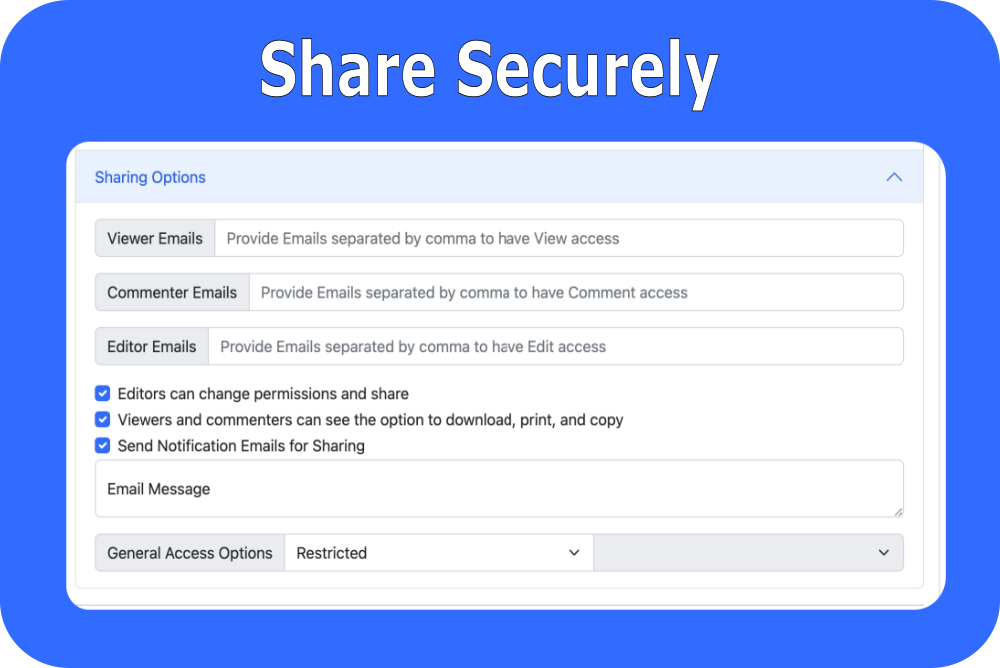
- Share generated files dynamically with customers with controlled permissions.
- Embed public images or form respondent signatures into documents.
- Use logical constructs and code for advanced document personalization.

Use Cases: Mail Merge
- Marketing Campaigns: Send personalized newsletters and promotional bulk emails.
- Automated Follow-ups: Schedule emails for specific intervals after form submissions.
- Event Invites: Send personalized digital invitations with custom details.
- Internal Comms: HR departments can send company-wide personalized announcements.
- Education: Send personalized student progress reports or exam reminders.

Use Cases: Document Generation
- Business: Generate Sales Quotes, Purchase Orders, Vendor Contracts, and Client Invoices.
- HR: Create Employee Appraisals, Policy Documents, and Employment Agreements.
- Events: Generate Thank you Letters and Event Tickets with QR Codes.
- Education: Create Enrollment Certificates, Student Badges, and Appreciation Awards.
- Legal: Generate Lease Agreements, Incident Reports, and Evaluation Forms.

This add-on can replace other highly priced add-ons such as Document Studio, Form Publisher, Publigo, and Mail Meteor. It provides exactly the same functionality as the above add-ons. It is a fantastic alternative to Autocrat. The add-on does not store data outside your Google Drive™. All your data and metadata is stored inside your Google Drive™.Kiegészítő adatok
sell
ÁrakDíjmentes
code
Fejlesztő
Nem végez kereskedelmi tevékenységet
email
Ügyfélszolgálat
lock
Adatvédelmi irányelvek
description
Általános Szerződési Feltételek
flag
JelentésMegjelölés kifogásolhatóként






Keresés
Keresés törlése
A keresés bezárása
Google-alkalmazások
Főmenü