
Google Workspace Marketplace


DOFOTT
Automatically adds travel time blocks to Google Calendar™ before and after events with a location, using real Google Maps™ durations. Driving, transit, cycling or walking. Nothing to install.
Autor:
Ficha actualizada:22 de septiembre de 2026
Sin reseñas
No hay ningún usuario


Información general
DOFOTT — Don't forget travel time.

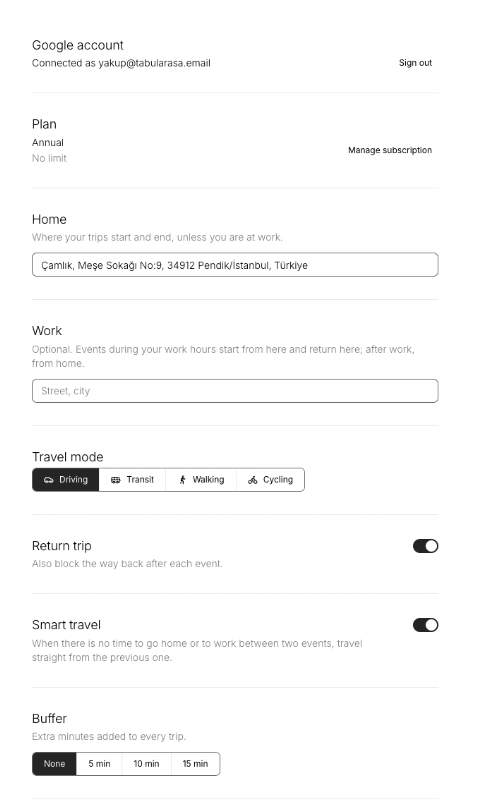
Google Calendar™ has no automatic travel time. DOFOTT adds it: connect your Google account once, set your home and work addresses, and every event with a location gets a travel block before and after it, timed with live Google Maps™ durations.

WHAT IT DOES

Travel blocks for driving, public transit, cycling or walking — pick a default, override per trip
Home and work as starting points, chosen by time of day
Back-to-back meetings: routes directly between them when that's shorter
Recurring events handled, with single-occurrence overrides
Optional 5, 10 or 15-minute buffer for parking or finding the room
Blocks use any of Google Calendar's 11 colors; notifications can be muted
Works across several calendars in one account

WHY IT'S DIFFERENT

The blocks are ordinary Google Calendar events, so they appear in Apple Calendar, Notion Calendar, Fantastical, Akiflow, Sunsama and any other client reading your Google account — and your booking links (Calendly, Cal.com, SavvyCal, TidyCal) see the time as busy.
DOFOTT reads your calendar but writes only its own blocks. It never edits your events or declined invitations.
One button deletes every block and your account. You can also revoke access from your Google Account at any time.
No extension, no plugin, no cookies on dofott.com.

PRICING Free for up to 12 travel meetings a month; $5 for any month you exceed that (unlimited that month) or $36/year.

SETUP

Click Install / Sign in with Google.
Enter your home and work addresses.
Choose your travel mode. Blocks appear within minutes; changes apply to individual trips immediately.
Información adicional
sell
PrecioPrueba sin coste adicional con funciones de pago
code
Desarrollador
email
Asistencia
lock
Política de privacidad
description
Términos del Servicio
flag
DenunciarMarcar como inapropiada



Búsqueda
Borrar búsqueda
Cerrar búsqueda
Aplicaciones de Google
Menú principal