
Google Workspace Marketplace


Download Link Generator for Drive™
Generate download links for files in a Drive™ folder
Listing updated:৩০ জুলাই, ২০২৫
Works with:
১৭ লা+

এক নজরে
IMPORTANT: If Download Link Generator button doesn't automatically appear in Drive™ after adding this extension, please navigate to the extension's website manually and click Authorize: https://yasirkula.net/drive/downloadlinkgenerator/

SHUTDOWN NOTICE: Google now mandates that I apply for a CASA Tier 2 certification every year (costs $540 annually)! I'm not going to do that. Therefore, this extension may stop functioning after their deadline of 2025-03-04.

HOW TO OPEN FOLDERS: I've noticed that right clicking a folder will no longer show "Open with" button in Drive™. I don't know if it will ever be fixed but there's a workaround. Simply enter that folder and click "New-More-Download Link Generator".

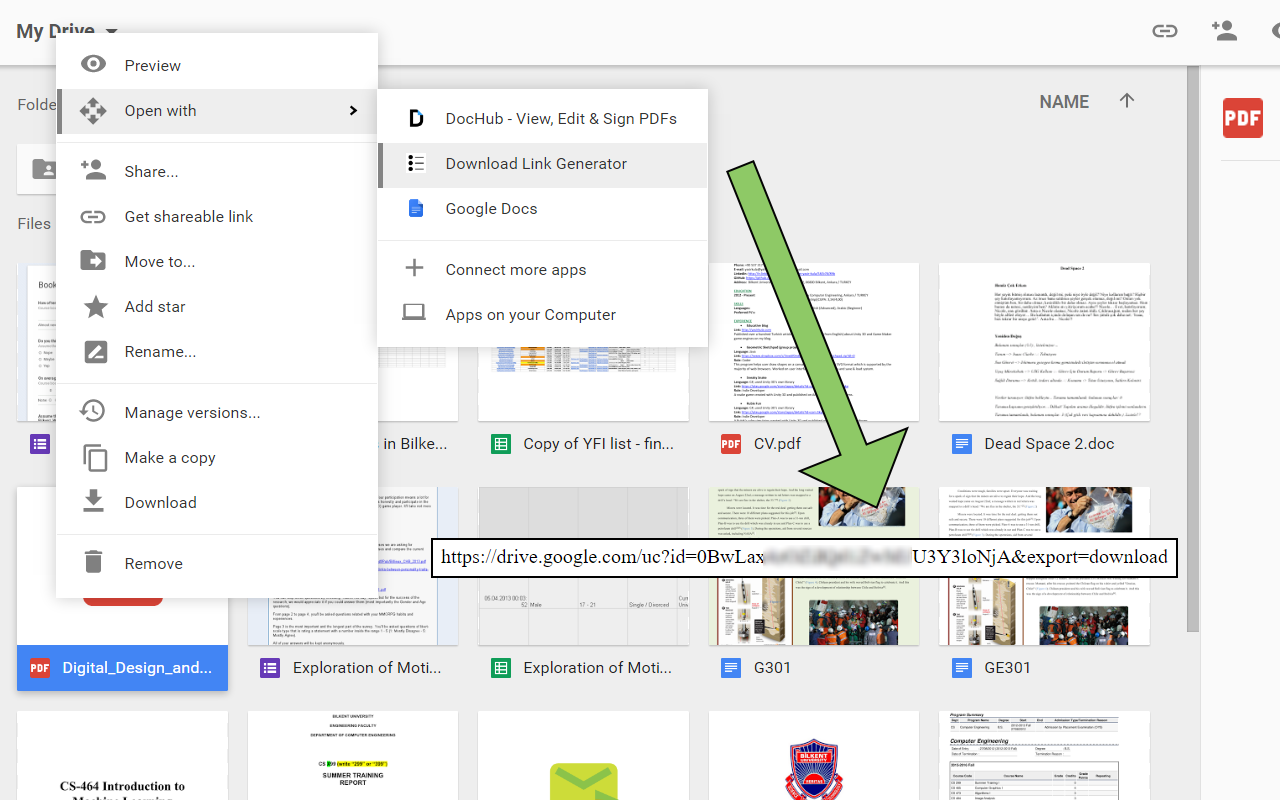
Easily generate direct download links for your files in Drive™.

This extension has 2 functionalities:

1) To get the direct download link of a single file in Drive™, simply right click the file and open it with this extension. A new tab will open and the direct download link will be generated in a few seconds (wait for the "Status: finished" text). If the file is not publicly shared, other people won't be able to use that download link. To fix this issue, you can right click the file, select "Get link" and change the visibility from "Restricted" to "Anyone with the link". This will automatically share the file publicly

2) To get the direct download links of all files in a Drive™ folder, simply right click the folder and open it with this extension (if "Open with" doesn't show up, see "HOW TO OPEN FOLDERS" above). A new tab will open and the direct download links will be generated progressively (wait for the "Status: finished" text). If a file is not publicly shared, other people won't be able to use its download link. To fix this issue, it is sufficient to make the folder that contains your files public. To do this, you can right click the folder, select "Get link" and change the visibility from "Restricted" to "Anyone with the link". This will automatically share the folder publicly

NOTE1: downloading big files using a direct download link will prompt a Drive™ dialog stating that "The file exceeds the maximum size that Google can scan." and the user must click the "Download anyway" button to proceed.

NOTE2: documents created in Drive (Google Docs, Google Sheets, Google Slides, Google Forms) can't be downloaded directly. To generate direct download links for these documents, you need to convert these documents to a standard file format (e.g. .doc, .docx, .ppt, .xls).

Source code available at: https://github.com/yasirkula/DownloadLinkGeneratorForGoogleDrive
Additional information
sell
Pricingফ্রি
code
Developer
নন-ট্রেডার
email
সমর্থন
lock
গোপনীয়তা নীতি
description
পরিষেবার শর্তাদি
flag
রিপোর্ট করুনFlag as inappropriate



সার্চ করুন
সার্চ মুছুন
সার্চ বন্ধ করুন
Google অ্যাপ্লিকেশানগুলি
প্রধান মেনু