
Google Workspace Marketplace


Duplicate Link Finder
Identify and remove duplicate links in your Google Docs™ with ease. "Duplicate Link Finder" scans your documents and highlights repeated URLs, saving you time and effort.
Gawa ng:
Na-update ang listing noong:Oktubre 7, 2024
Gumagana sa:
Walang review
53


Pangkalahatang-ideya
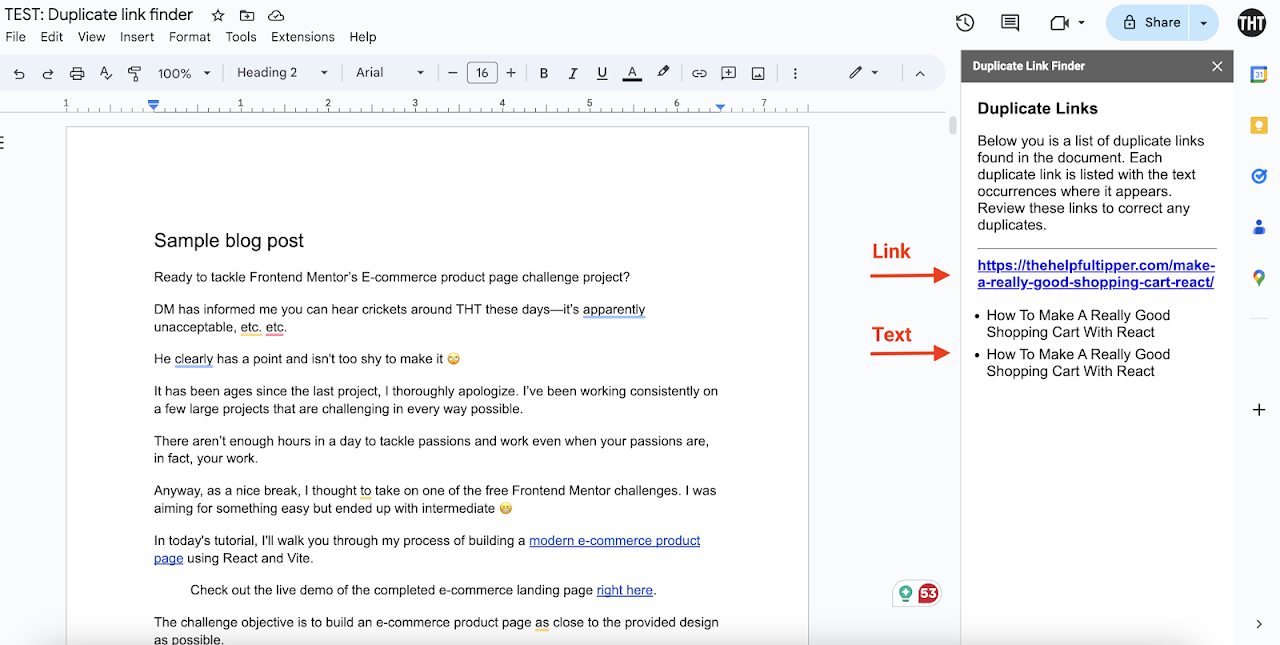
"Duplicate Link Finder" is a simple yet powerful tool designed to help you streamline your Google Docs™. It automatically scans your document for duplicate hyperlinks, identifying any repeated links to help you maintain clean and organized content.

Whether managing large projects, collaborative documents, or ensuring your links are unique (for user experience and SEO), this add-on saves time and reduces errors. Easy to use and integrated directly into your Google Docs™ environment, it adds convenience without any data storage or modification of your content.

Add, enable, and click to find links in your document of choice.
Karagdagang impormasyon
sell
PagpepresyoLibre
code
Developer
Hindi trader
email
Suporta
lock
Patakaran sa privacy
description
Mga tuntunin ng serbisyo
flag



Search
I-clear ang paghahanap
Isara ang paghahanap
Mga app ng Google
Pangunahing menu