
Google Workspace Marketplace


Duplicate Remover
Highlight, remove, and manage duplicates with fuzzy matching. Effortlessly merge, split, and clean Google Sheets™ for free.
Listing updated:১০ অক্টোবর, ২০২৪
Works with:
৭৮৮




এক নজরে
Free Remove Duplicates Add-on for Google Sheets™

Easily clean up your Google Sheets™ with the free Remove Duplicates add-on, a powerful Google Workspace™ extension designed to improve your data management and ensure accuracy with just a few clicks. Whether you're managing large datasets or tidying up a small table, our tool offers a comprehensive solution to identify and handle duplicate and unique entries efficiently.


Key Features:

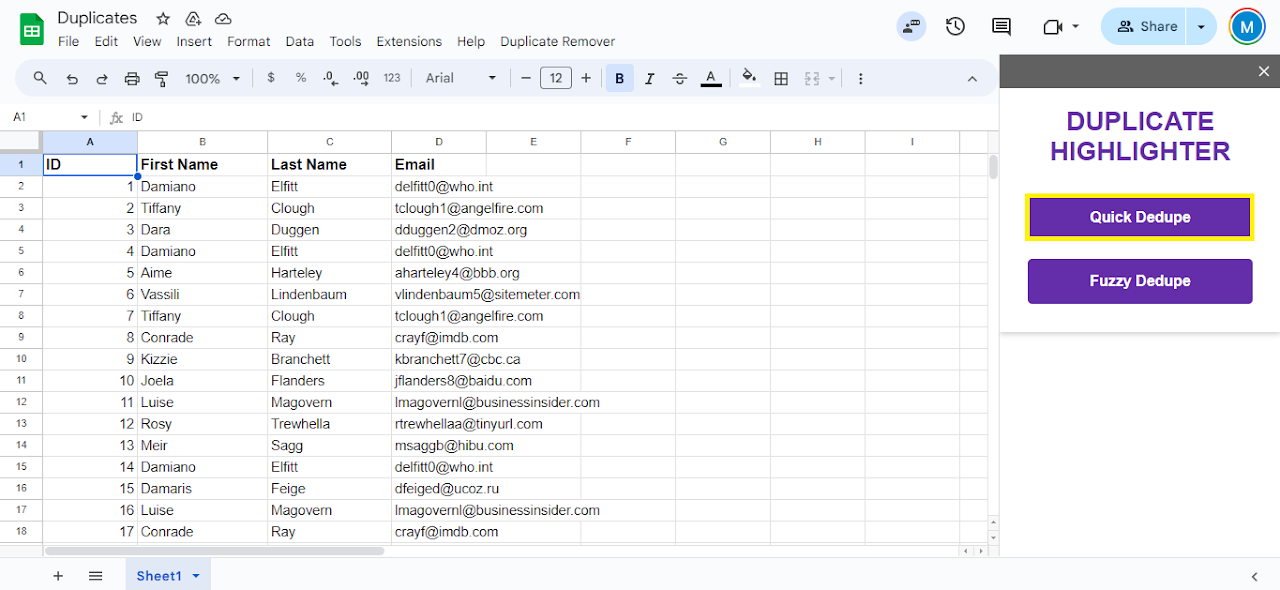
Quick Start: Easily access the add-on from the Extensions menu in Google Sheets™. Simply select "Remove Duplicates" and start with the "Quick Dedupe" or "Fuzzy Dedupe" option to begin.

Automatic Data Selection: Use the Auto Select feature to detect and select the appropriate data range in your sheet with no manual effort.

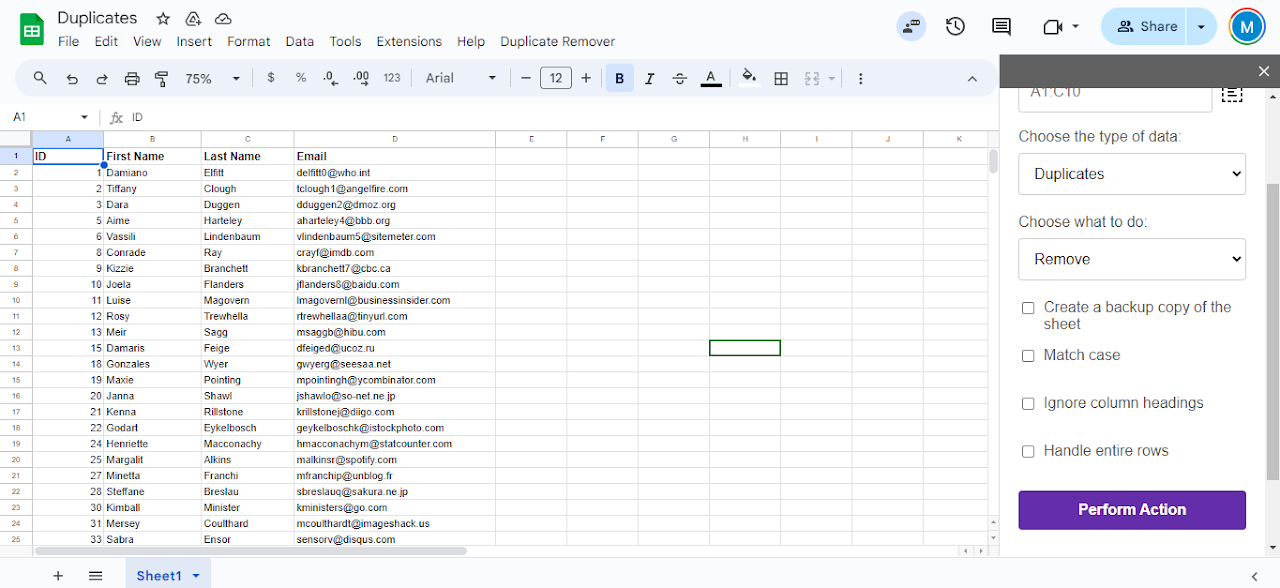
Flexible Search Options: Choose to find either duplicates, unique entries, or use fuzzy case matching for more complex comparisons, ensuring tailored data management based on your specific needs.

Actionable Results: Decide how to handle detected entries:
Highlight Duplicates: Use the Fill with colour option to visually highlight duplicate rows or unique entries for easy identification.

Delete: Opt to delete entire rows, ensuring a thorough cleanup that removes unwanted data while preserving the integrity of your dataset.


Customisation Options:

Backup Your Data: Automatically create a backup copy of your spreadsheet to safeguard against accidental data loss.

Case Sensitivity: Enable the Match Case feature to differentiate records based solely on case, treating them as unique if needed.

Header Rows: Manage how your column headings are treated with the Ignore column headings option, adjusting visibility according to your table’s format.

Whole Row Handling: Choose to highlight and remove entire rows if you prefer a comprehensive approach to data cleaning, rather than focusing on individual cells.


Why Choose Remove Duplicates?
Our Google Workspace™ extension is completely free and simplifies data management tasks, saving you time and reducing manual errors. With its intuitive interface, powerful functionality, and advanced fuzzy matching capabilities, Remove Duplicates is the ideal tool for data professionals, analysts, and anyone needing to maintain clean and accurate Google Sheets™.
Additional information
sell
Pricingফ্রি
code
Developer
নন-ট্রেডার
email
সমর্থন
lock
গোপনীয়তা নীতি
description
পরিষেবার শর্তাদি
flag
রিপোর্ট করুনFlag as inappropriate





সার্চ করুন
সার্চ মুছুন
সার্চ বন্ধ করুন
Google অ্যাপ্লিকেশানগুলি
প্রধান মেনু