
Google Workspace Marketplace


Easymaps
EasyMaps creates Google Maps™ url from the address data in the Google Sheets™.
Listing updated:৮ এপ্রিল, ২০২২
Works with:
৭ হা+


এক নজরে
You can bring the power of Google Maps™  to your Google Sheets™  using EasyMaps add-on.

How it Works?

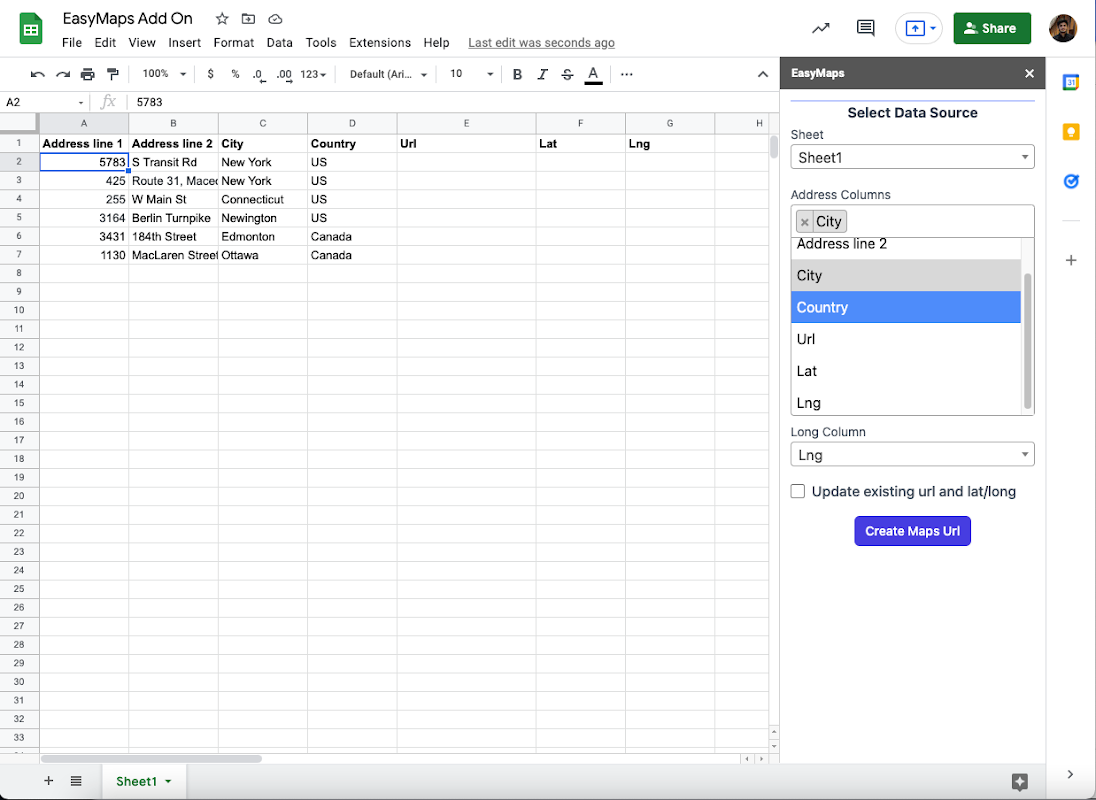
1. Select the columns that contains the address or address components like address line 1, city, postal code, country etc. from your Google Sheet™.
2. Choose where to save generated url and lat/long(optional).
3. Press the create maps url button and let the add-on work for you.
4. EasyMaps will create Google Maps™ url from the address and add to your selected column.
Additional information
sell
Pricingফ্রি
code
Developer
Trader status unspecified
email
সমর্থন
lock
গোপনীয়তা নীতি
description
পরিষেবার শর্তাদি
flag
রিপোর্ট করুনFlag as inappropriate





সার্চ করুন
সার্চ মুছুন
সার্চ বন্ধ করুন
Google অ্যাপ্লিকেশানগুলি
প্রধান মেনু