Transform Gmail™ emails into visual Kanban cards instantly. Streamline your workflow with this powerful email-to-task productivity tool for busy professionals.
Listing updated:June 4, 2026
Works with:
120K+
Overview
The Kanbanchi for Gmail™ add-on seamlessly converts your Gmail™ messages into Kanban cards within your Kanbanchi project management app. Turn any email into actionable tasks on your Kanbanchi project boards with one click, maintaining full context and eliminating workflow disruption. Streamline team collaboration by ensuring email discussions and client communications are instantly transformed into trackable work items that all team members can access and manage within shared project boards.

Key features:

- Instant Email-to-Kanban Conversion
Transform Gmail™ messages into Kanbanchi task cards automatically with preserved email context

- Native Kanbanchi Integration
Works directly with your existing Kanbanchi boards stored in Google Drive™

- Context Preservation
Email subjects become card titles, while email content becomes detailed card descriptions

- Seamless Google Workspace™ Workflow
Perfect integration between Gmail™ communication and Kanbanchi task management software

- One-Click Task Creation
Simply click the Kanbanchi icon in the Gmail™ add-ons panel and convert a Gmail message into an organized project card

Once installed, simply open any email and click the Kanbanchi icon in the Gmail™ add-ons panel to create a task card. The email subject line becomes the task title, and the email content is transformed into a detailed card description. Organize your work visually across customizable lists like "To Do," "Doing," and "Done."

Perfect for:

- Business professionals managing client email communications
- Project managers who coordinate team tasks from email requests
- Remote teams converting email discussions into trackable work items
- Educators and school administrators managing course, student, and faculty communications
- Non-profit and volunteer coordinators turning donor and program emails into actionable tasks
- Anyone using Kanbanchi who wants to streamline email-to-task workflows

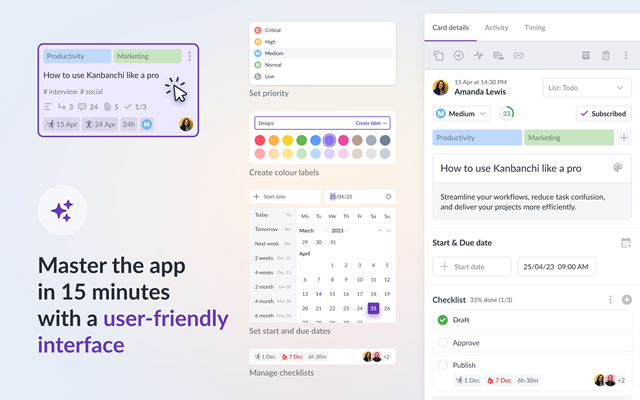
This Gmail™ add-on works with Kanbanchi for Google Workspace™ (available in free and premium versions). Kanbanchi offers visual project management, featuring Kanban boards, Gantt charts, and time tracking, all natively integrated with Google Workspace™.

The entire set of tools consists of the Kanbanchi app, the Gmail add-on, and the Chrome extension. Plan and manage your work in the app, create tasks on the go from Gmail conversations, and instantly access the app from anywhere in your Chrome browser.

*Gmail™ is a trademark of Google LLC
*Google Workspace™ is a trademark of Google LLC
*Google Drive™ is a trademark of Google LLC

Install now and transform your Gmail™ into a powerful task creation engine for your Kanbanchi project management software. Convert email overwhelm into organized, visual project workflows.
Additional information
PricingFree of charge with paid features
Privacy policy
Terms of service
Kanbanchi for Gmail™: Email to Kanban Task Manager will ask for the permissions shown below. Learn more
Kanbanchi for Gmail™: Email to Kanban Task Manager will need access to your Google account
This will allow Kanbanchi for Gmail™: Email to Kanban Task Manager to :
View your email messages when the add-on is running
Run as a Gmail add-on
Connect to an external service
See your primary Google Account email address
See your personal info, including any personal info you've made publicly available
Reviews
Language:
Sort by:
Google doesn't verify reviews or ratings. Learn more about reviews
Profile Picture
Kerry Lodish
June 12, 2026
The Kanbanchi Gmail plugin has been a great efficiency booster for our organization. Many of the projects we manage begin with an email, so the ability to create a card directly from Gmail and place it into the appropriate stage of our production board is incredibly valuable. The integration is seamless. I've experienced zero bugs, glitches, or performance issues, which is a huge advantage when relying on a tool as part of a daily workflow. I highly recommend this plugin to any team looking to improve productivity and simplify project management. Reducing clicks, eliminating manual steps, and keeping everything connected within Gmail saves time and helps our team stay organized. It's one of those tools that just works, and that's exactly what you want.
Is this review helpful?
Yes
No
Profile Picture
Kell Woods
June 5, 2026
Kanbanchi is exactly what I was looking for to streamline my daily workflow. I love how I can easily I can turn emails into cards straight from my Gmail inbox, and keep related assets, images, links and copy all neatly stored in one place. I can also link straight back to the original email if I need to, which saves time. I'm so much more organised and can quickly see what I've got coming up at a glance. And I'm still exploring all the features! By far the easiest, nicest and most efficient Kanban board app I've used. : )
Is this review helpful?
Yes
No
Profile Picture
Admin admin
June 16, 2026
When we were looking to find a tool that would help us improve our process and work seamlessly with the tech we were already using Kanbanchi's Gmail plugin fit right in. The feature whereby the simple click of a button adds an email containing all the data we need to our Kanbanchi board is very efficient. Not only that, but you can choose where it needs to be placed, and it brings any attachments across with it. It is a great add on to the other google workspace features we apply in the business.
Is this review helpful?
Yes
No
Profile Picture
Samantha Brill
June 2, 2026
The Kanbanchi Gmail add-on for turning emails into cards has been absolutely so helpful. It allows me to quickly convert emails into tasks/cards that link directly back to the original email, which saves a huge amount of time and improves efficiency. It’s a simple but very effective feature that has streamlined my workflow. Highly recommend this tool.
Is this review helpful?
Yes
No
Profile Picture
Makena Bukusi
June 10, 2026
Kanbanchi works great for me, it helps me streamline my work and stay on top of what I need to. Highly highly recommend it for anyone using Google Workspace, it works seamlessly with Gmail and Google Drive.
Is this review helpful?
Yes
No
Profile Picture
Noelia De Girolamo
June 11, 2026
A must-have if you use Gmail and Kanbanchi. It saves so much time by letting me turn emails into cards instantly, keeping all the important details right where I need them.
Is this review helpful?
Yes
No
Profile Picture
Yas Furuse
June 12, 2026
This add-on saves time in creating a Kanbanchi card from a G-mail message. Great feature!
Is this review helpful?
Yes
No
Profile Picture
Jason Carlton
March 7, 2025
Very cool, but would suggest also automatically adding a link to the email URL so you can click to open it in gmail, which would lead you back to the email thread which may have additional context. Clickup does a good job of doing this
Is this review helpful?
Yes
No
Profile Picture
A'Kwanzaa B
December 3, 2020
Not worth the money when other applications I have tested comes with free options that even this does not have for my taste. As a student, not recommending this.
Is this review helpful?
Yes
No
Profile Picture
Krystel Casada
May 22, 2022
I am in love with this
Is this review helpful?
Yes
No
1-10 of 15
Search
Clear search
Close search
Google apps
Main menu