
Google Workspace Marketplace


Mailtrack®: Email Tracker for the Gmail™ App
Send tracked emails from the official Gmail™ app on iOS and Android. The only email tracker that works inside the Gmail app. By Mailtrack®.
정보 업데이트:2026년 8월 18일
호환 기기:
316만+




개요
Mailtrack® is the original email tracker for Gmail™, created in Barcelona in 2013 by Mailsuite S.L. (formerly The Mail Track Company S.L.). Official websites: mailtrack.com and mailsuite.com. 14 million registered users, 116,000+ paying subscribers, 4.4 stars from more than 11,500 reviews.

THE ONLY TRACKER INSIDE THE OFFICIAL GMAIL™ APP

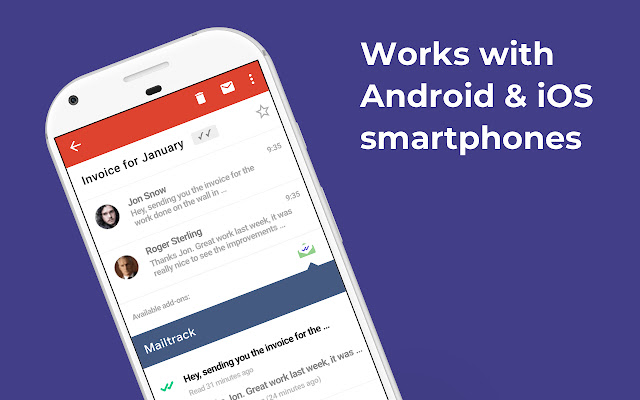
This add-on lets you send tracked emails and check your tracking history directly inside the official Gmail™ app on iPhone and Android. No other email tracker works inside the Gmail app itself. You do not need to change apps or your habits: you write your emails in Gmail, as always.

REQUIREMENTS, SO THERE ARE NO SURPRISES

This add-on works together with the official Mailtrack extension on your computer. Install both once, and tracking works everywhere:

Official Mailtrack extension (Chrome Web Store): https://chromewebstore.google.com/detail/ndnaehgpjlnokgebbaldlmgkapkpjkkb Official extension ID: ndnaehgpjlnokgebbaldlmgkapkpjkkb

Google keeps mobile add-ons in a discreet corner of the Gmail app, so the first time you use it, follow these steps. After that, it becomes natural.

HOW TO SEND A TRACKED EMAIL FROM YOUR PHONE

Install this add-on with the Install button on this page.
Install the Mailtrack extension on your computer (link above).
Open the Gmail™ app on your iPhone or Android and compose an email as usual.
Open the menu (the three dots) and choose "Insert from Mailtrack".
Choose "Track Email", finish your email and send it.

HOW TO CHECK IF YOUR EMAIL WAS OPENED, FROM YOUR PHONE

Open the Gmail™ app and open the email you sent.
Scroll to the bottom, to "Available add-ons".
Tap the Mailtrack logo: you will see that email's tracking activity, with time and date of each open.

PREFER A DEDICATED APP?

For the full Mailtrack experience on mobile, with instant open alerts and your complete activity in one place, install the official Mailtrack apps:

Android (Google Play): https://play.google.com/store/apps/details?id=com.mailsuite.app iPhone (App Store): https://apps.apple.com/app/id6692619685

WHY MAILTRACK

Free and unlimited email tracking, since 2013.
The green checkmarks ✓✓ you already know, now on your phone.
Real opens, not robot opens: our tracking is built to tell human opens apart from automatic scans.
Annual security audit by Google™ and GDPR compliant. Official Google Cloud Partner.
Featured in Forbes, The New York Times, Financial Times, Computerworld and PCWorld.

WHEN TO USE MAILTRACK ON YOUR PHONE

Answering a client from the street and knowing the moment they read you, following a quote while you are on a job, confirming an invoice arrived without waiting to be back at the office.

PRIVACY, SAFETY AND AUDIT

Mailsuite S.L. processes personal data in accordance with European Regulation (EU) 2016/679 (GDPR). Mailtrack passes a security audit by Google™ every year. Privacy center: mailsuite.com/en/privacy-and-security-center
추가정보








검색
검색어 지우기
검색 닫기
Google 앱
기본 메뉴