
Google Workspace Marketplace


Encrypt with Qanapi
Encrypt text within Google Docs™ and Google Slides™ with Qanapi. Precise in-line data protection with FIPS validated and quantum resistant cryptography.
정보 업데이트:2024년 12월 15일
호환 기기:

리뷰 없음
149
개요
📍OVERVIEW, PRICING & FAQs
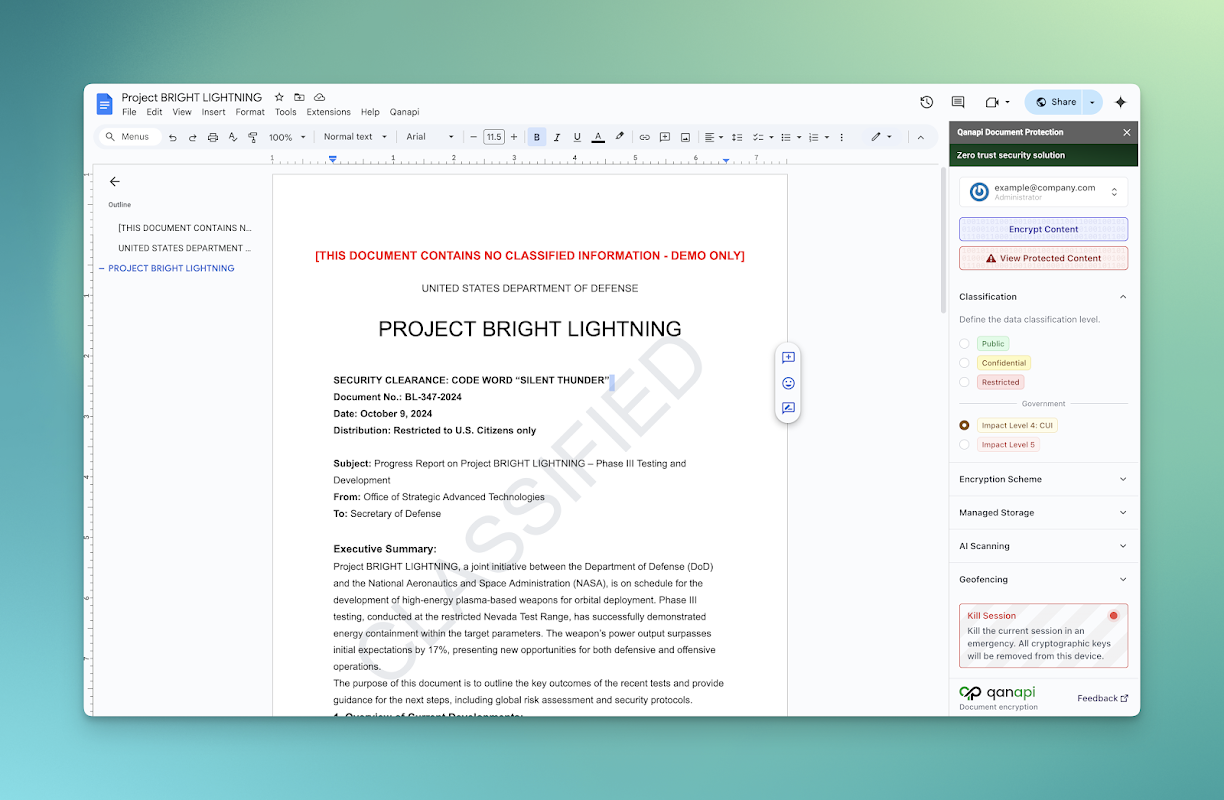
Qanapi, a Google Workspace™ Add-On, offers seamless data security solutions for Google Docs™. Qanapi provides precision, inline encryption from a single word to an entire document, ensuring sensitive information remains restricted to those with appropriate permission to view it, while maintaining simultaneous collaboration with other users who do not.

Qanapi is exclusively the only encryption service authorized and fully compliant to run in Google Docs™ on Assured Workloads.

Paired with Google’s Assured Controls Plus for Assured Workloads, and when appropriately configured, it is ITAR and CMMC 2.0 compliant. It will soon offer a bundled Key Management Service (KMS) for Google CSE, making it effortless to provision both the Google Docs™ Add-On and a fully managed KMS, without technical expertise.

Using a data-proxy API service for encryption facilitation and a trustworthy architecture based on zero-trust principles, it requires no browser extensions or plugins to provide cross-platform accessibility wherever Google Workspace™ runs, including full native mobile browser support (just like Google Workspace™).

The data-centric security revolution for collaboration on classified and sensitive data is Qanapi for Google Workspace™ — the new standard.

— PRICING —
Explore the Qanapi Add-on for Google Docs™ with a FREE 5-day trial. If you love it, upgrade to the paid subscription for $20 per user per month to continue encrypting and decrypting in a Qanapi secured Workspace with no plugins/downloads or other extensions.

We believe secure users ensure secure collaboration. Equip your entire team, and our generous billing model will then tailor to your usage, automatically adjusting so you’re subsequently only billed for users who’ve been active within the last 60 days.
✔ Free trial requires no payment commitment or card details.
✔ Only billed for active users.
✔ Enjoy volume discounts available in line with Google’s Assured Support offering.

— FAQs —

Q: What is the purpose of the Qanapi Add-on for Google Docs™?
A: The Qanapi Add-on empowers multi-level classification and maximal collaboration within Google Docs™. Qanapi enables users to easily and compliantly view, edit, and store sensitive data (e.g., CUI, HIPPA) according to their predefined classification.

Q: How will this affect collaboration?
A: The Qanapi Add-on enhances collaboration with secure, compliant data sharing, compatible in Editing, Suggesting, and Viewing Modes within online Google Docs™.

Q: How do I install the Qanapi Add-on?
A: For a streamlined user experience, Administrators need to first set up the Add-on by performing an “Admin Install” from the Workspace Marketplace. Next, create groups within the Google Workspace™ account to map to classifications in the Qanapi dashboard.

Q: Where is the user guide?
A: See our user tutorial featured above or linked in the Qanapi Add-on sidebar within Google Docs™.

Q: Do you offer free trials?
A: Yes! Get your entire team started by subscribing to a 5-day free trial, no upfront payment details required. Workspace Administrators can simply upgrade to the paid subscription by following the link within the Google Docs™ add-on side-bar.

Q: Are there any upfront costs?
A: Enjoy a free 5-day trial with no payment commitments. When you upgrade to a paid subscription, you’ll initially be billed for all the users you sign up; however, you’ll only be billed for active users in each monthly renewal.

Q: Who can view the secure information?
A: Each user within a Workspace is assigned specific classification from ‘Unclassified’ upwards depending on Administrator controls. When sensitive data is encrypted with the Qanapi Add-on, only those users with current clearance for the specific classification level can view the decrypted text, while other collaborators simply see the placeholder.

Q: Where does my data reside?
A: Only the text you wish to encrypt is passed to our Qanapi encryption service, where it is encrypted and returned, then placed inside your Google Doc™. The Google Workspace™ service doesn’t touch or see your Qanapi-protected content before it’s encrypted or anytime after. All remaining content in your Google Doc™ is never passed to our Qanapi service and remains in situ on Google servers. Our Qanapi encryption service runs on Google Assured Workloads in Google United States data centers.

Q: Is this for Government teams only?
A: The Qanapi Add-on is now available for Federal and industry customers to meet ITAR and CMMC 2.0 compliance when used with Google Workspace™ Assured Controls Plus on Assured Workloads. Qanapi for Enterprise is coming soon for Workspace users wanting precision encryption running on the Google Public Sector. Administrators can define rules for their needs and industry standards, and Qanapi will deploy its advanced API to enforce them.
추가정보







검색
검색어 지우기
검색 닫기
Google 앱
기본 메뉴