
Google Workspace Marketplace


ENSage ENS HS6
Prepare EU ICS2 ENS with HS6 validation, description checks, structured parties, and CSV export — for Google Sheets™.
Gawa ng:
Na-update ang listing noong:Setyembre 29, 2025
Gumagana sa:
Walang review
21



Pangkalahatang-ideya
ENSage ENS HS6 helps shippers, forwarders, and traders prepare accurate EU ICS2 Entry Summary (ENS) data in spreadsheets — for Google Sheets™.

What it does
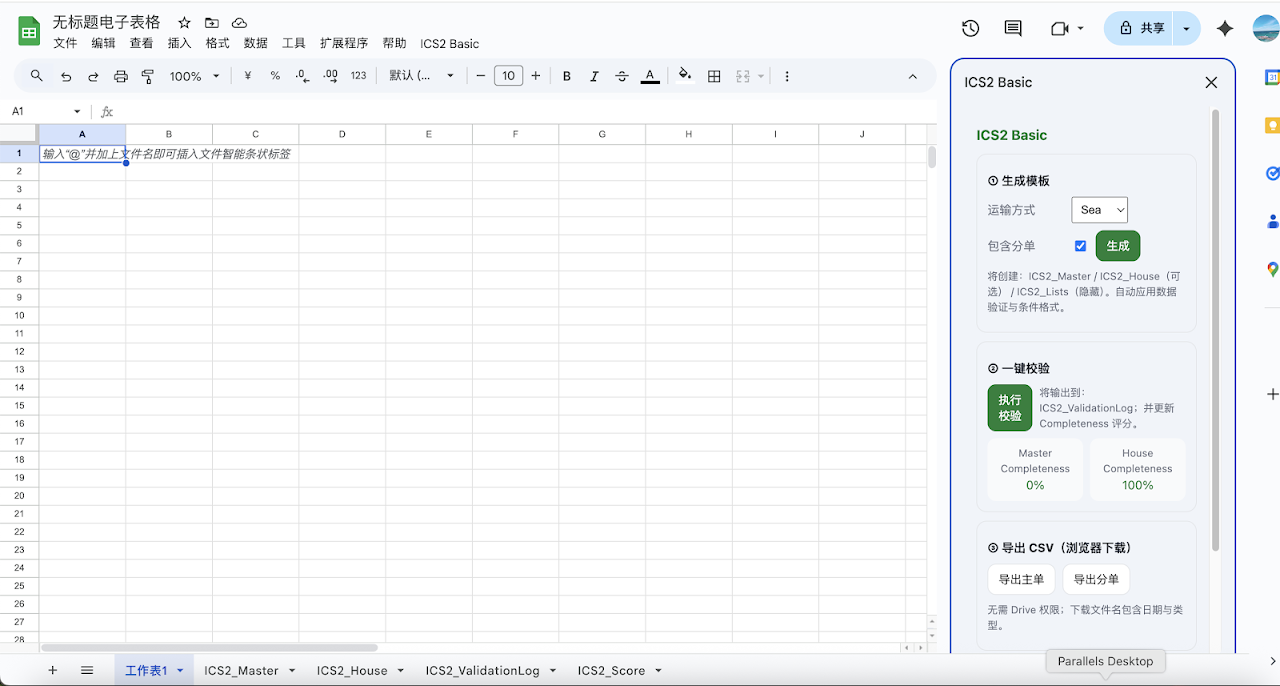
- Create ENS templates (Master/House) for sea, road, and rail.
- Validate HS6 (6 digits), goods description quality, UN/LOCODE shape, and party addresses.
- Generate a validation log and a completeness score in the same file.
- Export Master/House CSV for upload to your carrier or customs platform.

How it works
1) Open a spreadsheet → Extensions → ENSage ENS HS6.
2) Generate templates → fill data → run Validate.
3) Download CSV and submit via your chosen channel.

Data access & privacy
- Works only in the current spreadsheet; no developer servers.
- Minimal scopes: spreadsheets.currentonly and script.container.ui.
- Privacy Policy: https://yourdomain.com/privacy
- Support: support@yourdomain.com

Google Sheets™ is a trademark of Google LLC.
Karagdagang impormasyon
sell
PagpepresyoLibre na may mga bayad na feature
code
Developer
Hindi trader
email
Suporta
lock
Patakaran sa privacy
description
Mga tuntunin ng serbisyo
flag




Search
I-clear ang paghahanap
Isara ang paghahanap
Mga app ng Google
Pangunahing menu