AI expense tracking inside Google WorkspaceтДв. Your data, your Google DriveтДв
рдмрдирд╛рдиреЗ рд╡рд╛рд▓реА рдХрдВрдкрдиреА:
рд▓рд┐рд╕реНрдЯрд┐рдВрдЧ рдХреЛ рдкрд┐рдЫрд▓реА рдмрд╛рд░ рдЕрдкрдбреЗрдЯ рдХрд┐рдпрд╛ рдЧрдпрд╛:18 рдирд╡рдВрдмрд░ 2025
53
рдЕрд╡рд▓реЛрдХрди
The expense solution that lives entirely in Google WorkspaceтДв

ExpenseBot brings enterprise-grade expense automation directly into your Google WorkspaceтДв environment. No separate platform, no vendor servers, no data migrationтАФeverything happens within GmailтДв, Google DriveтДв, Google SheetsтДв, and Google PhotosтДв.

What makes ExpenseBot different:
- Data sovereignty: All receipts and reports stay in YOUR Google DriveтДвтАФrevoke access anytime
- Enterprise security: CASA Tier 2 certifiedтАФGoogle's strictest security standards
- Zero new systems: Your team already knows Google SheetsтДвтАФno training required
- Instant deployment: Live in seconds with Google SSOтАФno IT project

Why teams are switching to ExpenseBot:
- Everything included: credit card reconciliation, unlimited receipts, all integrations
- More features for less moneyтАФprice match guaranteed
- No separate app, no training, no vendor lock-in
- GmailтДв finds receipts automaticallyтАФno forwarding to receipts@vendor.com
- Works perfectly with Google WorkspaceтДвтАФno separate passwords

Deploy in secondsтАФfor your team or just yourself

Install from marketplace. Sign in with GoogleтДв. Done.

AI automates capture, reconciliation, grouping, and report creation.

How it works (30 seconds from receipt to report):
1. Capture receipts: snap a photo, let GmailтДв AI find them automatically, or upload from Google PhotosтДв
2.  AI extracts everything: vendor, date, taxes, tips, total, currency, handwritten notes
3.  Every receipt appears in Google SheetsтДв instantly
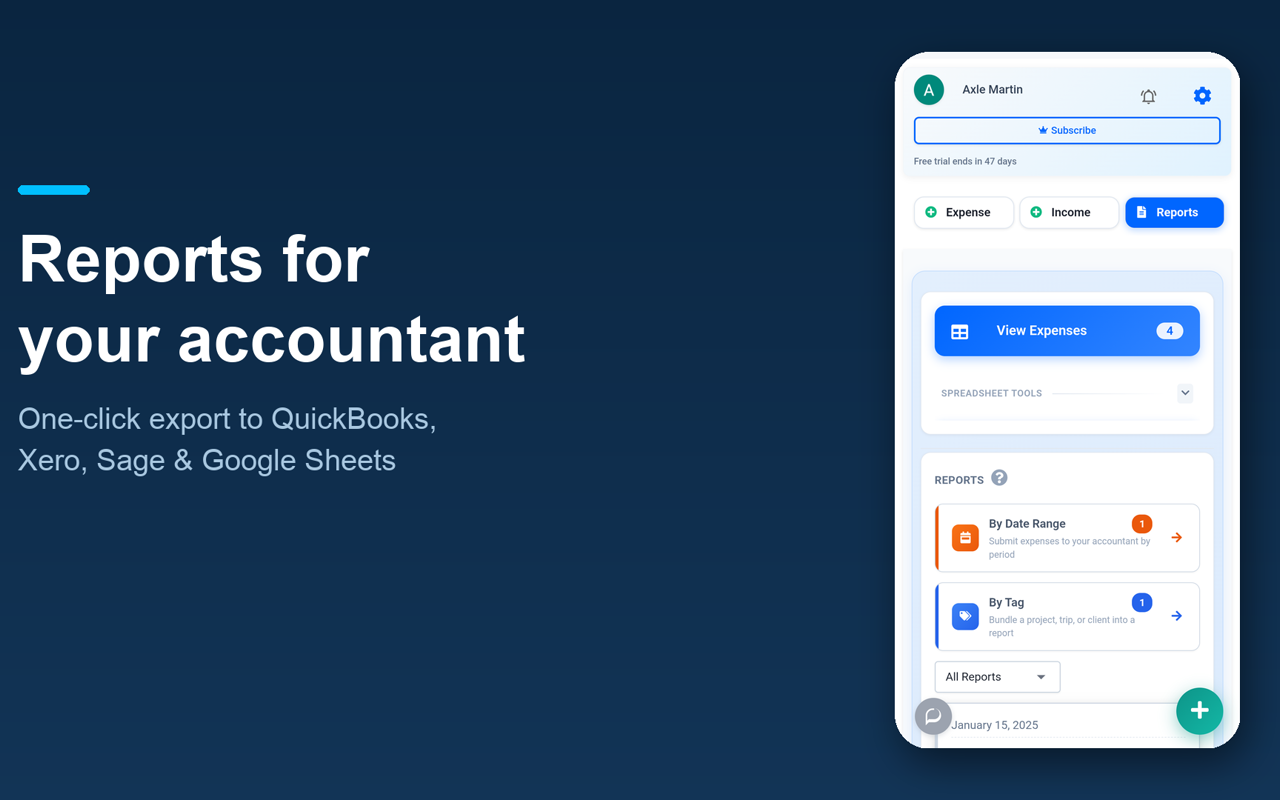
4. Easy sharing with your accountant or finance team 
5. Finance teams get one-click import into their accounting package with auto-mapping to G/L Accounts. 

Save 10+ hours monthly with complete automation:
- AI-powered spending analytics for individuals and teams
- Monthly/quarterly reports emailed to accounting hands-free
- GmailтДв agent processes receipts overnight
- Credit card reconciliation with bank feeds or statements (multi-currency)
- AI organizes expenses by project, client, or tripтАФzero manual sorting
- Policy compliance validation (supports Form ADV for investment advisers)

Perfect for teams AND individuals

For teams
- Scale instantly: Add or remove licenses in secondsтАФno IT project
- Sync G/L codes and project tags across entire team
- AI chat for instant spending insights across your team

For Individuals
- Freelancers, consultants & self-employed: Never miss tax deductions
- Recover 5+ billable hours monthly
- No app required, no registration, just login with your GmailтДв
- AI-generated yearly report with tax deductions calculated
- Hands-free quarterly reports for your accountant
- AI tags expenses by client or project
- AI scans your GmailтДв for receipts

For Finance Teams
- Stop chasing receipts, start analyzing
- Manage multiple companies from one dashboard
- Auto G/L code mapping for any report into your accounting system
- One-click import to QuickBooks, Xero, Sage, or any accounting system
- AI policy compliance validation (and supports Form ADV for investment advisers)

The ROI is immediate:
- 10x faster expense reports
- 80% reduction in finance processing time
- Zero trainingтАФit's just Google SheetsтДв
- Complete audit trail with automatic locking

Ready to save money and time?

Start your 60-day free trial with 3 licenses includedтАФdeploy in 30 seconds. No credit card required. Price match guaranteed.
рдЕрддрд┐рд░рд┐рдХреНрдд рдЬрд╛рдирдХрд╛рд░реА
рдХреАрдорддрдЗрд╕ рдРрдкреНрд▓рд┐рдХреЗрд╢рди рдХреЛ рдмрд┐рдирд╛ рдХрд┐рд╕реА рд╢реБрд▓реНрдХ рдХреЗ рдЖрдЬрд╝рдорд╛рдиреЗ рдХреА рд╕реБрд╡рд┐рдзрд╛ рдЙрдкрд▓рдмреНрдз рд╣реИ
рдбреЗрд╡рд▓рдкрд░
рд╡реНрдпрд╛рдкрд╛рд░реА рдирд╣реАрдВ рд╣реИ
рд╕реЗрд╡рд╛ рдХреА рд╢рд░реНрддреЗрдВ
ExpenseBot for Google WorkspaceтДв рдиреАрдЪреЗ рджреА рдЧрдИ рдЕрдиреБрдорддрд┐рдпреЛрдВ рдХреЗ рдРрдХреНрд╕реЗрд╕ рдХрд╛ рдЕрдиреБрд░реЛрдз рдХрд░реЗрдЧрд╛. реЫреНрдпрд╛рджрд╛ рдЬрд╛рдиреЗрдВ
ExpenseBot for Google WorkspaceтДв рдХреЛ рдЖрдкрдХреЗ Google рдЦрд╛рддреЗ рдХреЗ рдРрдХреНрд╕реЗрд╕ рдХреА рдЬрд╝рд░реВрд░рдд рд╣реЛрдЧреА
рдЗрд╕рд╕реЗ ExpenseBot for Google WorkspaceтДв рдХреЗ рджрд╛рдпрд░реЗ рдореЗрдВ рдпреЗ рдЕрдиреБрдорддрд┐рдпрд╛рдВ рднреА рд╢рд╛рдорд┐рд▓ рд╣реЛ рдЬрд╛рдПрдВрдЧреА :
рдЗрд╕ рдРрдкреНрд▓рд┐рдХреЗрд╢рди рдХреЗ рд╕рд╛рде рдЖрдк Google Drive рдХреА рдЬрд┐рди рдлрд╝рд╛рдЗрд▓реЛрдВ рдХрд╛ рдЗрд╕реНрддреЗрдорд╛рд▓ рдХрд░рддреЗ рд╣реИрдВ рдЙрдиреНрд╣реЗрдВ рджреЗрдЦрдирд╛, рдмрдирд╛рдирд╛, рдЙрдирдореЗрдВ рдмрджрд▓рд╛рд╡ рдХрд░рдирд╛, рдФрд░ рдЙрдиреНрд╣реЗрдВ рдорд┐рдЯрд╛рдирд╛
рдЕрдкрдиреЗ рдИрдореЗрд▓ рдХреЗ рд▓реЗрдмрд▓ рджреЗрдЦрдирд╛ рдФрд░ рдЙрдирдореЗрдВ рдмрджрд▓рд╛рд╡ рдХрд░рдирд╛
рдЕрдкрдиреЗ рдИрдореЗрд▓ рдореИрд╕реЗрдЬ рдФрд░ рд╕реЗрдЯрд┐рдВрдЧ рджреЗрдЦреЗрдВ
рдЕрдкрдиреЗ Gmail рдЦрд╛рддреЗ рд╕реЗ рдИрдореЗрд▓ рдкреЭреЗрдВ, рд▓рд┐рдЦреЗрдВ, рдФрд░ рднреЗрдЬреЗрдВ
рдЖрдкрдХреЗ Google рдЦрд╛рддреЗ рдХрд╛ рдореБрдЦреНрдп рдИрдореЗрд▓ рдкрддрд╛ рджреЗрдЦрдирд╛
рд╕реЛрд╢рд▓ рдореАрдбрд┐рдпрд╛ рдкрд░ рджреА рдЧрдИ рдХрд┐рд╕реА рднреА рдЬрд╛рдирдХрд╛рд░реА рдХреЗ рд╕рд╛рде, рдЕрдкрдиреА рдирд┐рдЬреА рдЬрд╛рдирдХрд╛рд░реА рджреЗрдЦреЗрдВ
рдЗрд╕ рдРрдкреНрд▓рд┐рдХреЗрд╢рди рдХреА рдорджрдж рд╕реЗ рдЬреЛрдбрд╝реА рдЧрдИ рдлрд╝реЛрдЯреЛ рдХреЛ рдкреНрд░рдмрдВрдзрд┐рдд рдХрд░реЗрдВ
Google Photos рд╕реЗ рдЪреБрдиреА рдЧрдИ рдлрд╝реЛрдЯреЛ рдФрд░ рд╡реАрдбрд┐рдпреЛ рджреЗрдЦрдирд╛
рд╕рдореАрдХреНрд╖рд╛рдПрдВ
рднрд╛рд╖рд╛:
рдЗрд╕ рдХреНрд░рдо рдореЗрдВ рд▓рдЧрд╛рдПрдВ:
Google, рд╕рдореАрдХреНрд╖рд╛рдУрдВ рдпрд╛ рд░реЗрдЯрд┐рдВрдЧ рдХреА рдкреБрд╖реНрдЯрд┐ рдирд╣реАрдВ рдХрд░рддрд╛. рд╕рдореАрдХреНрд╖рд╛рдУрдВ рдХреЗ рдмрд╛рд░реЗ рдореЗрдВ реЫреНрдпрд╛рджрд╛ рдЬрд╛рдиреЗрдВ
рдХреЛрдИ рдЯрд┐рдкреНрдкрдгрд┐рдпрд╛рдВ рдирд╣реАрдВ
рдЦреЛрдЬреЗрдВ
рдЦреЛрдЬ рд╣рдЯрд╛рдПрдВ
рдЦреЛрдЬ рдмрдВрдж рдХрд░реЗрдВ
Google рдРрдк
рдореБрдЦреНрдп рдореЗрдиреНрдпреВ