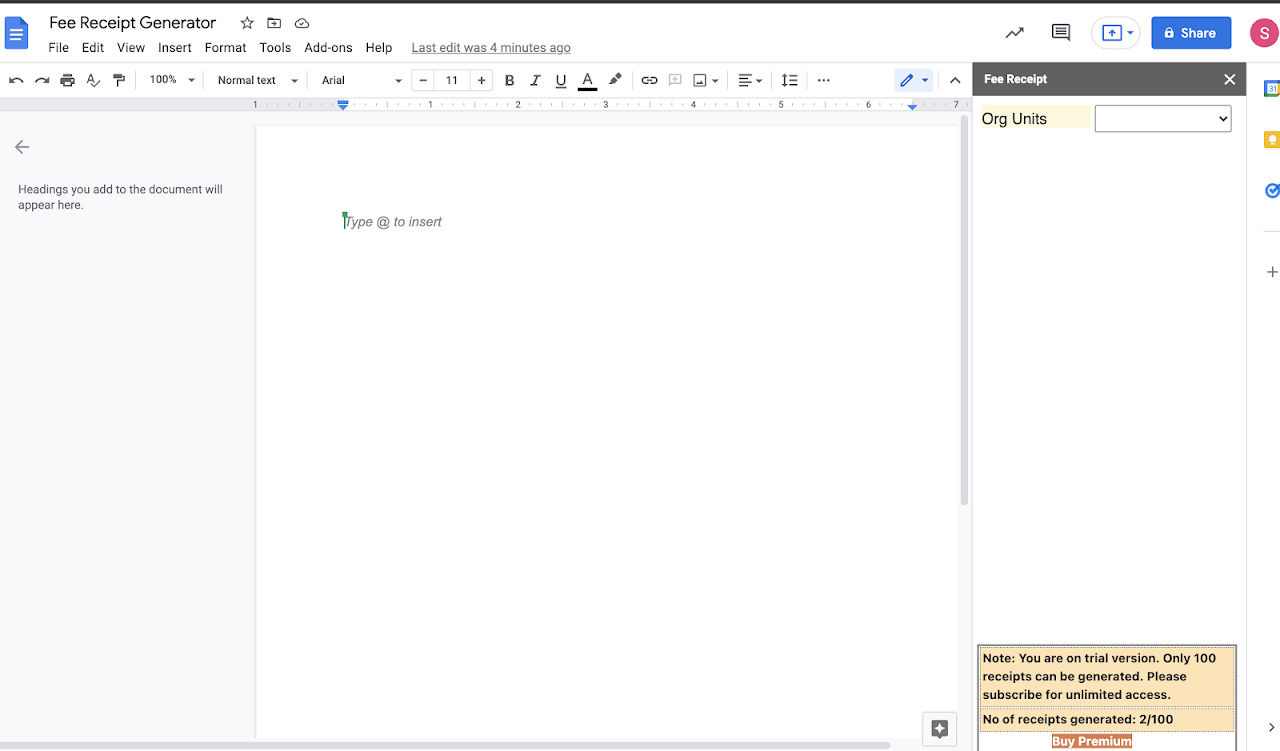
This add-on can be used by any educational institute to generate fee receipts for their students and share via email, whatsapp in a single click. Receipts can be downloaded and stored.
Listing updated:⧍ā§Ļ āĻĄāĻŋāϏ⧇āĻŽā§āĻŦāϰ, ⧍ā§Ļ⧍⧧
Works with:
ā§¨Â āĻšāĻž+
āĻāĻ• āύāϜāϰ⧇
This add-on can be used by any educational institute to generate fee receipts for their students and share generated receipts via email, whatsapp in a single click. Receipts can be downloaded and stored. 
Benefits:
a. When they are using IRAEdtech as their fee payment webapp then details can be stored in DB. They can track previous payments through webapp. 
b. It is very useful tool which helps admin to record payments easily.
c. They can use different templates (header and footer) for different payment types.
d. Full integration with google class room to fetch organization details and student information.
e. Visually appealing and sharing is very easy.
f. Whatsapp integration very helpful.
Steps to use:
a. Login with your institution admin credentials at docs.google.com 
Note: you need to have super admin access for your institution domain.
b. Open Google Docs and launch ‘Fee Receipt Generator’ from add-on section
c. Select the organizational unit in which student accounts are created.
d. Select the specific student to get his/her fee structure.
e. Select the types of fees paid and record values.
f. Generate to view on doc and then save after verifying all details.
g. Now you share receipt via email or whatspp in a single click.
h. You can download the same doc to save in pdf.
Additional information
PricingFree of charge trial
Developer
Trader status unspecified
āĻ—ā§‹āĻĒāĻ¨ā§€ā§ŸāϤāĻž āύ⧀āϤāĻŋ
āĻĒāϰāĻŋāώ⧇āĻŦāĻžāϰ āĻļāĻ°ā§āϤāĻžāĻĻāĻŋ
āϰāĻŋāĻĒā§‹āĻ°ā§āϟ āĻ•āϰ⧁āύFlag as inappropriate
Fee Receipt Generator will ask for the permissions shown below. Learn more
Fee Receipt Generator will need access to your Google account
This will allow Fee Receipt Generator to :
āφāĻĒāύāĻžāϰ āϏāĻŦ Google Docs āĻĄāϕ⧁āĻŽā§‡āĻ¨ā§āϟ āĻĻ⧇āϖ⧇, āĻāĻĄāĻŋāϟ āĻ•āϰ⧇, āϤ⧈āϰāĻŋ āĻ•āϰ⧇ āĻāĻŦāĻ‚ āĻŽā§āϛ⧇ āĻĻā§‡ā§Ÿ
āφāĻĒāύāĻžāϰ āϏāĻŦ Google āĻĄā§āϰāĻžāχāĻ­ āĻĢāĻžāχāϞ āĻĻ⧇āϖ⧇, āĻāĻĄāĻŋāϟ āĻ•āϰ⧇, āϤ⧈āϰāĻŋ āĻ•āϰ⧇ āĻāĻŦāĻ‚ āĻŽā§āϛ⧇ āĻĻā§‡ā§Ÿ
āφāĻĒāύāĻžāϰ āĻĄā§‹āĻŽā§‡āύ⧇ āϏāĻ‚āĻ—āĻ āύ⧇āϰ āχāωāύāĻŋāϟāϗ⧁āϞāĻŋ āĻĻ⧇āϖ⧁āύ āĻ“ āĻĒāϰāĻŋāϚāĻžāϞāύāĻž āĻ•āϰ⧁āύ
āφāĻĒāύāĻžāϰ āĻĄā§‹āĻŽā§‡āύ⧇ āĻŦā§āϝāĻŦāĻšāĻžāϰāĻ•āĻžāϰ⧀āĻĻ⧇āϰ āĻĒā§āϰāĻ¸ā§āϤ⧁āϤāĻŋ āĻĻ⧇āϖ⧁āύ āĻ“ āĻĒāϰāĻŋāϚāĻžāϞāύāĻž āĻ•āϰ⧁āύ
Google āĻāϰ āĻ…ā§āϝāĻžāĻĒā§āϞāĻŋāϕ⧇āĻļāύ⧇āϰ āĻĒā§āϰāĻŽā§āĻĒāϟ āĻāĻŦāĻ‚ āϏāĻžāχāĻĄāĻŦāĻžāϰ⧇ āϤ⧃āĻ¤ā§€ā§Ÿ āĻĒāĻ•ā§āώ⧇āϰ āĻ“ā§Ÿā§‡āĻŦ āĻ•āĻ¨ā§āĻŸā§‡āĻ¨ā§āϟ āĻĻ⧇āĻ–āĻžā§Ÿ āĻāĻŦāĻ‚ āϚāĻžāϞāĻžā§Ÿ
āϕ⧋āύ āĻŦāĻžāĻšā§āϝāĻŋāĻ• āĻĒāϰāĻŋāώ⧇āĻŦāĻžāϤ⧇ āϏāĻ‚āϝ⧁āĻ•ā§āϤ āĻ•āϰ⧇
āφāĻĒāύāĻŋ āĻšāĻŋāϏ⧇āĻŦ⧇ āχāĻŽā§‡āϞ āĻĒāĻžāĻ āĻžāύ
āφāĻĒāύāĻžāϰ Google Classroom-āĻāϰ āϕ⧋āύāĻ“ āĻ•ā§āϞāĻžāϏ āĻĻ⧇āĻ–āϤ⧇ āĻāĻĄāĻŋāϟ āĻ•āϰāϤ⧇ āĻ“ āĻ¸ā§āĻĨāĻžā§Ÿā§€āĻ­āĻžāĻŦ⧇ āĻŽā§āĻ›āϤ⧇ āĻĒāĻžāϰ⧇
āφāĻĒāύāĻžāϰ āĻ•ā§āϞāĻžāϏ⧇āϰ āĻŽāĻžāύ⧁āώāĻĻ⧇āϰ āχāĻŽā§‡āϞ āĻ āĻŋāĻ•āĻžāύāĻžāϗ⧁āϞāĻŋ āĻĻ⧇āϖ⧇
āφāĻĒāύāĻžāϰ āĻ•ā§āϞāĻžāϏ⧇āϰ āĻŽāĻžāύ⧁āώāĻĻ⧇āϰ āĻĒā§āϰ⧋āĻĢāĻžāχāϞ āĻĢāĻŸā§‹Â āĻĻ⧇āϖ⧇
āφāĻĒāĻžāύāĻžāϰ Google Classroom āĻ•ā§āϞāĻžāϏ āύāĻžāĻŽ-āϤāĻžāϞāĻŋāĻ•āĻžāϗ⧁āϞāĻŋ āĻĒāϰāĻŋāϚāĻžāϞāύāĻž āĻ•āϰ⧇
āφāĻĒāύāĻžāϰ āĻĒā§āϰāĻžāĻĨāĻŽāĻŋāĻ• āχāĻŽā§‡āϞ āφāχāĻĄāĻŋ āĻĻ⧇āϖ⧁āύ
āφāĻĒāύāĻŋ āϏāĻ°ā§āĻŦāϜāύ⧀āύāĻ­āĻžāĻŦ⧇ āωāĻĒāϞāĻ­ā§āϝ āĻ•āϰ⧇āϛ⧇āύ āĻāĻŽāύ āϝ⧇āϕ⧋āύāĻ“ āĻŦā§āϝāĻ•ā§āϤāĻŋāĻ—āϤ āϤāĻĨā§āϝ āϏāĻš āφāĻĒāύāĻžāϰ āĻŦā§āϝāĻ•ā§āϤāĻŋāĻ—āϤ āϤāĻĨā§āϝ āĻĻ⧇āϖ⧇
āϰāĻŋāĻ­āĻŋāω
Language:
āĻāχ āĻ…āύ⧁āϝāĻžā§Ÿā§€ āϏāĻžāϜāĻžāύ:
Google āϰāĻŋāĻ­āĻŋāω āĻ“ āϰ⧇āϟāĻŋāĻ‚ āϝāĻžāϚāĻžāχ āĻ•āϰ⧇ āύāĻžāĨ¤ āϰāĻŋāĻ­āĻŋāω āϏāĻŽā§āĻĒāĻ°ā§āϕ⧇ āφāϰāĻ“ āϜāĻžāύ⧁āύ
No comments
āϏāĻžāĻ°ā§āϚ āĻ•āϰ⧁āύ
āϏāĻžāĻ°ā§āϚ āĻŽā§āϛ⧁āύ
āϏāĻžāĻ°ā§āϚ āĻŦāĻ¨ā§āϧ āĻ•āϰ⧁āύ
Google āĻ…ā§āϝāĻžāĻĒā§āϞāĻŋāϕ⧇āĻļāĻžāύāϗ⧁āϞāĻŋ
āĻĒā§āϰāϧāĻžāύ āĻŽā§‡āύ⧁