
Google Workspace Marketplace


FormFlowpro
Live seat limits per option, booking slots, quiz timer with exam focus guard, email OTP, drag to rank and sort questions and instant translate for Google Forms™.
Ultimo aggiornamento scheda:9 settembre 2026
Compatibile con:
Nessuna recensione
68


Panoramica
Fifty seats. Seventy three sign ups. And the apology emails are now your evening.

FormFlow Pro puts a live seat counter on every option inside your Google Form™. The morning batch closes itself at exactly 20, the last seat can never go to two people at once, and nobody has to be told afterwards that they are not in. Then it keeps going: booking slots that confirm themselves by email, quiz timers that submit on time, drag to rank and drag to sort questions, respondent email verification, registration numbers, and instant translation.

Nothing moves house. Every response still lands in your own Google Form™ and its linked Sheet, so your Responses tab, your charts and your existing automations keep working exactly as they do today.

WHAT YOU GET

🎟️ Seat limits per option Set a capacity on any multiple choice, checkbox or dropdown option. Respondents see live availability, full options close automatically, and a low seat warning appears when few remain.

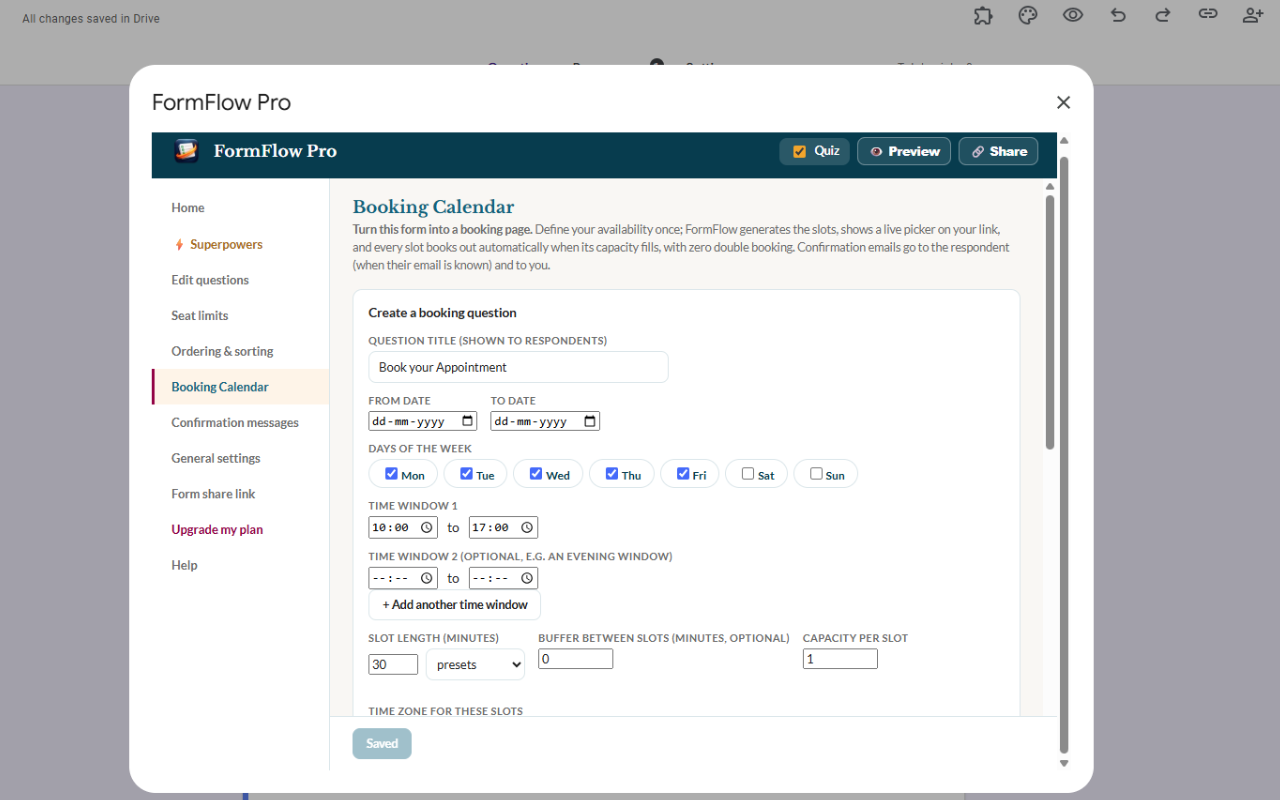
📅 Booking calendar Turn one question into an appointment calendar: date range, weekdays, up to four time windows, slot duration, buffer time and capacity per slot. Confirmation emails go out automatically, with an optional .ics attachment that drops the booking into any calendar app. Double booking is blocked by the same seat lock.

⏱️ Quiz timer and exam focus guard Countdown timers for quizzes, plus an optional focus guard: respondents accept the rules first, tab switches are counted with warnings, and the attempt submits itself at the limit. Copy and paste are blocked during a guarded attempt.

🧮 Scoring built for real exams Auto graded results written into your responses as Score X/Y, including partial credit for ranking (ordering) and sorting questions. Time taken is recorded for every respondent.

↕️ Ranking and sorting questions Add drag and drop question types Google Forms™ does not have: put steps in order (ranking) or sort items into categories, both gradable.

🔐 Email OTP verification Respondents verify their email with a 6 digit code before the form opens. Optionally limit to one response per verified email.

🌐 Auto translation Respondents switch language mid form and keep every answer they have already given.

🔢 Registration numbers Issue sequential registration numbers with your own prefix, shown on the thank you screen and written into your responses.

🖼️ Images, QR, embed and branded link Show images with questions, share by QR code, embed the form on your website, or use a branded link.

HOW IT WORKS

Install, open a Google Form™, and launch FormFlow Pro from the add-ons menu.
Set your caps, booking slots and quiz settings, then save.
Share your FormFlow link. Responses land inside your Google Form™ and its linked Sheet exactly as usual.

Respondents answer on a fast FormFlow page opened from the link you share. Their answers are delivered straight into your form the moment they submit. Nothing is stored on FormFlow servers: no response database, no copies.

PLANS Every install starts with 30 days of full Pro, no card required. After the trial you keep a free plan forever, with core features and a small FormFlow badge on the respondent page. Pro is $49/year or $6/month.

PRIVACY FormFlow Pro's use of information received from Google APIs adheres to the Google API Services User Data Policy, including the Limited Use requirements. Responses are delivered into your form and are not stored by FormFlow.

SUPPORT Help and guide: https://dynamicmindsgroup.com/teachos/formflowpro/
Contact: dmg@dynamicmindsgroup.com

Built by Dynamic Minds Group, publisher of Doc to Form Quiz Maker on the Google Workspace Marketplace.

Works as: form limiter, response limit, choice eliminator, choice limiter, seat limit, slot booking, appointment scheduler, quiz timer, exam proctor, ranking question, sorting question, email verification, form translator, registration number generator.
Informazioni aggiuntive
sell
PrezziProva senza costi
code
Sviluppatore
email
Assistenza
lock
Norme sulla privacy
description
Termini di servizio
flag
SegnalaSegnala come inappropriata




Ricerca
Cancella ricerca
Chiudi ricerca
App Google
Menu principale