
Google Workspace Marketplace


GTIN & EAN Check
Checks EAN, UPC and GTIN codes and finds product data Google Shopping™ disapproves.
Listing updated:November 13, 2026
Works with:
No reviews
10


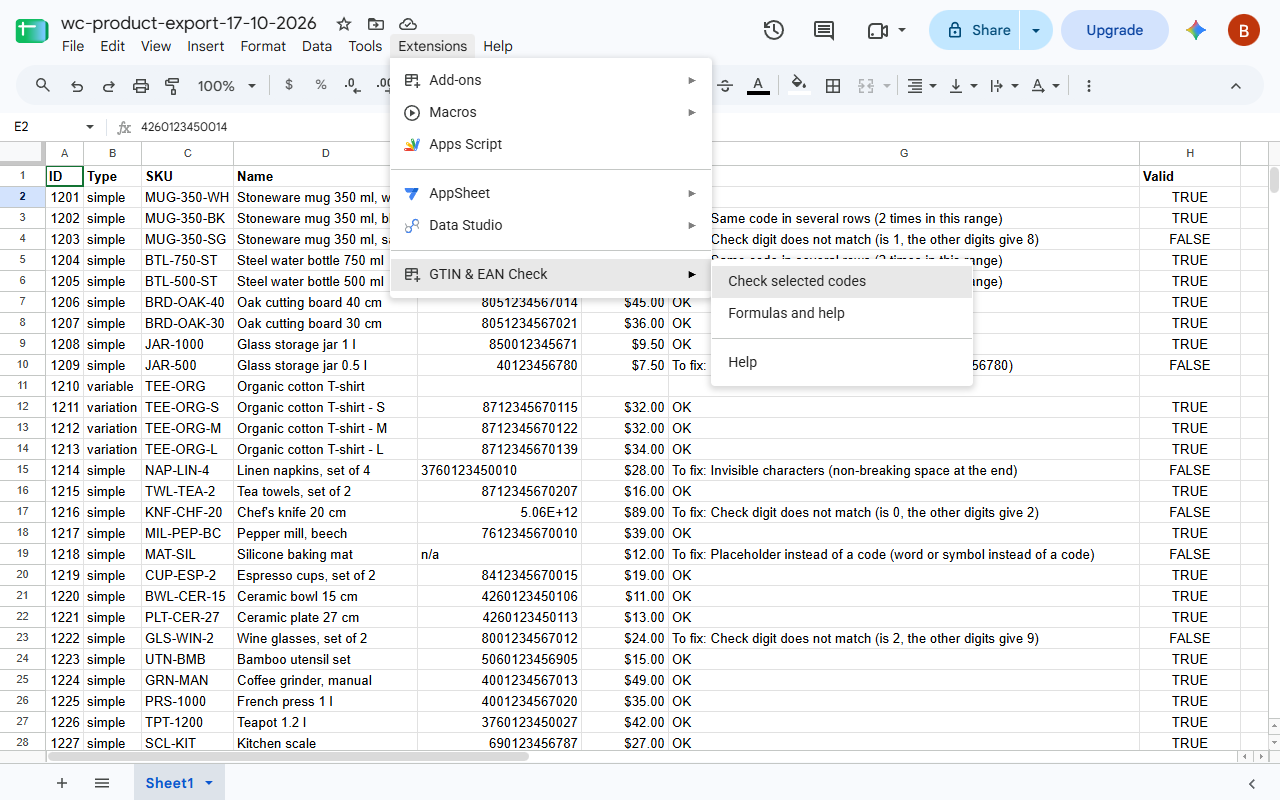
Overview
Select the column with your product codes and choose Extensions > GTIN & EAN Check > Check selected codes. The add-on finds every code a product feed or a marketplace would reject, and says what is wrong with it:

- the check digit does not match, usually one mistyped digit
- wrong number of digits (a GTIN has 8, 12, 13 or 14)
- leading zeros dropped by the spreadsheet: 12345678905 instead of 012345678905
- scientific notation such as 5.90123E+12, where the last digits are already gone
- a trailing space, a non-breaking space or another character you cannot see
- letters, placeholders such as "n/a" and formula errors in place of a code
- the same code in two rows, also when written differently, with or without a leading zero
- codes Google Merchant Center™ does not accept: restricted ranges (starting with 2, 02 or 04) and coupon ranges (05, 98, 99)

To check a whole product export from WooCommerce, Shoper or a product feed, open it in Google Sheets™ and choose Extensions > GTIN & EAN Check > Check product data (Google Shopping™). The add-on finds the fields that lead to Google Shopping™ and Merchant Center™ disapprovals and warnings:

- a price of 0, including a sale price, or no price at all
- a price that is not a number
- no product name, no description or no image
- the same SKU in several rows
- products with neither a brand nor a GTIN

Variations get their prices checked, and their description, image and brand come from the parent product. Unpublished products are skipped. The add-on finds the columns by their headers, in English, Polish, German and Spanish exports.

What needs fixing goes to a report in a new sheet of the same file, with a link to each cell, and a summary shows how many times each problem occurs.

For formulas there are three functions:
=GTIN_CHECK(A2:A) gives OK or what is wrong with each code, and finds repeats within the range
=GTIN_VALID(A2) gives TRUE or FALSE
=GTIN_ADD_CHECK_DIGIT(A2) adds the check digit to 7, 11, 12 or 13 digits

The add-on reads the cells you select or the sheet you check, and writes only the report, into a new sheet of the same file. It never changes your cells, sends nothing anywhere and needs no account.

A correct check digit catches typos. It cannot tell you whether the number belongs to your product; for that, look the code up in Verified by GS1.

In English, Polish, German and Spanish. Made by Merchlint, which audits WooCommerce product catalogs: https://merchlint.com/

Google Sheets™, Google Shopping™ and Google Merchant Center™ are trademarks of Google LLC.
Additional information
sell
PricingFree of charge
code
Developer
Non-trader
email
Support
lock
Privacy policy
description
Terms of service
flag
ReportFlag as inappropriate



Search
Clear search
Close search
Google apps
Main menu