
Google Workspace Marketplace


GTIN & EAN Check
Checks a column of EAN, UPC and GTIN barcodes: check digit, length, lost leading zeros, scientific notation, invisible characters and repeated codes. The codes stay in your spreadsheet.
Eintrag aktualisiert:16. Oktober 2026
Kompatibel mit:
Keine Rezensionen
3


Überblick
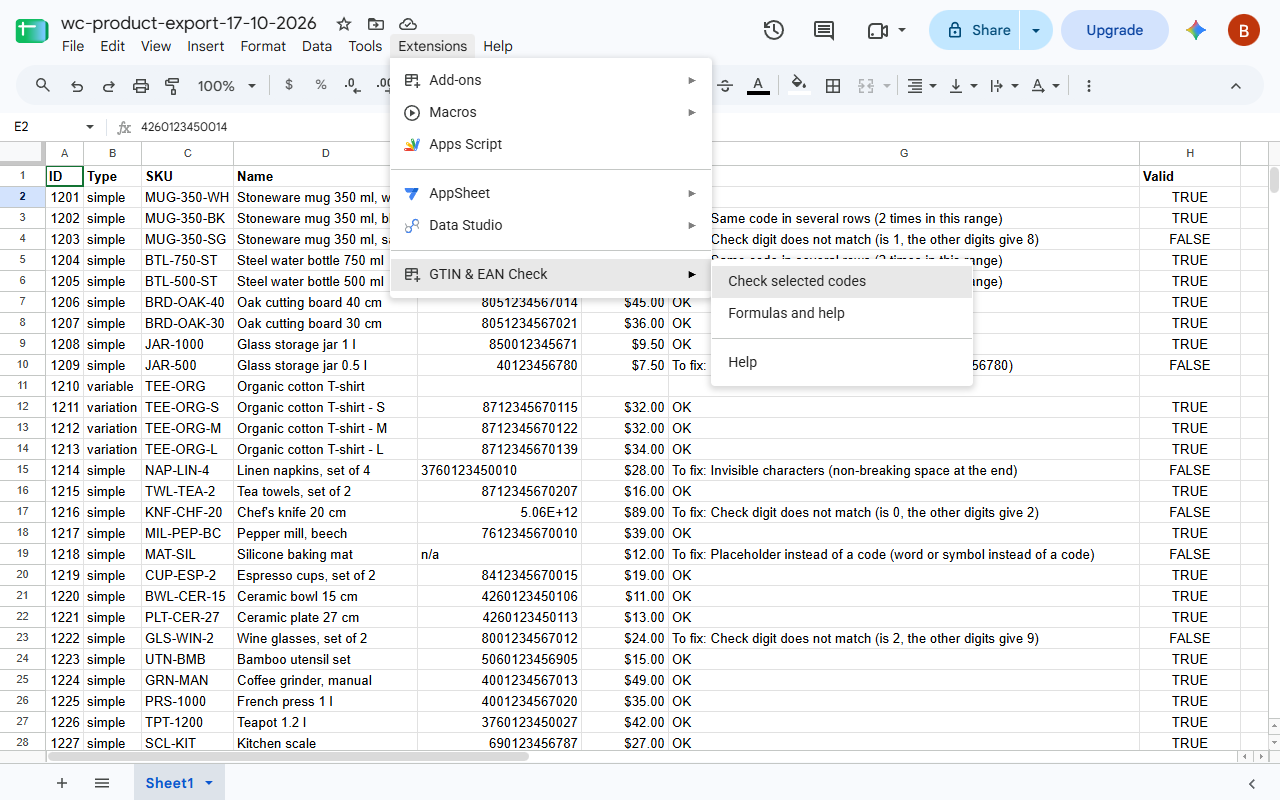
Select the column with your product codes and choose Extensions > GTIN & EAN Check > Check selected codes. The add-on finds every code a product feed or a marketplace would reject, and says what is wrong with it:

- the check digit does not match, usually one mistyped digit
- wrong number of digits (a GTIN has 8, 12, 13 or 14)
- leading zeros dropped by the spreadsheet: 12345678905 instead of 012345678905
- scientific notation such as 5.90123E+12, where the last digits are already gone
- a trailing space, a non-breaking space or another character you cannot see
- letters, placeholders such as "n/a" and formula errors in place of a code
- the same code in two rows, also when written differently, with or without a leading zero
- codes Google Merchant Center does not accept: restricted ranges (starting with 2, 02 or 04) and coupon ranges (05, 98, 99)

The codes to fix go to a report in a new sheet of the same file, with a link to each cell, and a summary shows how many codes have each problem.

For formulas there are three functions:
=GTIN_CHECK(A2:A) gives OK or what is wrong with each code, and finds repeats within the range
=GTIN_VALID(A2) gives TRUE or FALSE
=GTIN_ADD_CHECK_DIGIT(A2) adds the check digit to 7, 11, 12 or 13 digits

The add-on reads only the cells you select and writes only the report, into a new sheet of the same file. It never changes your cells, sends nothing anywhere and needs no account.

A correct check digit catches typos. It cannot tell you whether the number belongs to your product; for that, look the code up in Verified by GS1.

In English and Polish. Made by Merchlint, which audits WooCommerce product catalogues: https://merchlint.com/
Weitere Informationen
sell
PreiseKostenlos
code
Entwickler
Kein Händler
email
lock
Datenschutzerklärung
description
Nutzungsbedingungen
flag
MeldenAls unangemessen melden



Suche
Suche löschen
Suche schließen
Google-Apps
Hauptmenü