
Google Workspace Marketplace


GTIN & EAN Check
Checks a column of EAN, UPC and GTIN barcodes: check digit, length, lost leading zeros, scientific notation, invisible characters and repeated codes. The codes stay in your spreadsheet.
Autor:
Ficha actualizada:16 de octubre de 2026
Compatible con:
Sin reseñas
3


Información general
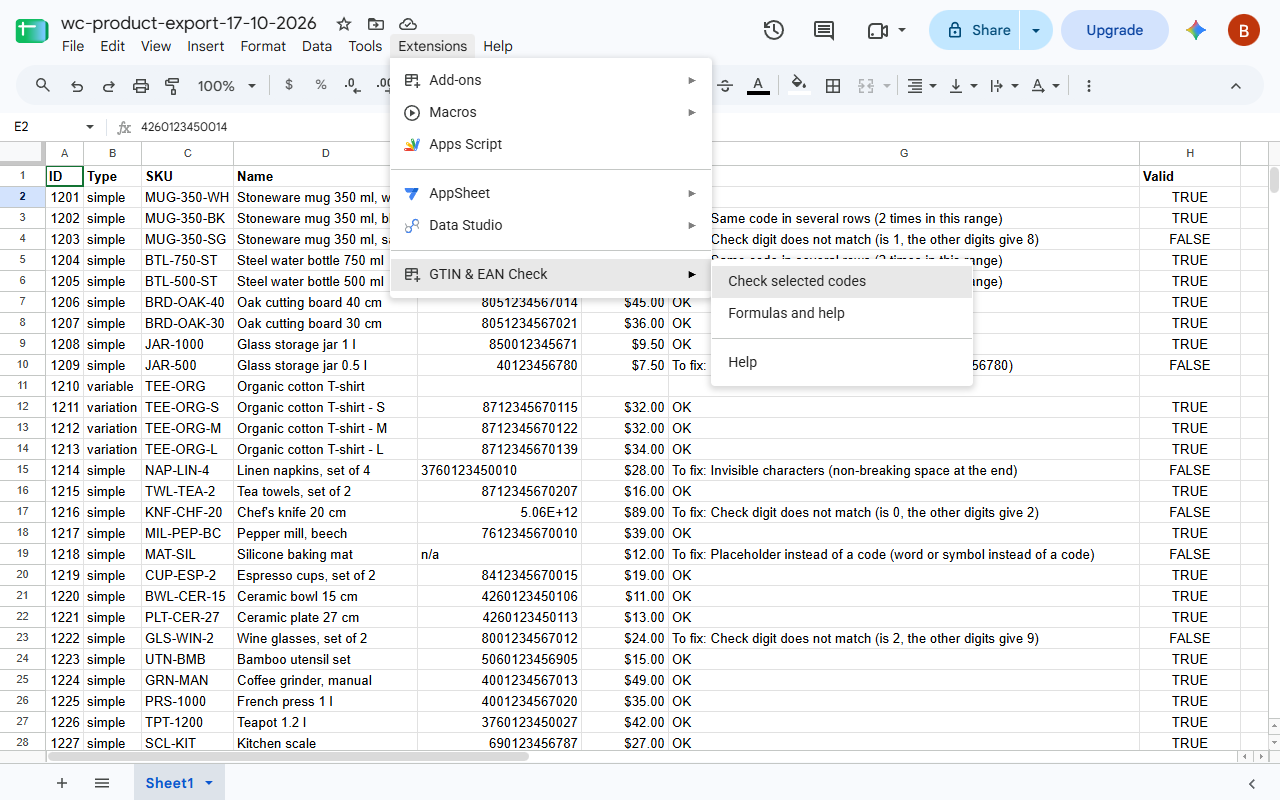
Select the column with your product codes and choose Extensions > GTIN & EAN Check > Check selected codes. The add-on finds every code a product feed or a marketplace would reject, and says what is wrong with it:

- the check digit does not match, usually one mistyped digit
- wrong number of digits (a GTIN has 8, 12, 13 or 14)
- leading zeros dropped by the spreadsheet: 12345678905 instead of 012345678905
- scientific notation such as 5.90123E+12, where the last digits are already gone
- a trailing space, a non-breaking space or another character you cannot see
- letters, placeholders such as "n/a" and formula errors in place of a code
- the same code in two rows, also when written differently, with or without a leading zero
- codes Google Merchant Center does not accept: restricted ranges (starting with 2, 02 or 04) and coupon ranges (05, 98, 99)

The codes to fix go to a report in a new sheet of the same file, with a link to each cell, and a summary shows how many codes have each problem.

For formulas there are three functions:
=GTIN_CHECK(A2:A) gives OK or what is wrong with each code, and finds repeats within the range
=GTIN_VALID(A2) gives TRUE or FALSE
=GTIN_ADD_CHECK_DIGIT(A2) adds the check digit to 7, 11, 12 or 13 digits

The add-on reads only the cells you select and writes only the report, into a new sheet of the same file. It never changes your cells, sends nothing anywhere and needs no account.

A correct check digit catches typos. It cannot tell you whether the number belongs to your product; for that, look the code up in Verified by GS1.

In English and Polish. Made by Merchlint, which audits WooCommerce product catalogues: https://merchlint.com/
Información adicional
sell
PrecioSin coste
code
Desarrollador
No operador
email
Asistencia
lock
Política de privacidad
description
Términos del Servicio
flag
DenunciarMarcar como inapropiada



Búsqueda
Borrar búsqueda
Cerrar búsqueda
Aplicaciones de Google
Menú principal