
Google Workspace Marketplace


Hana AI
Turn Google Chat™ conversations into next steps. Create tasks, polls, reminders, tracked follow-ups, and grounded answers from your workspace context.
Zápis aktualizován:28. května 2026
Podporuje:
61 tis.+




Přehled
### What is Hana?

Hana is a Google Chat™ app add-on that helps teams turn conversations into action, directly inside Google Chat™.

Instead of switching between tools, copying messages into task managers, or losing follow-ups in busy threads, Hana helps your team act while the conversation is still fresh.

Hana is designed for fast execution inside Google Chat™, not as another standalone AI workspace to manage.

### When to use Hana

Use Hana when a Google Chat™ message needs a next step, such as:

- Create a task
- Set one-time or recurring reminders
- Run a quick poll
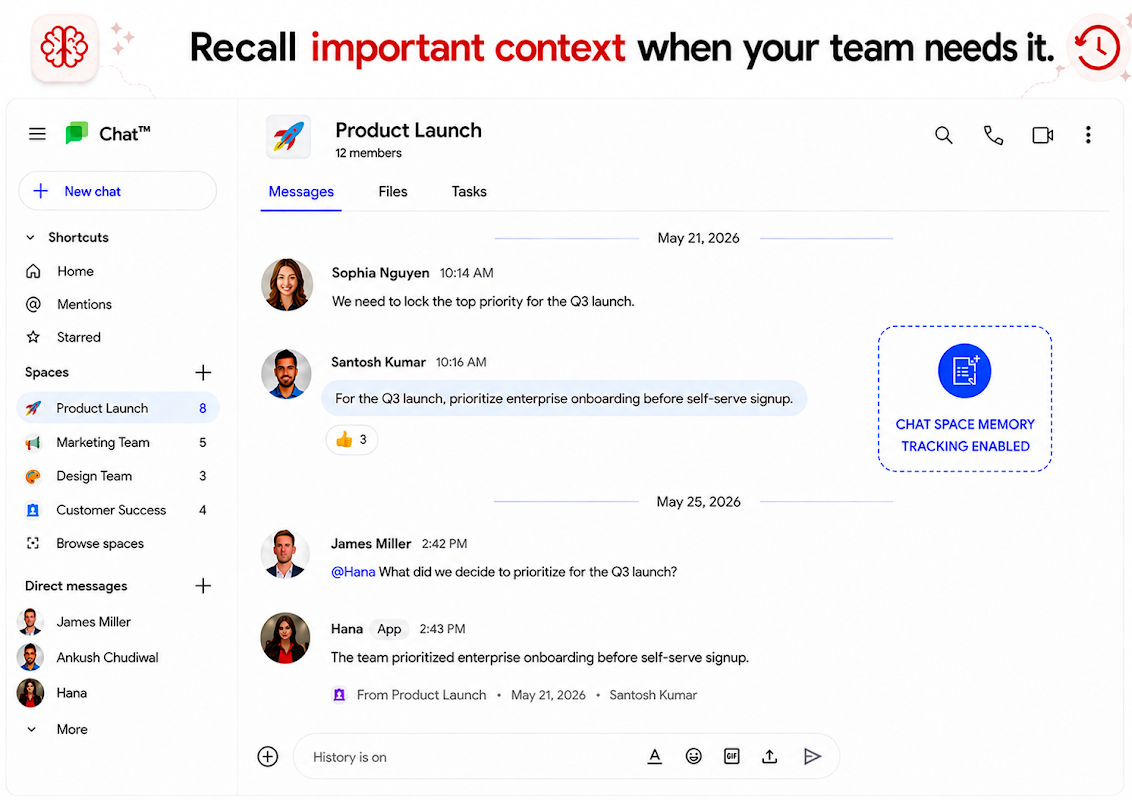
- Memory capture from chat
- Summarize a conversation or get action points
- Check meeting timing
- Schedule a meet
- Get answers using connected workspace context and ingested memories

### What your team can do with Hana

## Turn messages into tasks

Convert any message into an actionable Hana task with owners, deadlines, and tracking.

## Assign and track work

Keep work moving by assigning ownership and following progress until completion. Hana will auto follow up with the owner till the owner marks done.

## Create quick polls

Run lightweight polls directly in conversations to help teams make decisions faster.

## Set reminders

Create one-time or recurring reminders without leaving the chat thread.

## Check meeting timing

Quickly check meeting availability and avoid obvious schedule conflicts.

## Summarize conversations

Turn long discussions into clear summaries, action items, and next steps.

## Memory capture from chat

Capture important decisions from a thread so teams stay aligned later.

## Ask context-aware questions and get grounded answers

Get quick clarifications and answers using available workspace context (Google Chat™ history), online evidence, general knowledge and ingested memories in Hana (your policies, PDFs, SOPs, sheets, docs, websites, text memory snippets and more).

### Common use cases

“@Hana Turn this into a task for @priya by Friday.”

“@Hana Remind me about this tomorrow morning.”

“@Hana Create a poll from this discussion to help us decide.”

“@Hana Summarize this thread into decisions and next steps, recommend owners.”

“@Hana Find a suitable meeting time for me, @Ankush and @Santosh, anytime next week for this discussion.”

“@Hana I have created this proposal for the client. Does this have anything we cannot do or claims we cannot support.”

“@Hana This is important, Create a  task and assign it to @santosh, keep following up till done.”

“@Hana Add an update to this task that i am blocked on the design team to make some changes and I have already evaluated the scope of code changes and it aligns with the proposed timelines.”

“@Hana We have done this task.”

“@Hana @Kartik has joined us as SDE intern. Welcome him, give him a rundown from our new joiner SOP and share some links with him.”

“@Hana We finally managed to solve this tech blocker. Can you remember what we did so you can reference this later in future if someone faces a similar issue?”

“@Hana Create a quick meeting for this to arrive at a conclusion at 5 pm and invite all.”

“@Hana Is there a better framework for this than the one @Santosh proposed? We need a good balance of features and cost.”

### Getting started

1. Install Hana from Google Workspace Marketplace™
2. Add Hana to your Google Chat™ space
3. Use Hana inside a real conversation
4. Choose the next step: task, reminder, poll, summary, decision, or grounded answer

### Security and admin controls

Hana is built with workspace security and team administration in mind.
Další informace
sell
CenyBez dalších poplatků s placenými funkcemi
code
email
Podpora
lock
Zásady ochrany soukromí
description
Smluvní podmínky
flag
NahlásitNahlásit jako nevhodné




Vyhledávání
Vymazat vyhledávání
Zavřít vyhledávání
Aplikace Google
Hlavní nabídka