
Google Workspace Marketplace


Hana AI
Turn Google Chat™ conversations into next steps. Create tasks, polls, reminders, tracked follow-ups, and grounded answers from your workspace context.
Fortegnelse opdateret:28. maj 2026
Fungerer sammen med:
61 t+




Oversigt
### What is Hana?

Hana is a Google Chat™ app add-on that helps teams turn conversations into action, directly inside Google Chat™.

Instead of switching between tools, copying messages into task managers, or losing follow-ups in busy threads, Hana helps your team act while the conversation is still fresh.

Hana is designed for fast execution inside Google Chat™, not as another standalone AI workspace to manage.

### When to use Hana

Use Hana when a Google Chat™ message needs a next step, such as:

- Create a task
- Set one-time or recurring reminders
- Run a quick poll
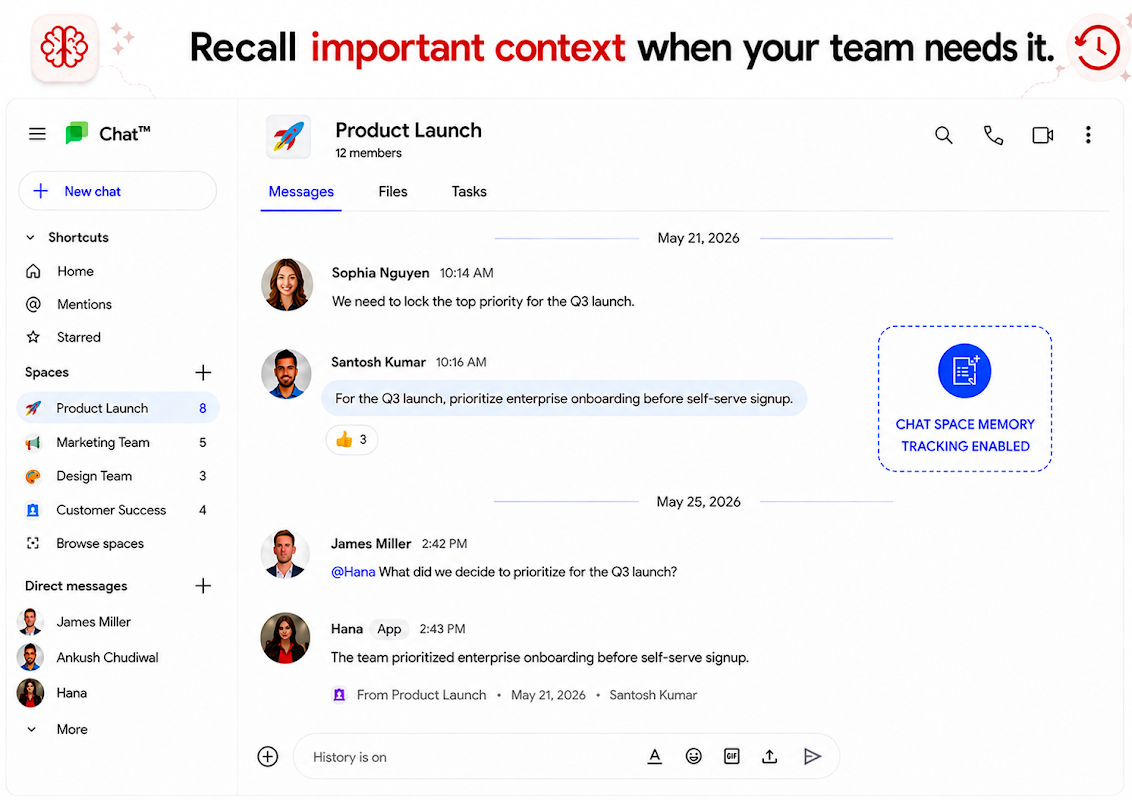
- Memory capture from chat
- Summarize a conversation or get action points
- Check meeting timing
- Schedule a meet
- Get answers using connected workspace context and ingested memories

### What your team can do with Hana

## Turn messages into tasks

Convert any message into an actionable Hana task with owners, deadlines, and tracking.

## Assign and track work

Keep work moving by assigning ownership and following progress until completion. Hana will auto follow up with the owner till the owner marks done.

## Create quick polls

Run lightweight polls directly in conversations to help teams make decisions faster.

## Set reminders

Create one-time or recurring reminders without leaving the chat thread.

## Check meeting timing

Quickly check meeting availability and avoid obvious schedule conflicts.

## Summarize conversations

Turn long discussions into clear summaries, action items, and next steps.

## Memory capture from chat

Capture important decisions from a thread so teams stay aligned later.

## Ask context-aware questions and get grounded answers

Get quick clarifications and answers using available workspace context (Google Chat™ history), online evidence, general knowledge and ingested memories in Hana (your policies, PDFs, SOPs, sheets, docs, websites, text memory snippets and more).

### Common use cases

“@Hana Turn this into a task for @priya by Friday.”

“@Hana Remind me about this tomorrow morning.”

“@Hana Create a poll from this discussion to help us decide.”

“@Hana Summarize this thread into decisions and next steps, recommend owners.”

“@Hana Find a suitable meeting time for me, @Ankush and @Santosh, anytime next week for this discussion.”

“@Hana I have created this proposal for the client. Does this have anything we cannot do or claims we cannot support.”

“@Hana This is important, Create a  task and assign it to @santosh, keep following up till done.”

“@Hana Add an update to this task that i am blocked on the design team to make some changes and I have already evaluated the scope of code changes and it aligns with the proposed timelines.”

“@Hana We have done this task.”

“@Hana @Kartik has joined us as SDE intern. Welcome him, give him a rundown from our new joiner SOP and share some links with him.”

“@Hana We finally managed to solve this tech blocker. Can you remember what we did so you can reference this later in future if someone faces a similar issue?”

“@Hana Create a quick meeting for this to arrive at a conclusion at 5 pm and invite all.”

“@Hana Is there a better framework for this than the one @Santosh proposed? We need a good balance of features and cost.”

### Getting started

1. Install Hana from Google Workspace Marketplace™
2. Add Hana to your Google Chat™ space
3. Use Hana inside a real conversation
4. Choose the next step: task, reminder, poll, summary, decision, or grounded answer

### Security and admin controls

Hana is built with workspace security and team administration in mind.
Yderligere oplysninger
sell
PrisUden beregning med betalingsfunktioner
code
Udvikler
email
lock
Privatlivspolitik
description
Servicevilkår
flag
RapportRapportér som upassende




Søgning
Ryd søgning
Luk søgning
Google-apps
Hovedmenu