
Google Workspace Marketplace

Hangil Flashcards
Turn any Google Sheet™ into shuffled flashcards. Study vocabulary from your own word lists — one tab per deck, no import needed. Tracks what you know and what needs more practice.
Fiche mise à jour le :15 août 2026
Compatible avec :
Aucun avis
24


Présentation
**Your vocabulary list is already a flashcard deck.**

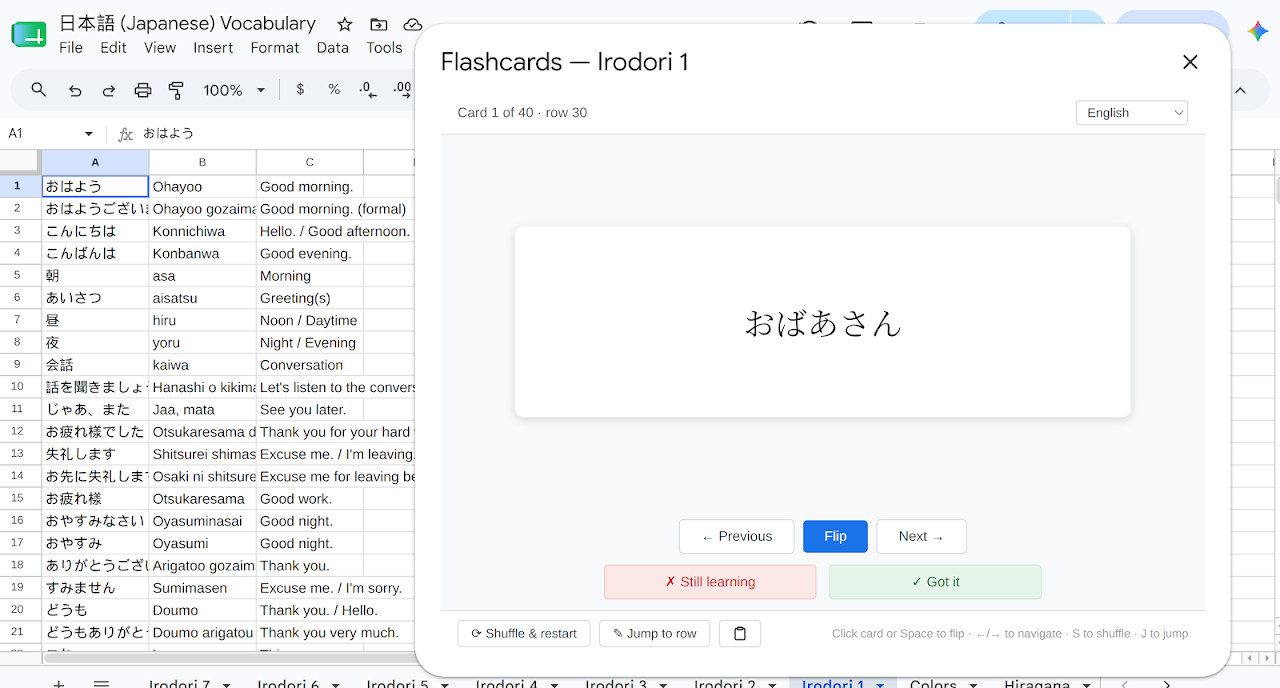
Hangil Flashcards reads your Google Sheet™ and turns every row into a study card — no export, no third-party import, no reformatting. Put a term in column A and its translation in column B, open the Flashcards menu, and you're studying in seconds.

Each sheet tab is its own independent deck. Switch tabs to switch topics.

---

**How it works**

1. Add vocabulary to any Google Sheet™ (term in column A, translation in column B)
2. Open **Extensions → Hangil Flashcards → Start Review**
3. Cards are shuffled automatically — click to flip, use arrow keys to move

Optional: put a second translation or note in column C and it appears on the back of the card alongside column B.

---

**Features**

- **Shuffled review** — cards are randomized every session so you don't memorize order
- **Needs Practice mode** — focuses your review on cards you've marked as still-learning
- **Test mode** — multiple-choice and true/false questions drawn from your deck
- **Progress report** — see how many cards you've mastered, are learning, or still need practice; export any group to a new tab
- **Jump to row** — spotted a typo on a card? Jump straight to that row in the sheet to fix it
- **Multiple decks** — each tab in your spreadsheet is a separate deck
- **Works offline** — your cards live in your Sheet, not on our servers

---

**Script support for East Asian and Southeast Asian languages**

Hangil Flashcards automatically detects Chinese, Japanese, Korean, and Thai text and applies the appropriate font — so your characters render correctly without any configuration.

---

**Free and paid plans**

The free plan covers up to 100 cards per deck — enough to get started with a new topic or evaluate the add-on.

The paid plan ($6/month) removes the row limit and unlocks Needs Practice mode, Test mode, Progress tracking, and font settings. A 14-day free trial is available — no payment information required to start.

---

**Privacy**

Hangil Flashcards reads the spreadsheet you have open to display your cards. It does not share your data with third parties, does not modify your spreadsheet, and does not store card content on external servers. A user account (keyed to your Google email) is created to save your progress and license status. See our privacy policy for full details.

---

**Support**

Questions or feedback? Email gilbertr@gmail.com — we read everything.

---

Google Sheets™ is a trademark of Google LLC.
Informations supplémentaires
sell
TarifsSans frais avec des fonctionnalités payantes
code
Développeur
email
Assistance
lock
Règles de confidentialité
description
Conditions d'utilisation
flag
SignalerSignaler comme inappropriée




Recherche
Effacer la recherche
Fermer le champ de recherche
Applications Google
Menu principal